We are excited to announce our latest updates for SolarWinds Service Desk! In this release, we are focusing on giving you greater customization and flexibility, whether you are fine-tuning your service level agreements to align with real-world workflows or automating your electronic signature processes.
Align metrics with reality via SLA Timer Start Configuration
Plan Type: All Plans | Status: General Availability
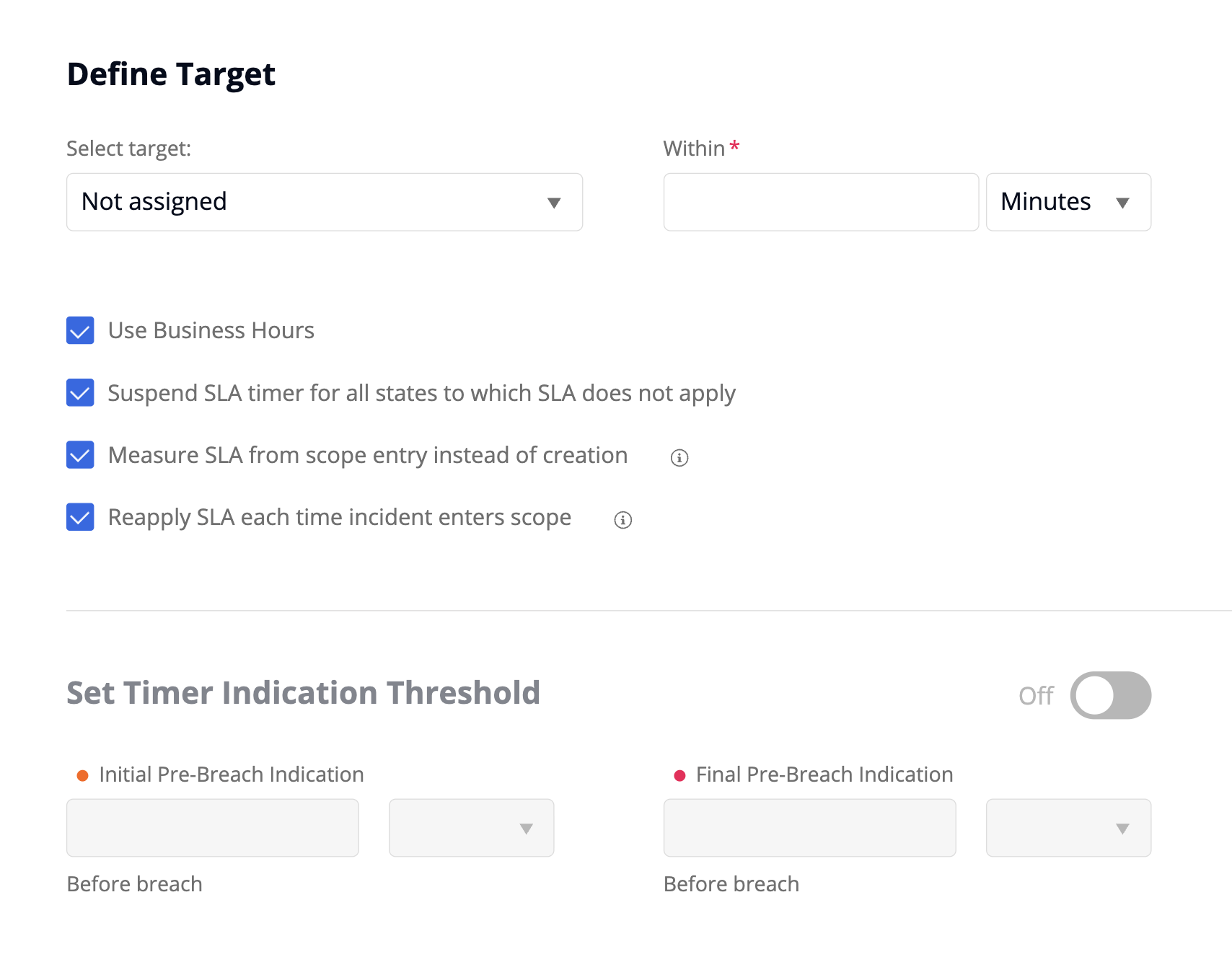
By default, the SLA clock begins the moment an incident is submitted, giving you a consistent, end-to-end view of total resolution time across the full ticket lifecycle. For teams that also want to measure performance at a more granular, team- or queue-specific level (for example, when a ticket moves between departments), we're introducing a new configuration option on SLA definitions.
Administrators can now choose to suppress the SLA clock until a ticket transitions into satisfying a policy's specific scope rules, such as changing status to "In Progress" or assignment to a specific support group. This configuration can also help solve the challenge of tracking SLAs when a ticket transfers between different departments, such as moving a ticket from HR to Marketing, by ensuring the new department's timer only starts when the ticket enters their defined scope for a fair and accurate evaluation. To learn more visit Service Level Management: Customize the SLA.
Track iterative workflows with SLA Policy Re-Application
Plan Type: All Plans | Status: General Availability
Tickets don't always follow a single straight path; they can move between teams, pause for vendor input, or get reopened after resolution. Previously, SLA policies gave a single measurement per ticket lifecycle. Now, we're extending how you measure SLAs with flexible scope re-application settings.
When enabled, every separate time a ticket drops out of scope and later re-enters it, a brand-new, independent SLA instance is spawned and evaluated automatically. This behavior allows for much more accurate tracking of multiple breaches, meaning that if an assignee misses a specific milestone timer multiple times on a single ticket, a manager can clearly report on each individual breach event. For more information you can visit Service Level Management: Customize the SLA.
Streamline e-signatures with a Built-In Process Integration for DocuSign
Plan Type: Advanced & Premier | Status: Labs
Electronic signature workflows have always been possible in SolarWinds Service Desk through our open API, giving technical teams full control over custom integrations. Now we're making this even more accessible with a built-in DocuSign Process Integration that features an out-of-the-box UI to easily map service desk fields to DocuSign attributes and trigger document delivery. The integration supports sending a template for signature, creating an envelope from a document, checking envelope status, voiding an envelope, and adding a signer to an active envelope, covering the most common signature workflows without any custom API work.
To track ongoing progress, administrators can add a Check Envelope Status action to their process automation or workflow to pull the latest status from DocuSign on demand. This allows you to view live updates directly within the platform while ensuring all relevant parties still receive standard DocuSign platform notifications upon document completion. For more about this feature, see Setup: Labs.

Final Thoughts
Office Hours Reminder: Do you have more questions about your Service Desk setup? You can join us for any of our upcoming office hours on the SolarWinds Academy and get all your queries and questions answered. View and book your slot using one of the links below:
If you have any questions, please leave a comment below. For more updates, visit our What We’re Working On (WWWO) post.
If you have any questions, please leave a comment below. Have a feature request? Upvote or submit your request here.