Happy New Year THWACK community! Our first release of 2026 is officially here, and it’s a big one. We’ve focused this update on streamlining your workspace and strengthening your data security. Whether you’re leveraging our new GenAI runbook generation, protecting sensitive information with PHI masking, or navigating your queue faster with our new quick filters, this release is all about reducing friction. We’ve even updated our terminology to better align with your daily workflows, ensuring that SolarWinds Service Desk is more intuitive and powerful than ever.
Drive Enterprise-Wide Consistency with Shared Forms and Logic
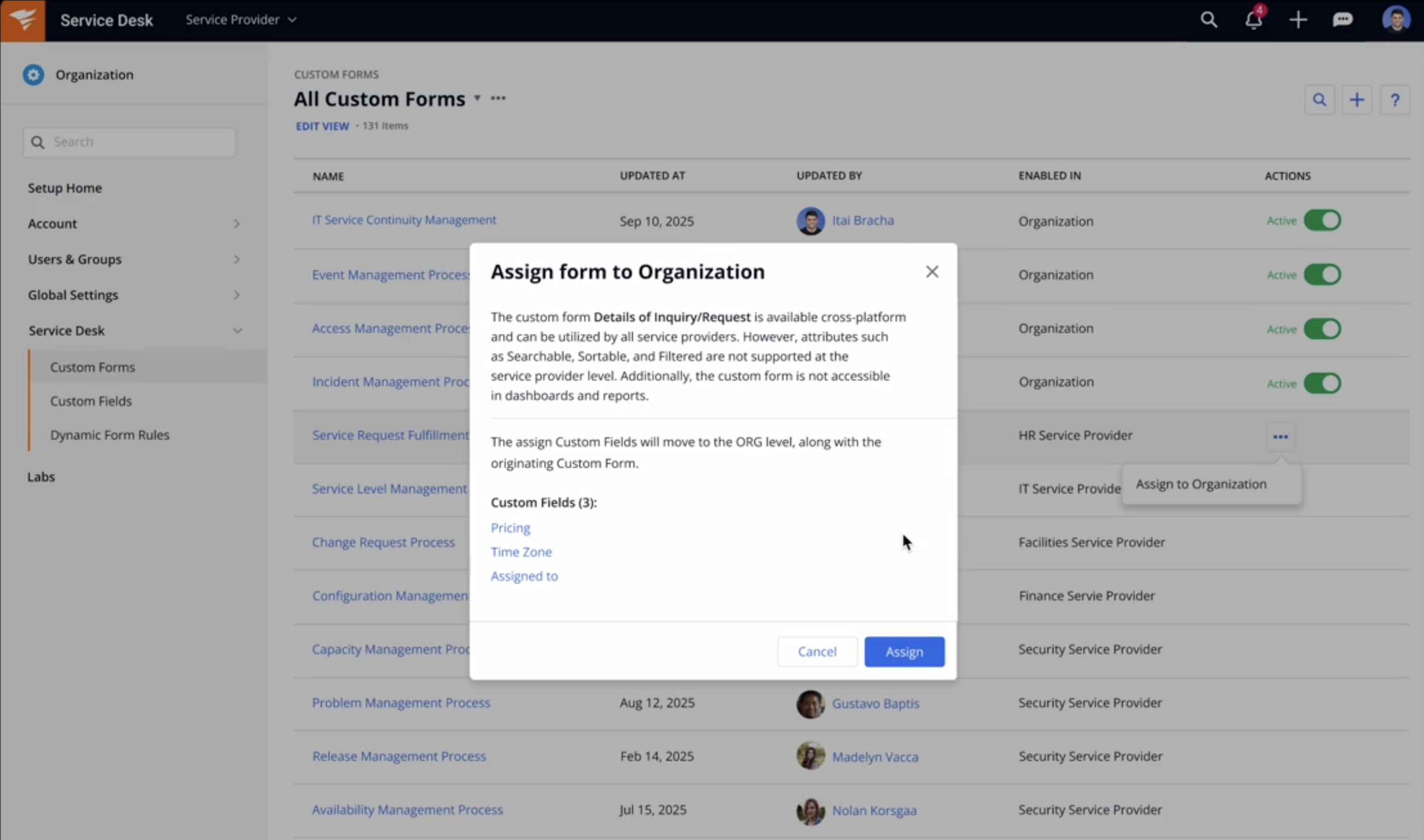
Elevate your cross-departmental collaboration with the power of shared standards through our new Shared Custom Forms and Shared Dynamic Form Rules. This update solves the challenge of inconsistent workflows across departments. By enabling organization-level administrators to centrally create and manage forms and rules, SolarWinds Service Desk now provides a "global template" that ensures every service provider—from HR to IT—is aligned. This centralized approach eliminates the administrative overhead of duplicating work across different departments, reduces the risk of manual errors, and ensures that your data remains clean and compliant for enterprise-level reporting and audits.
Key Changes at a Glance:
- Standardized Data Collection: Organization Admins can now design Shared Custom Forms at the Org level, making them global assets. This ensures that whether a ticket is raised in Marketing or Finance, the incident and asset details are captured with the same structure and precision.
- Unified Governance & Logic: With Shared Dynamic Form Rules, you can now enforce consistent automation across the entire tenant. By centrally defining which fields are mandatory or hidden based on user input, you ensure that your organizational workflows and compliance standards are instantly applied to every service provider.
- Reduced Administrative Overhead: Instead of building and maintaining identical forms and rules for every department, admins can "build once and deploy everywhere." Updates made at the Organization level propagate instantly, streamlining change management.
This feature is relevant to customers utilizing the Enterprise Service Management (ESM) environment and features, which is available to all Advanced and Premier tier customers. To learn more, see Custom Forms and Dynamic Form Rules.
Bridge the Gap Between Tools by Orchestrating External Workflows with Automation Rules
To empower our customers to build truly seamless, end-to-end workflows, we have introduced the ability to trigger Process Integrations as an Action within Automation Rules. This milestone transforms your service desk into a centralized orchestration hub, allowing you to trigger actions in external systems—like HR platforms or collaboration tools—the moment a ticket is created or updated. By eliminating the need for manual hand-offs or custom scripting, this update helps ensure your teams can automate workflows with complete data consistency without manual intervention. This feature is available to customers on the Advanced and Premier tiers. To learn more, see Automation Rules.

Manage Sensitive Data with Confidence Using Our New PHI Masking Model
Protecting sensitive healthcare information shouldn't be a manual burden, so we’ve made it a built-in safeguard. To help your organization strengthen its compliance posture and reduce the risk of accidental exposure, we are excited to announce that SolarWinds Service Desk has extended its advanced data masking capabilities to include Protected Health Information (PHI). Building on our existing, robust protection for Personally Identifiable Information (PII) and Payment Card Information (PCI), this update helps ensure a more comprehensive shield across your entire service ecosystem.
The new data masking model automatically detects and masks PHI within ticket fields (both system and custom), user text inputs, and text-based attachments. This cross-platform enhancement ensures that sensitive patient data is secured from the moment it enters the system, while still giving administrators granular control to assign unmasking permissions to specific authorized roles. By integrating PHI into our automated masking engine, we’re providing healthcare organizations and their partners with confidence to manage complex service requests while staying aligned with strict regulatory standards, such as HIPAA. This data masking enhancement is available for both Advanced and Premier plan customers. To learn more, see Labs.
Turn Documented Knowledge into Actionable Runbooks or Processes Instantly
If you’ve already documented the right way to handle an issue in a knowledge base article AKA solution, you can now turn that solution directly into a runbook or service catalog process—no rebuilding required.
With a click from the ‘solution’ screen, SolarWinds AI reads the steps you’ve already captured and generates a structured, repeatable workflow you can review, adjust, and publish. This helps ensure your knowledge base isn’t just reference material, but something that actually drives day-to-day execution.
By generating service catalogs and runbooks from approved solutions, teams follow the same steps every time—improving accuracy and standardization while saving admins and agents time. This feature is available on the Premier tier. To learn more, see Solutions, Service Catalog and Runbooks.

Find and Prioritize the Right Work Faster in a Clearer Ticket View with New “Ticket” Naming
Is it an incident or a service request? Now, you’ll know immediately. We’ve renamed the "incidents" menu to “tickets” to create a more accurate, ITIL-aligned workspace that houses all inbound work in one logical place, where you can easily differentiate. This change ensures that new admins and agents can clearly see the distinction and toggle between different work types from day one.
Accompanying this change is a new quick filter bar on the ticket index. This allows for lightning-fast sorting of your queue by key fields like ticket type, assignee, group, state, priority, and more. This makes it faster and more intuitive to focus on the right work without digging through advanced filter menus. And once you create a view that works for you, you can save it just like any other view and reuse it anytime. Available now in Labs.

Other notable enhancements
- Enable admin to manage email suppression lists
- Support of computers when creating a blank widget
We're excited for you to explore these new features. For a detailed guide on how to configure and use everything in this update, please check out the full release notes.
Office Hours Reminder: Do you have more questions about your Service Desk setup? You can join us for any of our upcoming office hours and get all your queries and questions answered. View and book your slot using one of the links below:
If you have any questions, please leave a comment below.
Have a feature request? Upvote or submit your request here.