I am trying to create which need to send notifications and tasks to the application owners and we have 80+ applications. Do we need to manually create tasks for all the 80+applications or is there any way to create automation for this?
Hi kmannem, are you trying to create a whole bunch of Tasks on one incident, a separate incident, or fill out a service catalog form for each application?
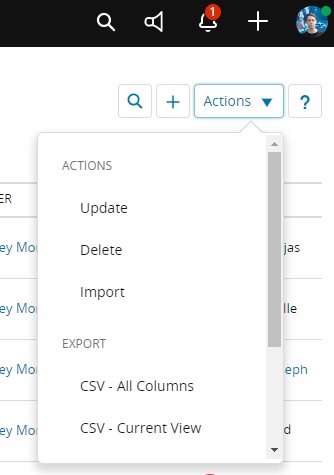
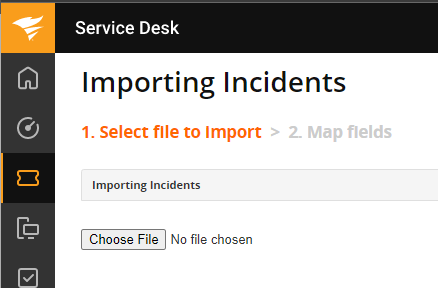
If you want to create tickets in bulk, you can use the "Import" feature in the incidents area and upload a CSV where each row is a separate incident:
https://documentation.solarwinds.com/en/success_center/swsd/content/completeguidetoswsd/csv-import.htm
If you want to bulk create incidents using a service catalog form you can do that, but you would need to use the API. Same for if you wanted to bulk create Tasks on one incident. Let me know if you want to do either of these and I can help with the API calls you would need to make
Hi MitchKiah
I would like to bulk create tasks to managers using a service catalog form. I am new to SolarWinds and not sure in creating APIS. I need your help in doing this.
Do you know powershell, bash, or any coding languages like python?
Unfortunately, no
No worries, it's not too hard to learn enough for some simple uses! I put together a powershell example to get you started. You'll need to update the "custom_fields_values" section to match your actual form fields. I'd recommend using Windows built in PowerShell ISE program for that.
Disclaimer though: I'm REALLY not a PowerShell user so there are probably a dozen better ways to write this. Also, while you're testing, make sure to only run it against one request at a time (one row in a CSV). You don't want to accidentally create dozens of bad requests.
Add-Type -AssemblyName System.Windows.Forms## Asks for your API token to use later for authentication and then converts it into a usable string.## You can create an API token by looking up your Administrator user account in Setup > Users & Groups > Users, clicking "Actions" and## selecting the "Create JSON Web Token" button. Keep in mind this is basically a password for your account, so keep it safe.$secure_api_token = Read-Host 'What is your API token?' -AsSecureString$api_token = [Runtime.InteropServices.Marshal]::PtrToStringAuto([Runtime.InteropServices.Marshal]::SecureStringToBSTR($secure_api_token))## The Catalog ID is part of the catalog item URL.## The ID for the URL below would be 1845517## https://example.samanage.com/catalog_items/1845517-test-powershell$catalog_id = Read-Host "What is the Service Catalog ID?"## Sets the HTTP headers for your request, including the authorization header with your token from above.## Documentation is here: https://apidoc.samanage.com/#section/General-Concepts/Authentication$headers = New-Object("System.Collections.Generic.Dictionary[[String],[String]]")$headers.Add("Accept", "application/vnd.samanage.v2.1+json")$headers.Add("X-Samanage-Authorization", "Bearer $api_token")$headers.Add("Content-Type", "application/json")## Opens the File Exlorer dialog and filters for ".csv" files.$FileBrowser = New-Object System.Windows.Forms.OpenFileDialog$FileBrowser.InitialDirectory = [Environment]::GetFolderPath('Desktop')$FileBrowser.Filter = "CSV (*.csv)|*.csv|All files (*.*)|*.*";$null = $FileBrowser.ShowDialog()if ( -not $FileBrowser.FileName) { Write-Host "No file selected, exiting." exit}## Imports the CSV, then loops through each row and submits a service request## This section could be improved a lot by adding Try/Catch statements for error## handling.## Also, this doesn't check to see if you've already created a request, so be careful running## it multiple times against the same CSV file.$csv = Import-Csv -Path $FileBrowser.FileNameForEach ($row in $csv){ ## This section is the JSON body of your form data. The documentation for this JSON payload is here: ## https://apidoc.samanage.com/#tag/Service-Request/operation/createServiceRequest ## ## The documentation is a little out of date, but this will work. ## You'll need to update the Name/Value fields for each of the form questions as well. ## The "AdditionalComments" you see in "$row.AdditionalComments" is be the CSV column header. $body = @{ incident = @{ requester_name = $row.Email custom_fields_values = @{ custom_fields_value = @( @{ name = "Additional Comments" value = $row.AdditionalComments }, @{ name = "More Additional Comments" value = $row.MoreAdditionalComments } ) } } } $JsonBody = $body | ConvertTo-Json -Depth 5 try { $ServiceRequest = Invoke-RestMethod -Headers $headers -Method POST -Uri "https://api.samanage.com/catalog_items/$catalog_id/service_requests.json" -Body $JsonBody } catch { Write-Host "Couldn't open request for $row.Email. $_.Exception.Response.StatusCode.value__" # Skip to next csv row rather than erroring out. continue } Write-Host "Created new request #$($ServiceRequest.number) for $row.Email: $($ServiceRequest.href_account_domain)"}
Happy to help more if you get stuck or have questions! Feel free to reply back here or DM me with questions.