So i have added script that will allow me to import from excel info for other assets and it creates the assets fine.
In the CMDB ci Types i added a new custom field of MAC Address to the Other Asset type and it shows up and i can add info to it.
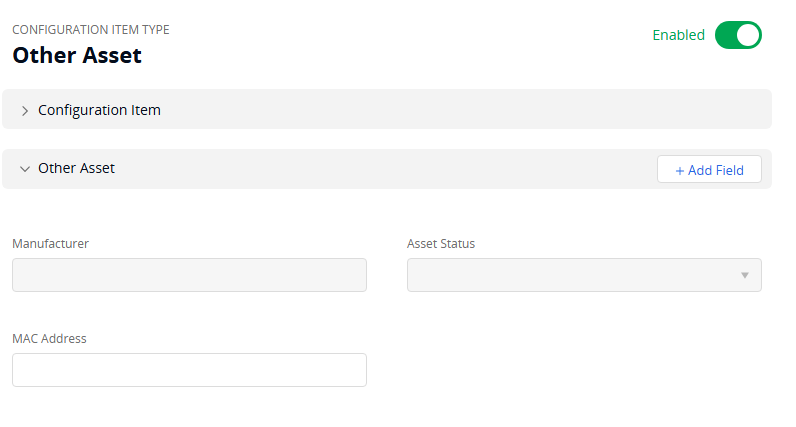
I have manually created assets and entered info on them in the right side menu and it saves etc.
When i use Rest API and do a get of all my other assets the
custom_fields_values and all its sub keys are empty.
I tried to create an asset via script and specify it and when i run a get it shows the custom fields info but nothing shows up on the asset in the web gui.
Columns in the spreadsheet are
- Name
- Manufacturer
- Type
- Status
- Model
- Serial Number
- Asset ID
- IP
- Description
- Owner
- User
- Site
- Department
#Building the JSON request


$assetInfo = @{

    other_asset = @{

        name = $excelData.Name

        description = $excelData.Description

	site = @{

		 name = $excelData.Site

	}

	department = @{

		name = $excelData.Department

	}


	asset_type = @{

		name = $excelData.Type

	}

	status = @{

		name = $excelData.Status

	}

	manufacturer = $excelData.Manufacturer

	ip = $excelData.IP

	model = $excelData.Model

        serial_number = $excelData.'Serial Number'

	user = @{

		email = $excelData.User

	}

	owner = @{

		email = $excelData.User

	}

	custom_fields_values = @{

		custom_fields_value =@{

			name = "MAC Address"

			value = $excelData.Description


		}

	}


    }

}


# Convert the payload to JSON format

$jsonInfo = $assetInfo | ConvertTo-Json -Depth 4


$jsonInfo


#Submitting the request


$JsonWebToken = "YOUR_WEB_TOKEN"


$Headers = @{ "X-Samanage-Authorization" = "Bearer $JsonWebToken";


              "Accept"                   = "application/vnd.samanage.v2.1+json"


              "Content-Type"             = "application/json" }


$UriBase = "https://api.samanage.com/"

$URI_Part = "other_assets.json"


$URI = $UriBase + $URI_Part

$URI


$WebResults = @()


try {

	$WebResults += Invoke-RestMethod -Uri ( $URI ) -Headers $Headers -Method POST -Body $jsonInfo -ResponseHeadersVariable ResponseHeaders

} catch {

	Write-Error $_.Exception.Message

	$_.Exception.Response.GetResponseStream() | ForEach-Object { New-Object IO.StreamReader($_) } | ForEach-Object { $_.ReadToEnd() }

}