Case study : One of the Huawei device failing download the configuration.
You are trying to download the configuration from on of the Huawei device and received and Error Unable to log into router: Time Out
First setup below and check the Session Trace
NCM few nodes failing downloading config files (Connection Refused ) / (Connection TimeOut) Error
View live NCM Job Logs activity for any failure / Errors / Performance
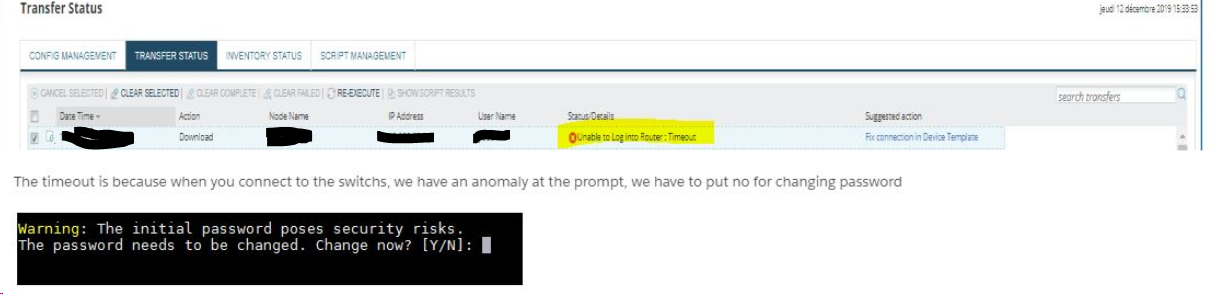
Checked the SSH to the device
Checked the Session Trace
[12/16/2019 4:30:19 PM] -----------------NCM 7.6-------------------
[12/16/2019 4:30:19 PM] UseCustomMorePromptBehaviour: False
[12/16/2019 4:30:19 PM] MorePromptKey:
[12/16/2019 4:30:19 PM] Custom MorePrompt Pattern:
[12/16/2019 4:30:19 PM] Login Attempts: 1
[12/16/2019 4:30:19 PM] Custom UserName Prompt:
[12/16/2019 4:30:19 PM] Custom Password Prompt:
[12/16/2019 4:30:19 PM] Custom Question Prompt:
[12/16/2019 4:30:19 PM] Device Template: Generic-Enterasys-1.3.6.1.4.1.2011.2.23.462 Connection Profile: Switches Huawei SSH
[12/16/2019 4:30:19 PM] System Name: xxxxxxxxxxxx
[12/16/2019 4:30:19 PM] System Description:
[12/16/2019 4:30:19 PM] System OID: 1.3.6.1.4.1.2011.2.23.462
[12/16/2019 4:30:19 PM] OS Image:
[12/16/2019 4:30:19 PM] OS Version:
[12/16/2019 4:30:19 PM] UseExactPromptMatch=False
[12/16/2019 4:30:19 PM] Menu-Based mode=False
[12/16/2019 4:30:19 PM] FreezeLoginForPreCommands mode= False
[12/16/2019 4:30:19 PM] FISP mode= False
[12/16/2019 4:30:19 PM] WODSSH Version: 3.0.0.184
[12/16/2019 4:30:19 PM] UseVirtualPromptForCommands False
[12/16/2019 4:30:19 PM] VirtualPrompt:
[12/16/2019 4:30:19 PM] VirtualEnablePrompt:
[12/16/2019 4:30:19 PM] Responce Timeout in seconds: 15
[12/16/2019 4:30:19 PM] Connection Timeout in seconds: 45
[12/16/2019 4:30:19 PM]
-->StateChange: Connecting to server<--
[12/16/2019 4:30:20 PM] Got HostFingerPrint:
[12/16/2019 4:30:20 PM] SWTelnet9 Crypto Information Begin
[12/16/2019 4:30:20 PM] Protocol = SSH2
[12/16/2019 4:30:20 PM] RemoteName = SSH-2.0--
[12/16/2019 4:30:20 PM] SCcipher = aes128-cbc
[12/16/2019 4:30:20 PM] CSCipher = aes128-cbc
[12/16/2019 4:30:20 PM] Keys = ssh-rsa
[12/16/2019 4:30:20 PM] SWTelnet9 Crypto Information End
[12/16/2019 4:30:21 PM]
-->StateChange: Connected to server - idle<--
[12/16/2019 4:30:21 PM] Solarwinds.Net SWTelnet9 Version 9.0.27
[12/16/2019 4:30:21 PM] Connected!
[12/16/2019 4:30:21 PM] -->
[12/16/2019 4:30:21 PM] --> Warning: The initial password poses security risks.
[12/16/2019 4:30:21 PM] --> The password needs to be changed. Change now? [Y/N]:
[12/16/2019 4:30:21 PM] ProcessLogin State: 0
[12/16/2019 4:30:21 PM] Standard password prompt detected
[12/16/2019 4:30:21 PM] <-- ********************
[12/16/2019 4:30:21 PM] -->
[12/16/2019 4:30:21 PM] --> Error: Please choose 'YES' or 'NO' first before pressing 'Enter'. [Y/N]:
[12/16/2019 4:30:21 PM] ProcessLogin State: 3
[12/16/2019 4:30:21 PM] TimerTick: mstrData=<Error: Please choose 'YES' or 'NO' first before pressing 'Enter'. [Y/N]:> State=3 - Connected to server - idle
[12/16/2019 4:30:21 PM] Pending Disconnect = False
[12/16/2019 4:30:23 PM] TimerTick: mstrData=<Error: Please choose 'YES' or 'NO' first before pressing 'Enter'. [Y/N]:> State=3 - Connected to server - idle
[12/16/2019 4:30:23 PM] Pending Disconnect = False
[12/16/2019 4:30:25 PM] TimerTick: mstrData=<Error: Please choose 'YES' or 'NO' first before pressing 'Enter'. [Y/N]:> State=3 - Connected to server - idle
[12/16/2019 4:30:25 PM] Pending Disconnect = False
[12/16/2019 4:30:25 PM] Pre-Commands: Waiting more than 3 seconds for response start sending pre-command if any...
[12/16/2019 4:30:27 PM] TimerTick: mstrData=<Error: Please choose 'YES' or 'NO' first before pressing 'Enter'. [Y/N]:> State=3 - Connected to server - idle
[12/16/2019 4:30:27 PM] Pending Disconnect = False
[12/16/2019 4:30:27 PM] Pre-Commands: Waiting more than 3 seconds for response start sending pre-command if any...
[12/16/2019 4:30:29 PM] TimerTick: mstrData=<Error: Please choose 'YES' or 'NO' first before pressing 'Enter'. [Y/N]:> State=3 - Connected to server - idle
[12/16/2019 4:30:29 PM] Pending Disconnect = False
[12/16/2019 4:30:29 PM] Pre-Commands: Waiting more than 3 seconds for response start sending pre-command if any...
[12/16/2019 4:30:31 PM] TimerTick: mstrData=<Error: Please choose 'YES' or 'NO' first before pressing 'Enter'. [Y/N]:> State=3 - Connected to server - idle
[12/16/2019 4:30:31 PM] Pending Disconnect = False
[12/16/2019 4:30:31 PM] Pre-Commands: Waiting more than 3 seconds for response start sending pre-command if any...
[12/16/2019 4:30:33 PM] TimerTick: mstrData=<Error: Please choose 'YES' or 'NO' first before pressing 'Enter'. [Y/N]:> State=3 - Connected to server - idle
[12/16/2019 4:30:33 PM] Pending Disconnect = False
[12/16/2019 4:30:33 PM] Pre-Commands: Waiting more than 3 seconds for response start sending pre-command if any...
[12/16/2019 4:30:35 PM] TimerTick: mstrData=<Error: Please choose 'YES' or 'NO' first before pressing 'Enter'. [Y/N]:> State=3 - Connected to server - idle
[12/16/2019 4:30:35 PM] Pending Disconnect = False
[12/16/2019 4:30:35 PM] Pre-Commands: Waiting more than 3 seconds for response start sending pre-command if any...
[12/16/2019 4:30:37 PM] TimerTick: mstrData=<Error: Please choose 'YES' or 'NO' first before pressing 'Enter'. [Y/N]:> State=3 - Connected to server - idle
[12/16/2019 4:30:37 PM] Pending Disconnect = False
[12/16/2019 4:30:37 PM] Pre-Commands: Waiting more than 3 seconds for response start sending pre-command if any...
[12/16/2019 4:30:37 PM] TimerTick: Login Timeout
[12/16/2019 4:30:37 PM] Disconnected - From: 100.100.100.100
Cause:
Right after login device ask question:
Warning: The initial password poses security risks.
The password needs to be changed. Change now? [Y/N]:
NCM is not expecting such password question and fail to login.
Resolution
Suggest customer just login on device using putty and change password to more complex so this warning disappears. After that NCM should login fine on device
If it is not possible to simply turn off that warning may try workaround from NCM side. To do so add to device template the following two lines:
<Command Name="FreezeLoginForPreCommand" Value="True"/>
<Command Name="PreCommand" Value="N"/>
Let me know if this helped. send us fresh session trace and copy of device template
Known BUG in Huawei
It turns out that it's a bug from huawei, namely that even if I change the password, the message reappears.
There is no work around in NCM to by pass this security