Is there are mechanism to configure the polling interval for a Custom Poller when the OIDs are polled for their values? If yes, how can this be done?
Thanks in advance!
NPM System Manager-> Settings-> Polling
Thanks Mark.
1) What is the difference between the "Polling" and "Statistics" collection? When I use a Custom Poller to gather the statistics for private MIBs, is that collection interval controlled by the "Polling" or the "Statistics" tab?
2) Is there an ability to control the collection interval at the Custom Poller group level instead of at the Node level?
1) Network polling checks the availability status and response time of resources on your network. It also determines network latency and packet loss.
Statistics collection provides a check of all monitored nodes, interfaces, and volumes, and it is normally done less frequently than polling.
-Use the Statistics tab to adjust the settings-
2) If you want your new settings to apply to all current network resources: click Apply these settings to All
1) So, for Custom Pollers, I should use the Statistics tab - right?
2) I want to have a different collection interval for different Custom Pollers (example, different intervals for different private MIBs). For example, if I have 1 custom Poller for Interface statistics and second custom poller for certain proprietary counters defined in a private enterprise MIB, I want to have different polling/collection intervals for the 2 customer pollers.
And, I want each of the the Custom Pollers settings to be applicable to all nodes.
evalUser - there ais currently no way to control polling interval at the custom mib poller level. You can only control this at the node level.
We will look to add this ability to a future release.
this is an old post but I am curious if this issue has been addressed. Can we set different polling intervals for different universal device pollers?
No, this is still an open enhancement request we have in the system
Just wondering if this is still being looked at? I would really not want to drop the global polling value for all the nodes when all I need is the custom poller to be dropped to 1 minute for 5 nodes that it is applied to.
This is something we have in our system and something we want to do, just a matter of time and priority.
Is this enhancement available?
Is this coming in 10.2? We really need this feature and have certain custom pollers for UPSs that we need to poll at lesser intervals than the statistics interval.
This is a must have for us. We have numerous custom pollers setup where we would like to poll on much greater intervals than the interval setup for a device or interface and we also have a few custom pollers that we would like to poll more aggressively than the device/interface the poller is associated with. It makes no sense to poll a device for a S/N every 5 or 10 minutes when i could just pull it once a day.
Hi,
Your post back in 2011, is 100% applicable to what I am currently looking for.
As discussed with a coleague of mine the are a few other attributes that need to be monitored to comply with any inventory audit and compliance reports.
These atributes only need to be polled once or twice within a 24 Hour period of time.
has this problem bee resolved?
Or have you been able to find a work arround to get the same result?
Cheers,
Dan
Custom Pollers in the Universal Device Poller application have had an update since NPM 10.2 in 2011.
By default, all Custom Pollers follow the Node Polling Intervals (10 minutes); you can set the Polling Interval by editing the Poller and expand out Advanced Options, then you can set the Polling Intervals from 1 minute to 600 minutes.
Next on the agenda is...
What is the Polling Interval Set at?
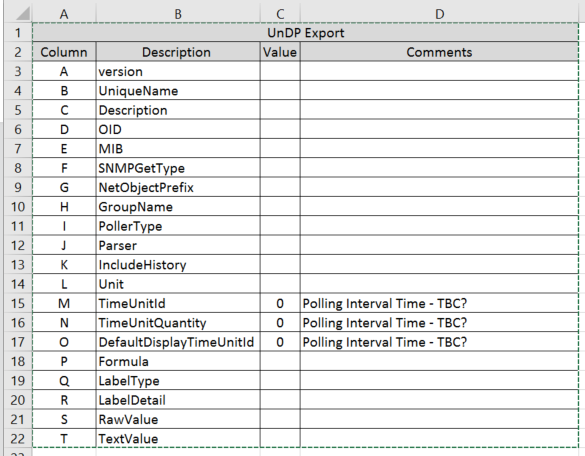
After exporting theOrion UnDP File or Folder and being able to view the items with Excel which column should show the Polling Interval Time, M, N or O?
Reference Polling Interval for Individual Orion UnDPs:
Core Temperature, No Polling Interval time set. Cells M, N & O have the value 0 (Zero).
productID, Polling Interval Set to 600, Cells M, N & O have the value 0 (Zero).
productVersion, Polling Interval Set to 600, Cells M, N & O have the value 0 (Zero).
sysUpTime, Polling Interval Set to 60, Cells M, N & O have the value 0 (Zero).
Although most of the other Description Cells are self-explanatory if there is another SolarWinds Engineer who would like to add and explanation for each of the Description Cells it will be good for our future reference.
Alternatively please post a URL for where we may find the Description’s and their explanations for clarification.
Knowing where to see, the value for the Polling Interval within a Spreadsheet filter will be ideal to see how many devices with the UnDPs assigned with which Polling Intervals other than SolarWinds Orion defaults.
Otherwise at this moment in time I am having to check each of the UnDPs individually.
Thank you in advance for any feedback and advice moving forward.