hi,
i want to change GUI language with Arabic can any body help me to create CustomLabels_ar.properties file. i read following knowledge base but still not succeed.
SolarWinds Knowledge Base :: How To Customize The Web Help Desk GUI (Language And Labels)
Hi Qureshi,
What is the system locale on the workstation you are using to access WHD?
What does it mean you do not succeed? Can you please be more specific on what you did, what happened and how it is different to what you expect?
Hi Quershi,
Please try the following:
1. Copy the existing Label.properties file and rename to CustomLabels_ar.properties - this step is very important - Do not use the existing file you have created, delete it necessary.
2. Edit the new CustomLabels_ar.properties and go to line 159 and change it
From
login.msg.enterEmail = Please enter an e-mail address.
To
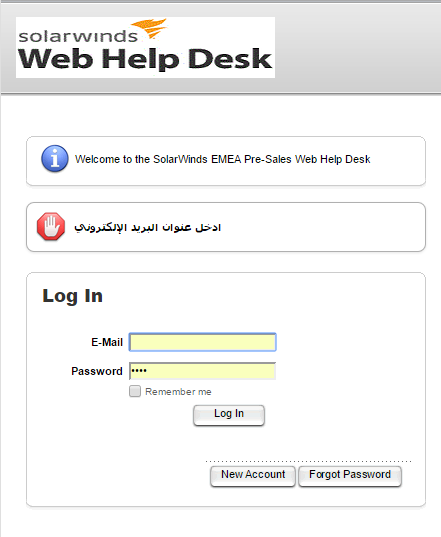
login.msg.enterEmail = \u0627\u062f\u062e\u0644 \u0639\u0646\u0648\u0627\u0646 \u0627\u0644\u0628\u0631\u064a\u062f \u0627\u0644\u0625\u0644\u0643\u062a\u0631\u0648\u0646\u064a
You will need to repeat the process for each label you want to change
Next - How do we change the Arabic characters to escape Unicode??
To convert Arabic, Non ASCII characters I have used the following website
Online Unicode(UTF-8) to ASCII(Unicode Escaped) converter tool
The end result will look like this.
Note: You may need to restart WHD using the STOP WHD and Start WHD commands.
Lets us know how that goes for you.
-Tony
Thank you for your kind reply.
i tried to edit following two labels. first i copy Label.properties and paste and rename with CustomLabels_ar.properties. after that i edit following two labels in CustomLabels_ar.properties and stop the WHD with WHD stop and start it again but still nothing change on client page on request and history button.
lbl.subject = \u0645\u0648\u0636\u0648\u0639
i also change
btn.request = \u0633\u062C\u0644
btn.request = \u0637\u0644\u0628 \u062E\u062F\u0645\u0629
is there any other change i have made to do this successful GUI language.
Any update ?
Hi Tony,
Currently i am testing it on my own laptop and accessing WHD from same laptop. shld i use to access whd from different laptop or machine with arabic lang ?
Yes you will need to access WHD from an Arabic system as WHD will detect required language, and thus CustomLabels_ar.properties file to use.
Thank you for your kind support it will work fine. once again thank you for support.
Best regards,
Qureshi
Salam
As you have change your WHD language from English to Arabic, I also want to know what is the full process for it. I have to install WHD for a client and their requirement is that ticketing system will be in Arabic so that users can easily send their tickets in their native language I have read this post but can't understand it so kindly explain it for me.
Thanks
Salam baqir
At which part of the process are you having the challenge?
Thanks.
Tony
Thanks tony for your reply
First thing I am not aware of basic requirements for changing language to arabic.
Second thing I don't know that what to change in CustemLabels_ar.properties file and what to not.
Third As I read one of your messages and change a label
I am not able to save it when I want to save it, it says access denied
So I am new with WHD and also not know the programming so explain the procedure in simple words so I can follow and able to change the language.
Thank you tony
1. The custom labels files are used to change the language based on the browser language detected so changing the custom labels file alone is only 1 part of the process.
2. The custom labels file only supports UNICODE characters, As arabic contains NON UNICODE characters we need to use ESCAPED UNIDCODE
which is why it looks like this
Instead of this
login.msg.enterEmail = ادخل عنوان البريد الإلكتروني
You can play around with the conversion examples here Decode or Encode Unicode Text - Online Toolz
In choosing what to change in the file I cannot really suggest a best solution here as it varies.
"Access Denied" means you are probably not logged on as an administrator. Try saving the file to a different location and then copying it to the correct directory.
abdulraheemsidz - Have you guys done any WHD translation work?
Here is one file which has translated Arabic labels, not all are converted but still useful to have basic Arabic GUI and you can start over from this file.
salam Abdul raheem
The file you share here i want to use it but its not showing any effect in GUI. I noted one thing that in the file Arabic is written and not decoded. Do you have any file with ESCAPED UNIDCODE .