Has anyone successfully used the API Poller to poll Azure? I'm in desperate need of some help to get this working. Can anyone provide some information on the steps needed to successfully poll Azure (from start to finish)? Please help!
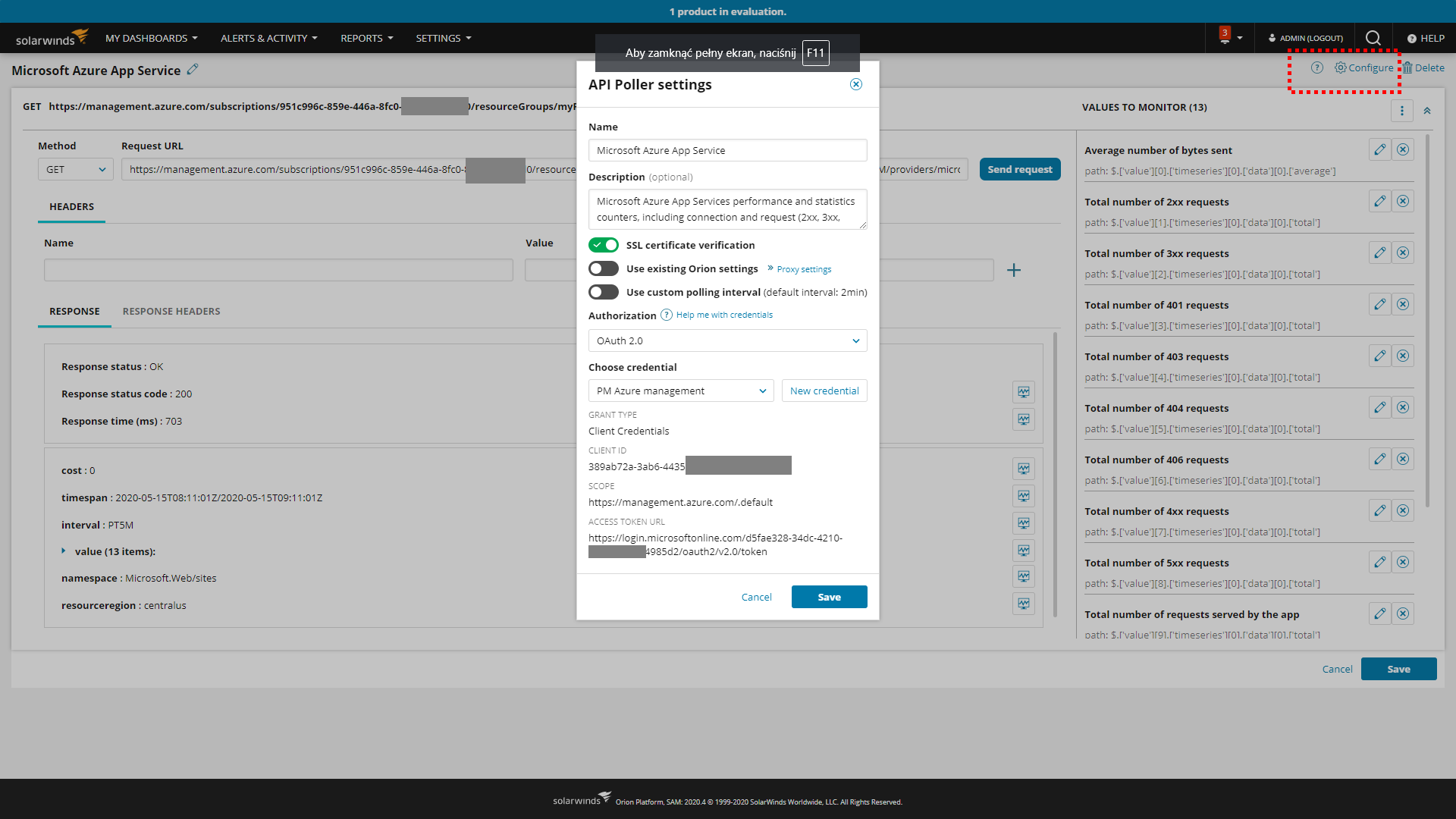
@LatteLarry Azure REST requires using OAuth2.0 credential, what is supported by API Poller starting from 2020.2 RC
Here are the steps to configure it:
1. Create API Poller to monitor Azure
2. Go to Configure option
3. Select OAuth2.0 Authorization
4. Click "New credential"
5. Fill all the fields:
Sample configuration below:
Let us know if that helps and if you have any other questions or needs.
What is the URL you would like to use in API Poller request?
Can you provide any information about where in this process this is failing for you?
@sturdyerde Sure thing... I have my GET request all figured out in POSTMAN. The part I am unclear on is how to do I use token based authentication (that expire) in the Solarwinds API Poller? It only uses basic username and PW based authentication.To give more context, I followed this blog post for my authentication and to create my GET request for the Azure resources I need.
@sturdyerde My apologies, see below... This should be very helpful for other people as well.
https://blog.jongallant.com/2017/11/azure-rest-apis-postman/
Not too worried about transfering the GET request and headers to the Orion API Poller, more just trying to figure out how to do the authentication.
Not sure if you saw my reply because of how it got posted into the thread. Let me know if the newer walk-throughs help.
Thanks for the response and help! I actually just installed 2020.2 earlier today. It's pretty cool and looks like it may get me past my struggles. Just need to mess around with it a little more. I should have an update over the next few days.
@LatteLarry interested in your outcome. We are still on 2019.4 and a device requires token authorisation
Ok... First off, I'm very impressed with all of the new features and enhancements of 2020.2. The release was much needed and I'm very happy I upgraded!The API Poller enhancements have gotten me past some of my struggles with other providers, but I still struggle with the Azure REST API. My struggle is with the OAuth2.0 authentication Azure REST uses.
First ProblemI cannot get my POST request to work in order to obtain the Bearer token. My POST looks like this: https://login.microsoftonline.com/{{tenantId}}/oauth2/token. I replace tenantId with my actual tenant ID. No matter what I try, it returns with a 400 status code saying "The request body must contain the following parameter: 'grant_type'." It doesn't matter what I do to pass grant_type in the body, it doesn't work. Without this, I have no way to get my bearer token for authentication.
Second ProblemOnce I finally get my POST to work and it returns with a bearer token, how do I pass it through to my GET requests? Or how do I pass any variables through?I have to think this has been tested and works? Otherwise, there's no way you can effectively do API Polling against Azure. My GET request does actually work. I can manually generate my bearer token and manually pass it through on my GET requests to Azure for successful responses. The POST and passing variables is the struggle.
@serena Is there any way you can ask a developer? I really need this.@sturdyerde Any ideas?
In my experience we were trying to get the OOB MS O365 API Pollers working using the MS Graph API.
I also had issues where I could not use the API Poller interface to do the POST in order to get the Bearer Access Token. I got the same error no matter what syntax I tried in the body (and even though the grant_type was indeed in the body) : "The request body must contain the following parameter: 'grant_type'." This was VERY frustrating. I apparently do not know what syntax to use in the body to get it to POST correctly. So, I ended up using curl (which I happened to have installed on one of our Test Windows servers) to do the POST to obtain the token. Here is the curl command I ran on Windows command prompt as Administrator (all on one line):
curl -H "Content-Type: application/x-www-form-urlencoded" --http1.1 --insecure --data "client_id=actual_client_id_here&scope=https%3A%2F%2Fgraph.microsoft.com%2F.default&client_secret=actual_client_secret_here&grant_type=client_credentials" --url "https://login.microsoftonline.com/your_tenant_id_here/oauth2/v2.0/token"
Hint: You can decode your access token at https://jwt.ms/ which I found to be a pretty cool tool.
In my case the Bearer Token expired in 1 hour and I was wondering how I was going to automated the obtaining of a Token every hour, but I later realized this no issue since we only had to use the Token once to obtain the first successful GET RESPONSE using the Bearer token, see details below.
Once I had the token I then made sure all the text was on one line and then copied it into my clipboard, then I went into the I assigned the API Poller using an OAuth2 credential which was using my client_id, client_secret and the Access Token URL was set to https://login.microsoftonline.com/actual_tenant_id_here/oauth2/v2.0/token and the Scope was set to https://graph.microsoft.com/.default
Then I added a Header entry as follows:
Key=Authorization
Value=Bearer your_actual_token_id_here
I then clicked the "Send request" and got an OK response! After that, I then noticed that all the other MS O365 API Pollers I had assigned previously using only OAuth2 creds but were failing with Unauthorized errors started working without having that Authorization header in them. that is when I realized I only had to make one initial successful GET request using that token then it was no longer required and the OAuth2 creds worked after that. So, I removed the Authorization Header from the one API Poller and tested it and it worked without the Authorization header.
From this point forward now the OAuth2 creds work for all of the MS O365 API Pollers which use the MS Graph API.
Since my app was registered to have a client_secret which does not expire, now I can use the OAuth2 creds without having to use Bearer Access Token.
So, in the end I would like to now if anyone figures out how to get the POST body syntax correct without getting the grant_type error we are getting. I would like to be able to do the POST from the SW Console instead of having to use curl to obtain the token. We will have to run the POST again any time we need to get a new token.
I am also having the issue where I have a bunch of old or bad API Poller Credentials I want to delete but I seem to have no way to manage them so I am not sure how to delete the API Poller credentials I no longer want or need so I can prevent someone else from accidentally choosing them.
This is a long shot but did you ever figure out how to send the grant_type' in the body ? I'm running into the same issue and its very fustrating.
refer thishttps://thwack.solarwinds.com/product-forums/server-application-monitor-sam/f/forum/93220/how-to-monitor-any-azure-services-using-api-pollingplease mark is as correct answer