I have this loaded in a two different test environments and can confirm that at least the character combo crashes, checklist errors and tomcat versions have been addressed.
Report back with your findings!
Please raise support ticket
and the FAQ problem is fixed? (under linux?)
I also encountered a similar problem, but in the latest version 12.8.5, this jar package was not added back. Instead, there was a bug fix to delete this dependency (01835837)
SW asked to re-install WHD from zero to our linux,
we did it - same error - FAQ page is still not working
version is the latest: 12.8.4 - Build #12.8.4.628
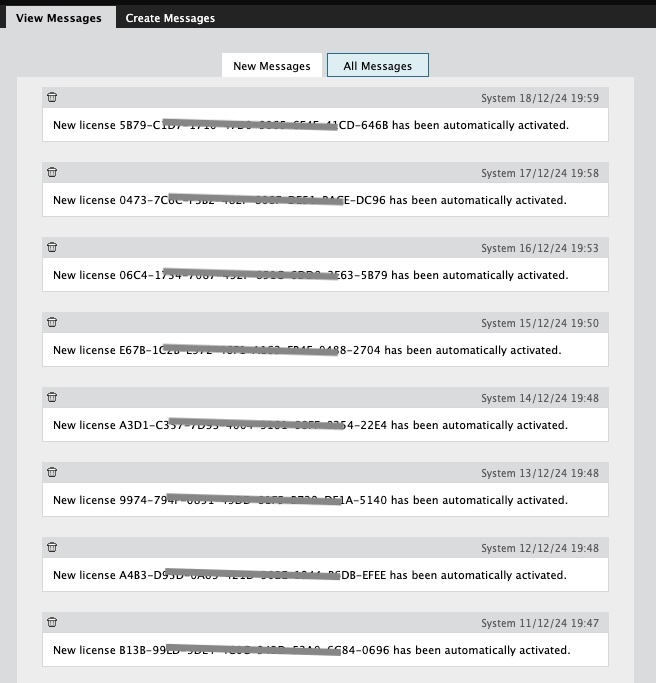
also we've got the "new license" messages issue too - every day 1 msg
Outgoing mail is working in Test! But....incoming mail, which worked before switching APIs, now doesn't. Did a re-auth using the new secret, which authenticated fine, but saving the account then resulted error. Deleting the incoming account and re-adding. Of course, I forgot to delete email history, so it'll take a while. Also why I can't copy/paste the error right now. Enabled debugging, so will grab all that later.
Yes already have a case with Support and it has been acknowledged as a bug to be fixed in the upcoming 12.8.5 release.
Just realized we're seeing the exact same on both Prod and Test. Disabled auto-activate simply to avoid the message altogether, but this does give us one more thing to do manually at re-up time. Anyone submit a ticket for it?
Thanks!!! Just had our meeting and worked everything out. I sent him the Admin Guide pdf link, and that's what I'm using now to finish the config. I'll update after we test.
Good. What is confusing is this On-Line document https://documentation.solarwinds.com/en/success_center/whd/content/helpdeskconfigureincomingemailaccountoffice365.htm is wrong. It does talk about two options which can be used 1. Exchange Web Services (EWS) or 2. Microsoft Graph API. I think MS have given notice on EWS connections so option 2 should be used. It also has incorrect screenprints further down about Send permission which relate to Outbound rather than Inbound settings. The Administration Guide PDF is much better.
Got a response from support. Basically, I finally RTFM, and it clearly shows that we did it wrong. Meeting tomorrow w/ 365 admin to go over details.
Hi,
same error here - after update from 12.8.3+HF3 to 12.8.4
alma linux 5.14.0-503.21.1.el9_5.x86_64
which is interest - for the clients, their FAQ page is working - just limited - of course - for their FAQs
if I switch from my tech user to Client user - it's working for me too on those pages - also just limited
what we recognized is that, after looking at the logs I can see an issue which may be releated:
It appears to be wanting to call a Java component jabsorb.jar but it cannot find this.Due to an error in the WHD12.8.4 build this was omitted from the folder {webhelpdesk}\bin\webapps\helpdesk\WEB-INF\lib
we put it back from a backup, but not helped
Did you get a solution for this reported issue on your two Servers?
No problem, fingers crossed it works for you!
Got it! Thanks! I'll send it over to our 365 admin with the request for a new secret.
Sent a PM via Thwack.
That might help! Thanks!
I can PM you the API / Permission screen from my EntraID if you wish so you can review that they are similar?
OK, thanks! That gives me hope!
I had to create a new secret because I did not have a record of the existing one (going back into EntraID it does not show it anymore).
I validated the Inbound connection with the new secret then used same details for the Outbound, validated and it was all good.
Obviously the new permission was added to Graph for "Mail.Send".
Submitted a ticket yesterday. Support got back to me asking if we had created a new client secret. We didn't, but didn't know that could be an issue. The incoming mail, which uses the same account, using OAuth, is working fine. Waiting on their follow-up to that information.
We have implemented this by adding relevant permissions into the EntraID Registered App which is currently used for the Inbound Mail via OAUTH and it seems to work well.
Hi jholzhey_bu , can u please raise support ticket for the OAuth for outgoing mail -since we have fixed the issue. Thanks
Testing has gone fairly well on our test platform...EXCEPT for OAuth for outgoing M365 email. I was under the impression that this was fixed for x.8.4, but apparently not.
Does anybody know the csrf headers that the webhelpdesk uses? We are behing a reverse proxy and keep getting "csrf token not found to compare errors". Trying to resolve this issue that has been a pain. Thanks!
Just for context, which flavor of Linux are you using?
Last friday, support said:
I checked your logs, and there are a lot of database-related issues that appear. I think it would be best if we reinstall your WHD and restore from a database. Ref: Back up and restore the PostgreSQL database using the command line in Web Help Desk (WHD)
I have the same problem on our WHD Linux testserver as on our WHD Linux production server.
Now i will create a 3rd Linux server where Solarwinds will install WHD in a remote session
I have not experienced this issue, what did the support say?
Hi, we use WHD on a Linux server.
I upgraded from 12.8.3+HF3 to 12.8.4 and now i get an error when i click on FAQs. 'Something went wrong'.
I already have created a case (01824266)
We're getting the same repetitive messages about licensing so I presume it's a bug. Isn't this so much fun! We should get an award for enduring all the fun!
Our upgrade to v12.8.4 seems to be fine, but I do notice the Lic appearing to auto-activating nightly. Also weird that the Lic number references are nothing like our actual Lic in Setup > General > License. So I'm guessing it is some sort of distraction and just rubbish data triggering a false notification perhaps when daily for the expiry of the License???
I would assume as such, but because the method exists in general it may be exploitable whether intentionally used or not.
ticket 01819046 opened for this continued character issue.
No crashes so far, upgraded about 6 hours ago and been pumping various test scenarios through. Errors just being reported in logs just a frequently as the CSRF errors used to show.
Hmmm... any system crashes or just errors showing in the logs?
Yes mine Lab seems to be clean with those now but plenty of "ERROR w.helpdesk.com.macsdesign.whd.daemon - Error while triggering session in com.macsdesign.whd.daemon.ServletPulseDaemon: javax.net.ssl.SSLHandshakeException: PKIX path building failed: sun.security.provider.certpath.SunCertPathBuilderException: unable to find valid certification path to requested targetjavax.net.ssl.SSLHandshakeException: PKIX path building failed: sun.security.provider.certpath.SunCertPathBuilderException: unable to find valid certification path to requested target" still !!
Are you getting any CSRF errors with 12.8.4? I'm hoping they resolved this issue in this version.
I take that back. 'java.com' will still crash the ticket/session, even if you wrap it in a quote or code block.
Thanks for the info. It looks like we won't be affected if we don't use Jakarta Authentication then?
https://nvd.nist.gov/vuln/detail/CVE-2024-52316
https://lists.apache.org/thread/lopzlqh91jj9n334g02om08sbysdb928
From the Release notes:
The severity is a bit misleading as Apache shows this is low and github and others are classifying as critical.
Was there a vulnerability in the Tomcat version?
I wanted to share a new dashboard a co-worker ( @mblackburn ) came up with to help us better view groups of interfaces and various metrics for each. Using a single HTML widget, we are able to visually compare numerous different interfaces by populating each interface dataset onto its own graph. We are able to view…
PALO-ALG - Logging.xmlPalo Alto Networks ALG Security Technical Implementation Guide :: Version 2, Release: 3 Benchmark Date: 27 Oct 2022
Alert Cleared.htmlHello, I would like to share the HTML template details we have prepared so that Solarwinds alarms can become more meaningful. It can list alarm object details and connected device details separately in HTML template. Except for object and device details, you can easily add custom property information…
Cisco ASR Devices.pollerCisco ASR Devices