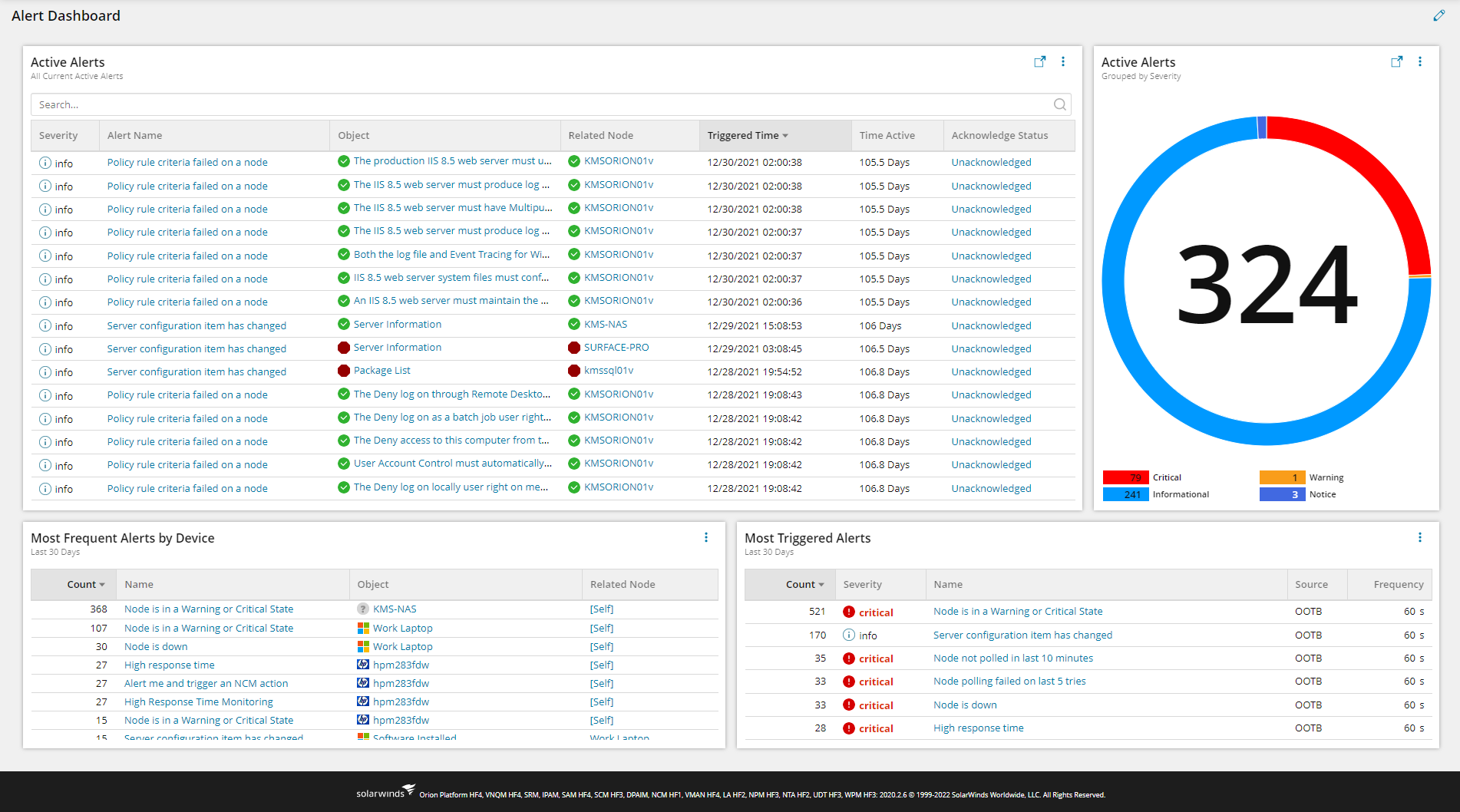
Similar to the below, but for the alerting section, like active alert, which application, server, node triggering more alert like that.
Do we have any swql query for that?
SteveK, given the endorsement or your code by KMSigma I would really like to give this a try. You have several custom properties related to both email and responsible teams. In my environment (so far) I only have a custom property for 'system_owner', which is an email address. Is there a way I could simplify your code to use this single custom property?Thanks!Joe
Thank you for sharing this very useful SWQL.It help a lot to understand how the Alert Dashboard is created.By utilizing this SWQL, i created modern dashboard as shown below.To further enhance the dashboard for operational, 1) how to include interactive button inside the table to be similar with the OOTB (Out-Of-The-Box) "Alerts & Activity > Alerts" dashboard so that the engineer can click that button to Acknowledge and put the Annotation? 2) how to add buttons on the top on the "Active Alert" table to show the total alerts grouped by Severity. and when the button is clicked, the Active Alerts will be filtered to show only the alert with that severity to be similar with the widget in the "My Dashboard > Network > NPM Summary > Active Alerts" ?
For some reason the following did not work:Where 42 = 'Life, The Universe, and Everything'
I may have to report a bug on that one. I also tried 'How many roads must a man walk down' but that still came back as wrong.
And I would have gone weird with it and used:
WHERE ( 3.14 > 0 ) AND ( 42 > 3.14 )
Because I'm very odd.
Glad its just not me on that one. So now the 2=2 has just become a standard in every SWQL query I write. I never know where the query may end up (Widget, one off run, report, etc...)
Yeah - multiple things in the platform don't like comments as the last line. If I remember right, it's something about preventing possible SQL injections - which I understand, but it seems to be fresh and new every time I encounter it and I'm like...
Thank you. @KMSigma.SWI feel free to use any of it. It took a bit to get the tables we used linked up, and I think I drove one of our DBAs a bit crazy trying to get the subquery sorted out. When I start doing some crazy queries like that, I like to get them involved to make sure I don't cause any issues on the backend they manage.
So on the 1=1, was a trick a previous DBA told me to use. Essentially as we played around with various where statements, it allowed me to quickly comment out the various conditions without having to move stuff around. It always seemed like i was commenting out the first thing behind where, so I was cutting/pasting, re-adding "Where" and just got tired of it. Plus it doesn't really add any time when the query runs.
The 2=2 was due to a bug I stumbled in with the modern dashboard widgets. I don't know if its still an issue, but the widgtets didn't like the last line being a comment. So this allowed me to get around that as I would comment out the where pieces for my "template" dashboards.
This is a thing of beauty. You should be very proud of yourself @SteveK because I am duly impressed.
Curious about the reason for the WHERE 1=1 and WHERE 2=2 near the end, but otherwise...
WHERE 1=1
WHERE 2=2
I wanted to share what I have on my alerting table. So one of the issues I ran into, is we use custom properties pretty heavily for our alerts. Basically all of our emails are tied to a Email custom property for the object type. When trying to create a dashboard for the teams, this became a bit of a struggle since I didn't really have a good way to filter. I forget what was original code and what was lifted or modified from other queries and dashboards. I believe the active time came from one dashboard, and I want to say I used the link @KMSigma.SWI referenced for the base of the table layout.
To make something usable for our end, I ended up doing a subquery with various Cases to populate back the custom properties. This then allowed me to easily filter in my where clause for the teams, and provide a clean-ish select statement at the top. Anything in the [CP] table is the subquery which gets nasty. The subquery would need to be edited to line up with your environment. The main things I pulled over for ours is a Responsible Team property and an Email address field. Each object (Node, Volume, Datastore, Application (and component), Transaction (and step)) has a corresponding custom property for this.
When I build out the modern dashboard widget, I have:An Alert name which hyperlinks to the alertSeverityObject (Node, Volume, Virtual Machine, etc....)Triggering Entity (Name, Status, Hyperlink)Related Node (Name, Status, Hyperlink)EmailResponsible TeamTrigger TimeTime ActiveAcknowledge by
SELECT [AA].AlertObjects.AlertConfigurations.Name , '/Orion/NetPerfMon/ActiveAlertDetails.aspx?NetObject=AAT:' + ToString([AA].AlertObjectID) As AlertDetailURL --Build Out URL/URI , [AA].AlertObjects.AlertConfigurations.Severity , [AA].AlertObjects.EntityCaption , [AA].AlertObjects.EntityDetailsUrl , [CP].EntityStatus , Case [AA].AlertObjects.EntityType When 'Orion.Nodes' then '[Self]' Else [AA].AlertObjects.RelatedNodeCaption End As RelatedNodeCaption , [AA].AlertObjects.RelatedNodeDetailsUrl , [AA].AlertObjects.Node.Status as RelatedNodeStatus , ToLocal([AA].TriggeredDateTime) As TriggerTime , CASE WHEN MINUTEDIFF([AA].TriggeredDateTime,GETUTCDATE()) > 1440 THEN (TOSTRING(ROUND(MINUTEDIFF([AA].TriggeredDateTime,GETUTCDATE())/1440.0,1)) + ' Days') WHEN MINUTEDIFF([AA].TriggeredDateTime,GETUTCDATE()) > 60 THEN (TOSTRING(ROUND(MINUTEDIFF([AA].TriggeredDateTime,GETUTCDATE())/60.0,1)) + ' Hours') ELSE (TOSTRING(MINUTEDIFF([AA].TriggeredDateTime,GETUTCDATE())) + ' Minutes') END AS TimeActive , [AA].Acknowledged , [AA].AcknowledgedBy , [CP].EntityObj , [CP].Email , [CP].ResponsibleTeamFrom Orion.AlertActive [AA] Left Outer Join ( SELECT [AO].AlertObjectID , Case [AO].EntityType --Sets a clean value for alert object type When 'Orion.Nodes' then 'Node' When 'Orion.Volumes' then 'Volume' When 'Orion.APM.Component' Then 'Component' When 'Orion.APM.Application' Then 'Application' When 'Orion.VIM.Datastores' then 'Datastore' When 'Orion.VIM.VirtualMachines' then 'Virtual Machine' When 'Orion.SEUM.TransactionSteps' then 'WPM - Step' When 'Orion.SEUM.Transaction' Then 'WPM - Transaction' When 'Orion.Engines' Then 'Orion Server' Else [AO].EntityType --Entity type not accounted for End As EntityObj , Case [AO].EntityType --Retrieves status of Object When 'Orion.Nodes' then [AO].Node.Status When 'Orion.Volumes' then [V].Status When 'Orion.APM.Component' Then [C].Status When 'Orion.APM.Application' Then [App].Status When 'Orion.VIM.Datastores' then [DS].Status When 'Orion.VIM.VirtualMachines' then [VM].Status When 'Orion.SEUM.TransactionSteps' then [TS].Status When 'Orion.SEUM.Transaction' Then [T].Status When 'Orion.Engines' Then [SW].Status Else 0 --Entity type not accounted for End As EntityStatus , Case [AO].EntityType When 'Orion.Nodes' Then [AO].Node.CustomProperties.Email When 'Orion.Volumes' then [V].CustomProperties.VEmail When 'Orion.APM.Application' then [App].CustomProperties.AEmail When 'Orion.APM.APplication' then [C].Application.CustomProperties.AEmail When 'Orion.VIM.VirtualMachines' then [AO].Node.CustomProperties.Email When 'Orion.VIM.Datastores' then [DS].CustomProperties.DSEmail When 'Orion.SEUM.Transactions' then [T].CustomProperties.TEmail When 'Orion.SEUM.TransactionSteps' then [TS].Transaction.CustomProperties.TEmail When 'Orion.Engines' then [SW].CustomProperties.Email Else Concat('N/A - ',[AO].EntityType) End As Email , Case [AO].EntityType When 'Orion.Nodes' Then [AO].Node.CustomProperties.ResponsibleTeam When 'Orion.Volumes' then [V].CustomProperties.VResponsibleTeam When 'Orion.APM.Application' then [App].CustomProperties.AResponsibleTeam When 'Orion.APM.Component' then [C].Application.CustomProperties.AResponsibleTeam When 'Orion.VIM.VirtualMachines' then [AO].Node.CustomProperties.ResponsibleTeam When 'Orion.VIM.Datastores' then [DS].CustomProperties.DSResponsibleTeam When 'Orion.SEUM.Transactions' then [T].CustomProperties.TResponsibleTeam When 'Orion.SEUM.TransactionSteps' then [TS].Transaction.CustomProperties.TResponsibleTeam When 'Orion.Engines' then [SW].CustomProperties.ResponsibleTeam Else Concat('N/A - ',[AO].EntityType) End As ResponsibleTeam From Orion.AlertObjects [AO] Left Outer Join Orion.Volumes [V] on [AO].EntityDetailsURL = [V].DetailsURL Left Outer Join Orion.APM.Application [App] on [AO].EntityDetailsUrl = [App].DetailsUrl Left Outer Join Orion.APM.Component [C] on [AO].EntityDetailsUrl = [C].DetailsUrl Left Outer Join Orion.VIM.VirtualMachines [VM] on [AO].EntityDetailsUrl = [VM].DetailsUrl Left Outer Join Orion.VIM.DataStores [DS] on [AO].EntityDetailsUrl = [DS].DetailsUrl Left Outer Join Orion.SEUM.Transactions [T] on [AO].EntityDetailsUrl = [T].DetailsUrl Left Outer Join Orion.SEUM.TransactionSteps [TS] on [AO].EntityDetailsUrl = [TS].DetailsUrl Left OUter Join Orion.Nodes [SW] on [AO].EntityCaption = [SW].Caption ) as [CP] on [AA].AlertObjectID = [CP].AlertObjectIDWhere 1=1-- And [AA].Acknowledged is NULL-- And [AA].Acknowledged = TRUE-- And [CP].Email like '%EMAILHERE%' And 2=2
Probably, cant remember where I got it from and revised several bits. There's a couple columns there no-one needs but hey I had it to handEveryone else, if 2 people recommend a page, and one of them is @KMSigma.SWI use his one first
Is this tweak on the SolarWinds Active Alert Dashboard , @adam.beedell ?
SELECT aa.AlertActiveID,CASE WHEN ao.AlertConfigurations.Severity = 2 then 'Critical' WHEN ao.AlertConfigurations.Severity = 3 then 'Serious' WHEN ao.AlertConfigurations.Severity = 1 then 'Warning' WHEN ao.AlertConfigurations.Severity = 0 then 'Informational' WHEN ao.AlertConfigurations.Severity = 4 then 'Notice' ELSE concat(ao.AlertConfigurations.Severity, '') END AS [Severity], CONCAT('' , ao.AlertConfigurations.DisplayName, '') AS Alert , a.triggertimestamp, a.TriggerCount AS [Recent Alert Count], CASE WHEN Minutediff(a.triggertimestamp,GETUTCDATE()) BETWEEN 0 AND 119 THEN concat('',Minutediff(a.triggertimestamp,GETUTCDATE()), ' Minutes Ago') WHEN HOURDIFF(a.TriggerTimeStamp,GETUTCDATE()) BETWEEN 2 AND 48 THEN concat('',HOURDIFF(a.triggertimestamp,GETUTCDATE()), ' Hours Ago') ELSE concat('',DAYDIFF(a.triggertimestamp,GETUTCDATE()), ' Days Ago') -- ELSE concat('',a.TriggerTimeStamp,'') END AS [Trigger Time] , concat('',ao.AlertNote,'') as [Ticket], concat('',ao.AlertActive.AcknowledgedBy,'') as [Acknoledged By], concat('',ao.AlertActive.AcknowledgedDateTime,'') as [Acknoledged Time], CASE WHEN ao.RelatedNodeCaption IS NULL then CONCAT('',ao.EntityCaption, '') WHEN ao.EntityCaption = ao.RelatedNodeCaption then CONCAT('',ao.EntityCaption, '') ELSE CONCAT('',ao.EntityCaption, ' on ','', ao.RelatedNodeCaption,'') END AS [On]FROM Orion.AlertActive aaLEFT JOIN Orion.AlertStatus a on aa.AlertObjectID = a.AlertObjectIDLEFT JOIN Orion.AlertObjects ao on a.AlertObjectID = ao.AlertObjectID
@KMSigma.SWI Do we have any
I wanted to share a new dashboard a co-worker ( @mblackburn ) came up with to help us better view groups of interfaces and various metrics for each. Using a single HTML widget, we are able to visually compare numerous different interfaces by populating each interface dataset onto its own graph. We are able to view…
PALO-ALG - Logging.xmlPalo Alto Networks ALG Security Technical Implementation Guide :: Version 2, Release: 3 Benchmark Date: 27 Oct 2022
Alert Cleared.htmlHello, I would like to share the HTML template details we have prepared so that Solarwinds alarms can become more meaningful. It can list alarm object details and connected device details separately in HTML template. Except for object and device details, you can easily add custom property information…
Cisco ASR Devices.pollerCisco ASR Devices