I'm looking for a way to summarize the total used and free disk space for either a Group or a selected list of servers. I remember this was possible in the web view many versions ago, but not sure how to do it now. Thank you for any help.
orioncrack
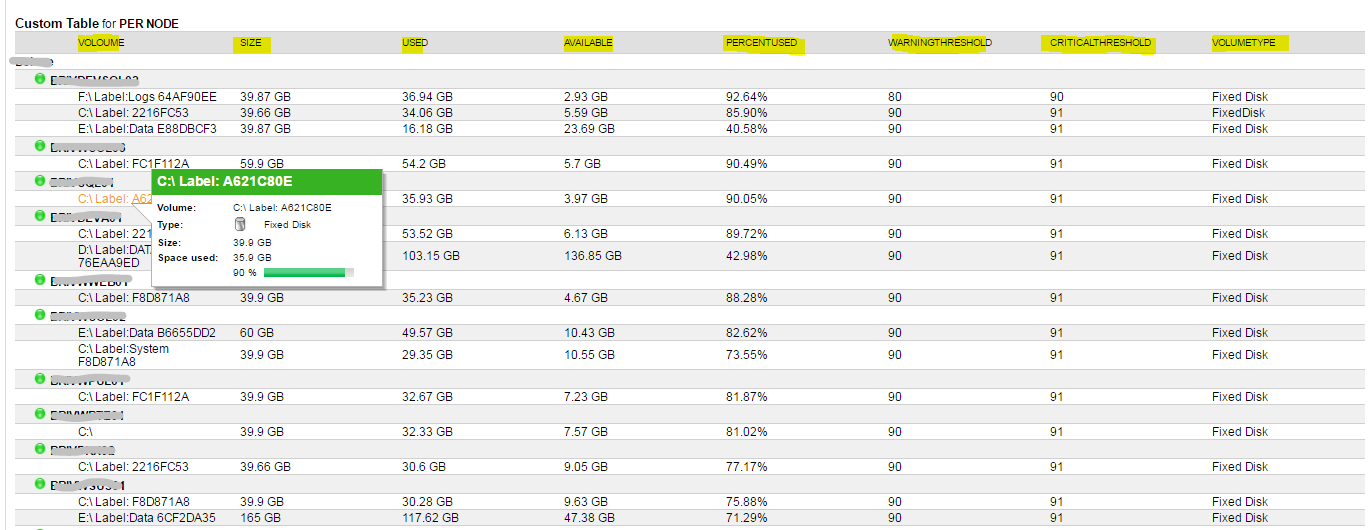
Version 3 thank you for the feed back. i have now added some custom links for volumes and added per node basis i actually have another idea id like to implement into this this report it should be ultimate volume report at the end
Volume Report - Fixed Disk - Available - Size - Used - overall volume capacity NEW ** THRESHOLDS **
HI jmp99
Hope this helps you if you have any questions please ask
Volume summary report - Fixed Disk - Available - Size - Used & overall volume space
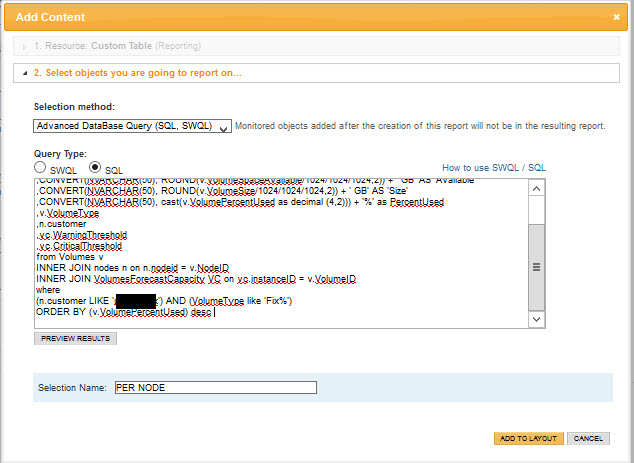
Need the report to query on Custom Property CUSTOMER. How would you tweak the code to do what the OP desires? I'm trying but its not working.
I'd like the same report. Although I already get this data with a custom View for Customers.
But I'd like to see how you can report on groups with this one.
Thanks for your help
HI orioncrack,
i have added some additional features hopefully i have answered your question here
Volume Report - Fixed Disk - Available - Size - Used - overall volume capacity NEW ** THRESHOLDS ** included
Thanks, need some guidance. Its not working for me. I have a custom property at the Node level called Customer.
When I set the code its not returning anything.
How would this be integrated for your Groups based report?
Disregard, I think I got it now.
My only issue now is I want the report to group by Node, showing all volumes.
How it should group:
NODE01
-------C
-------E
-------F
NODE02
------C
Right now there is no grouping of multi disk nodes.
C
E
Thanks. The only issue is this is for only Windows. All of our clients have Linux boxes too. This is great for people that only use Winders.
(Cue - Debbie Downer noise)
orioncrack
what you can do here is update the vendor
from
this
(n.Vendor like 'Windows')
to this
AND (n.Vendor IN ('Windows','VMware Inc','net-snmp','Linux'))
you can poll any volumes that are monitored
Thanks much, this is a great report.
I'm trying to also include Mount Points - can you help with the code?
AND VolumeType IN('Fixed Disk', 'FixedDisk', 'Mount Point')
really glad i can help
i have looked in my db and i cant see 'mounted disk's' what you should do is filter what disks you have and just add them to the volumetype
Volumes:
select distinct VolumeType from Volumes
i get this
vendor:
select distinct Vendor from Nodes
also if you hover over the volume you can see what voloumetype it is
you can add any of these filters to the report
Thanks....."Mount Point" is defined as a volume type in my system. I have several of them. I'm just looking for help with the code. I will tinker with it today.
Hi,
The attached files are not opening, could you please attach notepad file.