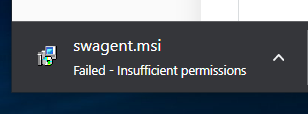
Usually we deploy Solarwinds agent via the console. However, I have a situation where I need to deploy the agent using the standalone installer MSI.
Trying to download the agent returns 'Failed - insufficient permissions'
That is All Settings > Product Specific Settings >> Agent.
I am logged into the Solarwinds console as an administrator. Verified that I have write permissions to the target folder on my workstation. I get the same message using Chrome or Edge.
Can anyone offer ideas for why this message appears? Thanks.
Message below.