Hello,
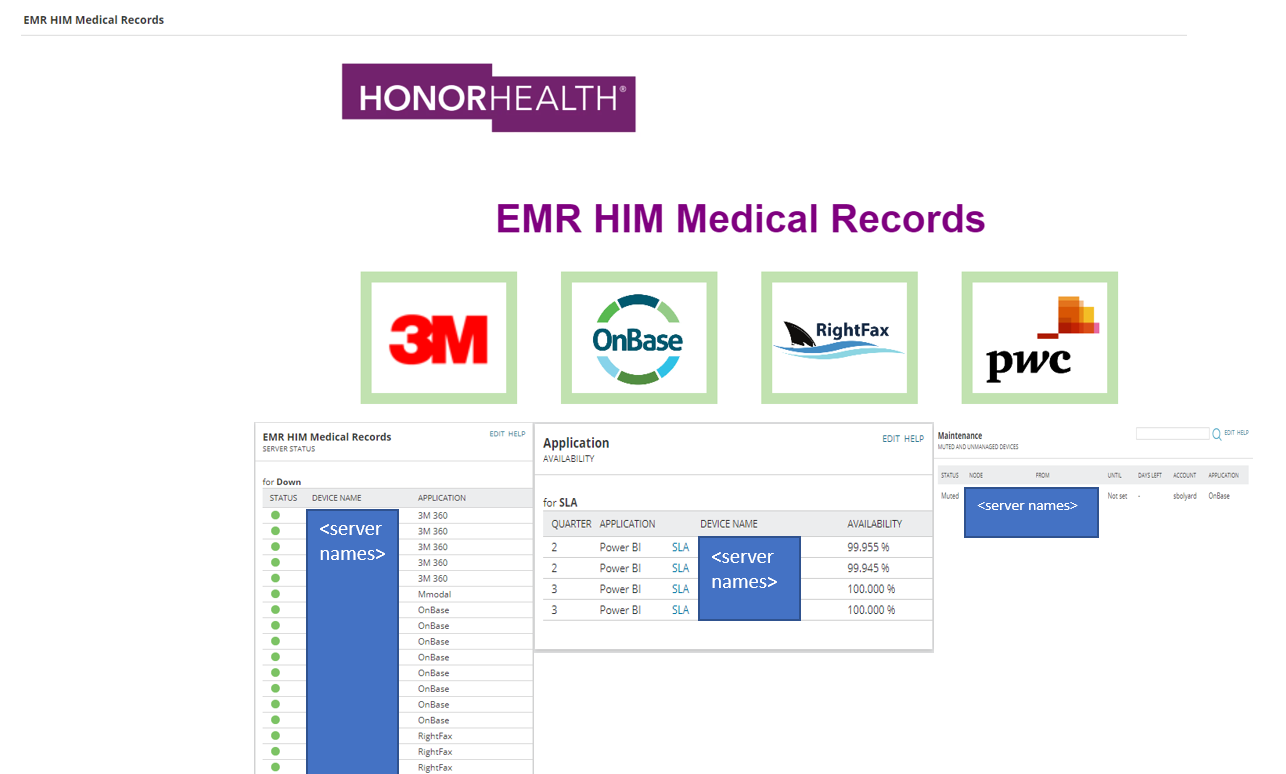
I created the below map and my problem is that it centers all the objects in the widget. I want it to default left corner. Is there a way to do that? The current default settings contains to much wasted white space in the widget.
@s-bolyard can you share a look at the dashboard that includes the map widget? The map widget does try to autofit your map into the available space. At some point the scale is going to be considered. It will depend on the column width and height of the widget to fit it perfectly. Have you tried adjusting scale of the objects?
<----------------->
The objective is to have this map as the default view for the application owner across the top of the page. The wider the widget gets the more it scales to the center of the page. Which I guess is fine. Doing it this way though, I can't add any other widgets below it because they would be to big under this column. I guess I'm looking to do something like this, which I don't know if it's possible or not.
@s-bolyard Right - makes sense. That is not possible in legacy dashboards because we are currently restricted to the columns. Obviously this is something we are working on to allow for exactly what you are hoping to accomplish. @tony.johnson discusses some of those updates here.
We need to incorporate the Maps Widget into Modern Dashboards and there is some other work necessary there but it is something we are hoping to provide in the future. For now you would likely need to adjust the view using the current options.