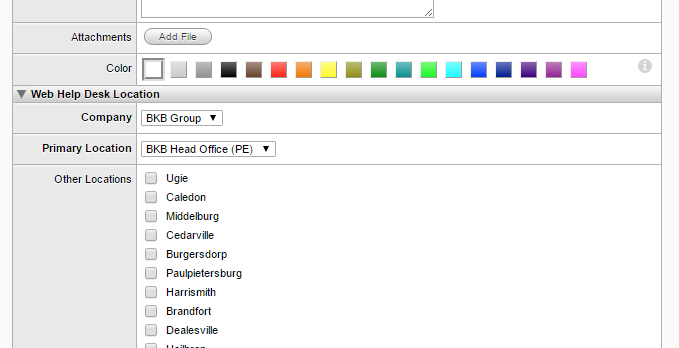
When a client is set up - why is the other locations not in alphabetical order - can this be changed as it is quite a mission going through the list.
Hi bsamuels,
Can you provide a screenshot of what you are seeing?
Hi
Thanks for replying.
The problem occurs when you create a new client > the other locations fields are in a random order and you cannot seem to fix that. Not sure if I am missing something
Thank you.
Hello ">bsamuels
What version of WHD are you running?
Thanks,
To
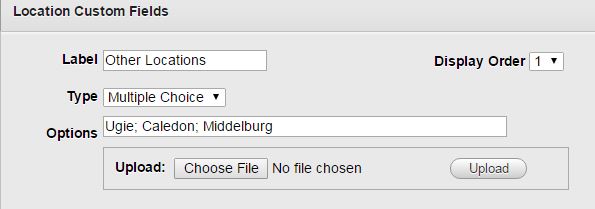
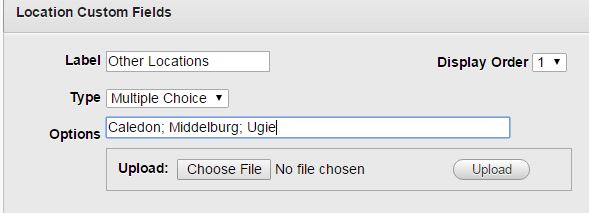
Is 'Other Locations' a custom field that you set up? I'm not seeing that field in our Web HelpDesk (just location); if that's the case then I think the options display in the order they are set up - you would need to go to setup -> clients -> client custom field, then re-order the fields from there so that they are alphabetical?
This is what I would look at given the custom field you defined. Sinfan is correct that the order you type in the Custom Field is the order you will see when you navigate to which ever area the custom field belongs (location, assets, etc).
Thanks for your feedback. Will have a look.
B
Belinda Samuels
Enterprise Services – Operations Manager and SDM
Dimension Data Eastern Cape
Tel: +27 (0) 41 398 5361
Tel: +27 (0) 41 398 5300 (Reception)
Cell: +27 (0) 71 333 7576
Skype: bsamuels
e-mail: Belinda.samuels@dimensiondata.com<mailto:Belinda.samuels@dimensiondata.com>
Nevermind, I didn't notice it was a custom field.
Barry