Dear all,
I am a starter on WHD and I would like to know how to export Reports to Excel. Does it possible ? If yes how ?
Thank you in advance for your help.
Gianni
Here's the steps I use to create the TSV file from the report:
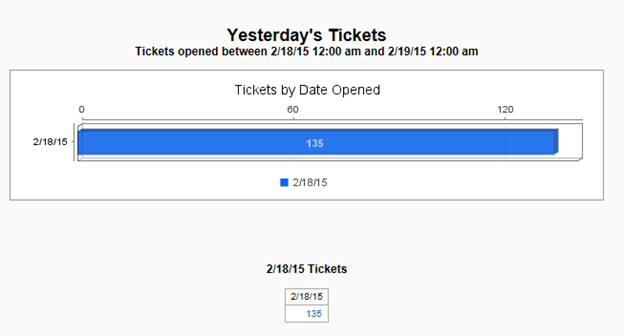
Run the report
From the results page, click on the number that I want to drill down into the details on. In this case the 135 link.
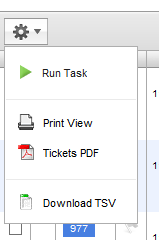
The next page that opens has the "gear" symbol in the upper left corner
Click on the down arrow to get the options
Click on Download TSV to get the data that can be imported into Excel.
Hope this helps!
Rick
Gianni,
You can download a tab separated value file (TSV) and import that file into Excel. The option to download the TSV file is found on the results page - gear symbol. You have to generate this page by clicking on a total in a results table produced by the report.
Hello Rick,
Thank you for your reply.
Unfortunately I cannot find where I can do it... Gear Symbol it means the menu "General" and then ? Could you explain to me step by step please ?
In the menu Reports, in front of reports, I have only 3 buttons "Run", "Print" and "PDF files"...
Thks.
Thank you very much Rick !!!!! you have helped me
Have a nice day.