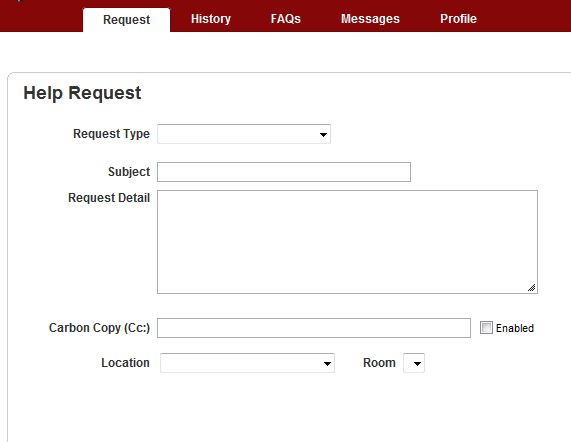
There is an option to hide the subject field if you want (Setup -> Tickets -> Options -> Use Subject Field).
You can choose whether or not the Priority field shows by going to Setup -> Tickets -> Options -> Client Priority Option. If you set it to "all clients" it will toggle ON that field on the end-user side.
You can choose whether to allow the user to change the Location field or not at Setup -> Tickets -> Options -> Lock Ticket to Client Location.
-----------------------
The customization for adding other fields would be done on the individual Request Types level. You can go into Setup -> Tickets -> Ticket Custom Fields and define whatever custom fields you want (text boxes, radio buttons, dropdowns, etc...). You can then assign those custom fields to specific Request Types.
As an example, I have a Request Type for Microsoft Office requests, and I've got a custom field defined so they can tell me what aspect of Microsoft Office they are dealing with:
For a different Request Type (Software License Request), I am presenting the user with a bunch of Ticket Custom Fields; the ones i have marked with red asterisks are required so they have to be answered if the user wants to submit the ticket:
Can you clarify what you mean by default request type. In your picture there is nothing defaulted.
If you look at the attachments you can see that I have customized the fields shown by the request type chosen, this is my default
this one has several customized fields that are required and instructions
This one has a customized field called Alternate contact number but it is not required
Thank you for replying.
When a client visits their portal and clicks the "Request" tab, my snapshot shows what is shown by default. I was curious if WHD offers the ability to add or hide any of the fields within this default Help Request page? And if so where?
The same with the "Profile" tabbed page. Does WHD offer the ability to make changes to what the client sees on their profile page? Like hide or add new fields? Make additional fields required?
There are a few things I know of that can be hidden I sent you an email message with my phone number, if you want to call I will walk you thru that options I know of
How did you remove the 'Room' field? All I see is a check box to require entry. I would love for this to go away. Any help?
Hi Rubysa
Will paste below my notes that I have on modifying fields in WHD's Help Request Form.
~Chris
Subject Field
Priority Field
Carbon Copy (Cc:) Field
Checked shows field and allows Clients to carbon copy e-mail Tickets to additional addresses.Unchecked hides field from default Help Request and custom Help Requests as well.
Location Field
Unchecked, the Client will see the “Location” field in default Help Request which also allows Client to select which “location” they work in … NOT where the problem/issue is happening from.
Room Field
Checked will show “Room” field in Client’s default Help Request web page and will allow Rooms to be attached to Locations.Unchecked will hide “Room” field from Client’s default Help Request web page.
Attachments (add file)
Kellytice,
Under the Setup--> Tickets--> Ticket Custom fields when my users select the request type of toner, even though the custom fields are required it still allows them to submit the requests. Is there anyway for force them to select the type of toner such as below as well as the model/asset? I already have the Request type as being required, I have set the toner type to be required, which then creates the drop down for the custom field, however, even with checking the req'd under custom field they still can submit. I would like to make it 1, 2, and 3.
I would suggest creating mandatory custom fields. see example below.
hope this helps?
Apologies rubysa, i somehow missed this reply to this thread when you posted it. As nickmorrisonrrp noted, your solution is a custom field that is required. It looks like you may have thought that you had tried that, but in your screenshot i don't see any custom fields. The "models" section is controlled by the "Use Models" checkbox in the Request Type settings, but is not a custom field.
It might be that you did create a ticket custom field, but after you create/save it, you have to go and specifically assign that custom field to the Request Type (in this case, Toner -> Black and White)
and to answer your other question: no, you can't force the users to choose a model. you can put that option in front of them but you can't force an answer.