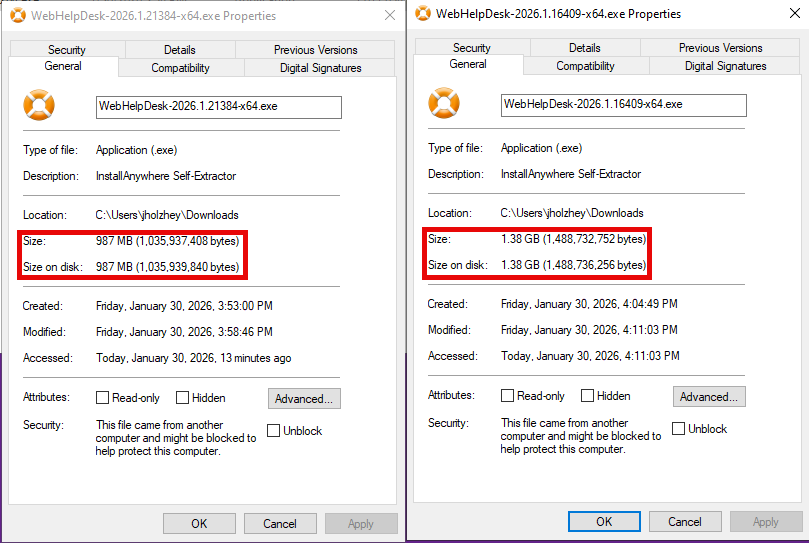
Why are there 2 different versions of very different size for the new installer? Did I miss something? Last thing I want to do is re-run an entire upgrade process. Which is the correct installer?
Not if it doesn't support SAML 2.0. I'm trying to get SAML 2.0 working again in 2026.1 LEGACY.
Hi Jholzhey, You may like to install the NextGen (New Client UI+existing tech
I need to know more.
First, just for context, our Test WHD environment used to be connected to our Test SAML 2.0 solution (OKTA). Then, a while back, I copied the WHD Prod database over to WHD Test to assure a properly configured and (nearly) identical test system. However, in doing that, I lost the ability to properly test the SAML 2.0 function with OKTA Test and WHD Test.
This week, I upgraded WHD Test to the legacy version of 2026.1. Unfortunately, I didn't think to convert WHD Test back to using OKTA Test FIRST, so BEFORE the upgrade to make sure it was working. I'm trying to do that now in legacy 2026.1, and it's not working yet. Therefore, I don't know if I've made a mistake in switching back to OKTA Test, or if it's a problem with legacy 2026.1. So, Percy…can you please explain what you meant and why? Please and thank you! 😁
I reached out to Support on this (Case #02084720), as I want to upgrade to 2026.1 Legacy UI for the security fixes, but need SAML. Here's what they said:
"Thank you for reaching out to SolarWinds Technical Support. My name is Roschelle, and I will be working on this case with you. This is a quick note to inform you that I have taken ownership of this case.
Please note that according to the release notes linked below, SAML is indeed supported in the Web Help Desk (WHD) 2026.1 Legacy Interface. Therefore, customers who have SAML enabled in their WHD environment can proceed with installing this version confidently."
…and a second tech responded in the same ticket…
"I understand you have a query regarding WHD 2026.1 release (SAML Supported in 2026.1 Legacy Interface?). For Web Help Desk (WHD) 2026.1 (the product that has the new NextGen UI), the official release notes are explicit:
There is a list of “Features temporarily unavailable in NextGen WHD”. That list includes “SAML Authentication – Only Basic Authentication is available.” Immediately before the list it states: “The following features are temporarily unavailable in NextGen WHD. They are continuously available in the legacy Client user interface:”
So, as per documentation:
In NextGen WHD 2026.1: No SAML support yet (Basic Auth only).
In Legacy WHD 2026.1: SAML remains supported and is expected to keep working.
Regards, Vishesh Mishra Technical Support Rep"
They both are talking about what the release notes say and not experience on the ground, however, so maybe there's a bug. I will link to this discussion and see further information.
@percyplant, if you get more information either way on SAML with 2026.1 with the Legacy UI, I'd love to know.
did you upgrade to 2026.1.16409?, as we can't get SAML working with 2026.1.16409
This is the response I got from Support about the two different installers:
To clarify:
2026.1.16409
– this is the
NextGen UI
build. It introduces the new, modern Web Help Desk interface and underlying changes that go with it.
NextGen WHD: Updated language, framework, and user interface
2026.1.21384
Legacy UI
build. It keeps the classic Web Help Desk interface you are already familiar with, while still including the same 0?day security fixes and core 2026.1 updates.
If your goal is to maintain the legacy interface and avoid the NextGen UI, you should install WHD 2026.1.21384.
If your goal is to
maintain the legacy interface and avoid the NextGen UI
, you should install
WHD 2026.1.21384
.
I am sticking with the Legacy installer for now.
OK, found it.
The following features are temporarily unavailable in NextGen WHD. They are continuously available in the legacy Client user interface…
Which means I can upgrade, but then disable the new interface so SAML will still work, or no matter what, SAML doesn't work in NextGen?
Wait, what??? So I can't upgrade in accordance with the security alert released last week about the "critical (9.8) bug?" And I read the release notes, but didn't see that part. Lemme take my dyslexia and go read it again.
the legacy release 2026.1 also doesn't support saml logins…
One is the next gen interface and one is the legacy. see the release notes for the next gen one as it currently does not support saml logins.
I wanted to share a new dashboard a co-worker ( @mblackburn ) came up with to help us better view groups of interfaces and various metrics for each. Using a single HTML widget, we are able to visually compare numerous different interfaces by populating each interface dataset onto its own graph. We are able to view…
PALO-ALG - Logging.xmlPalo Alto Networks ALG Security Technical Implementation Guide :: Version 2, Release: 3 Benchmark Date: 27 Oct 2022
Alert Cleared.htmlHello, I would like to share the HTML template details we have prepared so that Solarwinds alarms can become more meaningful. It can list alarm object details and connected device details separately in HTML template. Except for object and device details, you can easily add custom property information…
Cisco ASR Devices.pollerCisco ASR Devices