We’re excited to announce a release candidate (RC) for version 2026.1 of the SolarWinds® Platform, SolarWinds® Observability Self-Hosted, and the Network and Systems modules. Version 2026.1 RC is now available for all customers under maintenance, so log in to your customer portal to download it. Want to see everything new? Check out the Release Notes.
Here is a quick list of all the major features with more detailed information below.
Observability Self-Hosted exclusives:
- Preview of SolarWinds LLM in OSH
- Routing Insights:
- Provides end-to-end visibility into routing behavior by correlating routes, peers, interfaces, and VRFs
- Enriched routing table data and routing peers
- Risk Analysis adds Exploitability score
- Improved Proxmox support (Storage, VM disks and snapshots)
- Expanded Cloud Monitoring:
- GCP: MySQL, PostgreSQL, Load Balancers
- Azure: Functions
- AWS: EKS (Kubernetes), Lambda
Observability Self-Hosted, Network, and Infrastructure Modules
- SwitchStack support for Juniper
- SCM: Compare two servers
- IPAM: Kea support
- VNQM: CUCM v15.x support
SolarWinds Platform (available to all products)
- New All Active Alerts page
- Log Events Widget on node details page
- Custom banners
- Integration With SolarWinds Incident Response (formerly SquadCast)
- Improved Feature Adoption page
- Intelligent Maps improvements
- Improvements to Recurring Maintenance Windows
- Node Status Change on Failed Credentials
- And more…
Observability Self-Hosted Exclusives
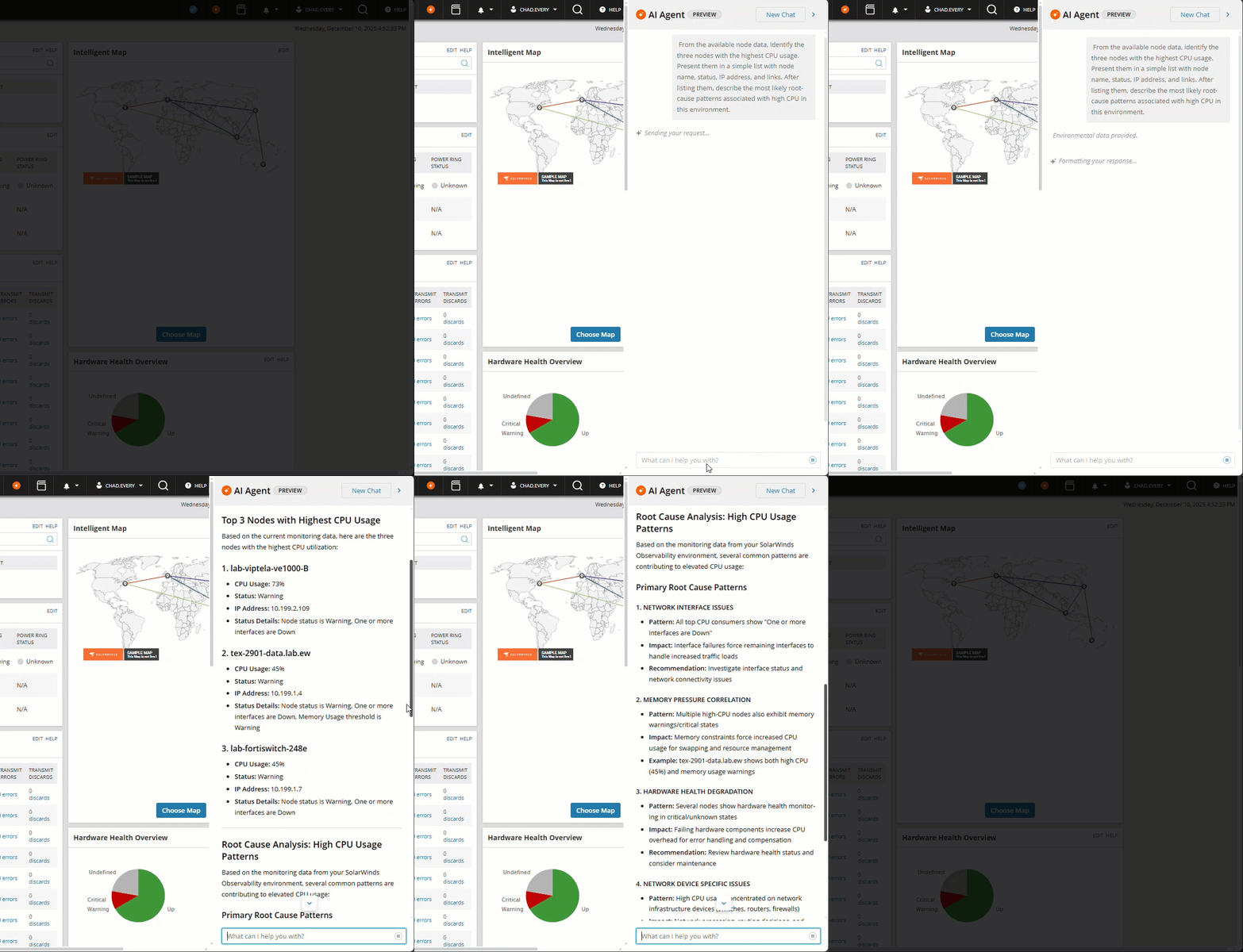
Preview SolarWinds LLM in Observability Self-Hosted (now available)
Update: AI Agent preview is now live! Download, install/upgrade, turn on platform connect and give our LLM a try.
In January, customers with 2026.1 will be able to try a preview version of the SolarWinds LLM integration with OSH. In this preview mode, you’ll be able to ask questions related to monitored metrics and platform-wide feature capabilities and how to set them up. This feature will see frequent enhancements throughout 2026 and beyond.
Routing Insights (Phase 1)
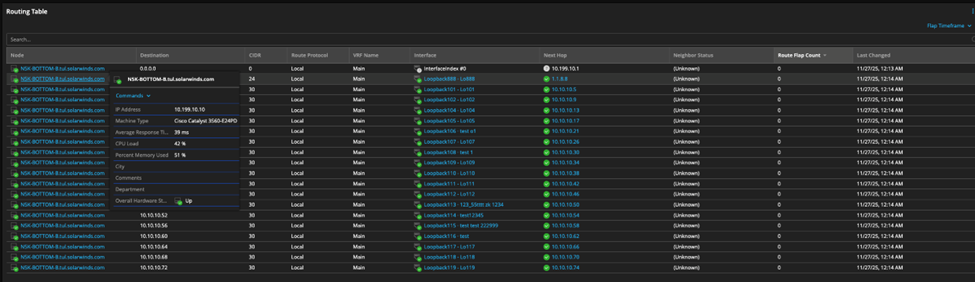
Routing Insights provides complete visibility into how traffic flows across the network by correlating Layer 2 and Layer 3 routing behavior with next-hop, peer, interface, and VRF context.
This release introduces enriched routing tables and peer intelligence by adding interface, VRF, next-hop, and peer context to routing data.
Routing Table Enrichment: Turning raw routes into insight
- Shows exactly how each route is forwarded by adding interface and VRF context.
- Links next-hop IPs to peers, enabling peer-aware route diagnostics.
- Highlights unstable routes with flap counts and last-changed timestamps.
- Connects routing behavior to interface health for faster cross-layer RCA.
- Provides VRF-level service impact visibility.
Routing Peer Enrichment: Deep Context on Peers
- Identifies peer role (iBGP/eBGP) and health for clearer control-plane RCA.
- Maps peer issues affecting routes and next-hop paths.
- Adds uptime, error, and flap activity to detect unstable neighbors.
- Correlates peer behavior with interface state and bandwidth.
- Shows VRF impact when peers or adjacencies fail.

Risk Analysis improved with Exploitability Score
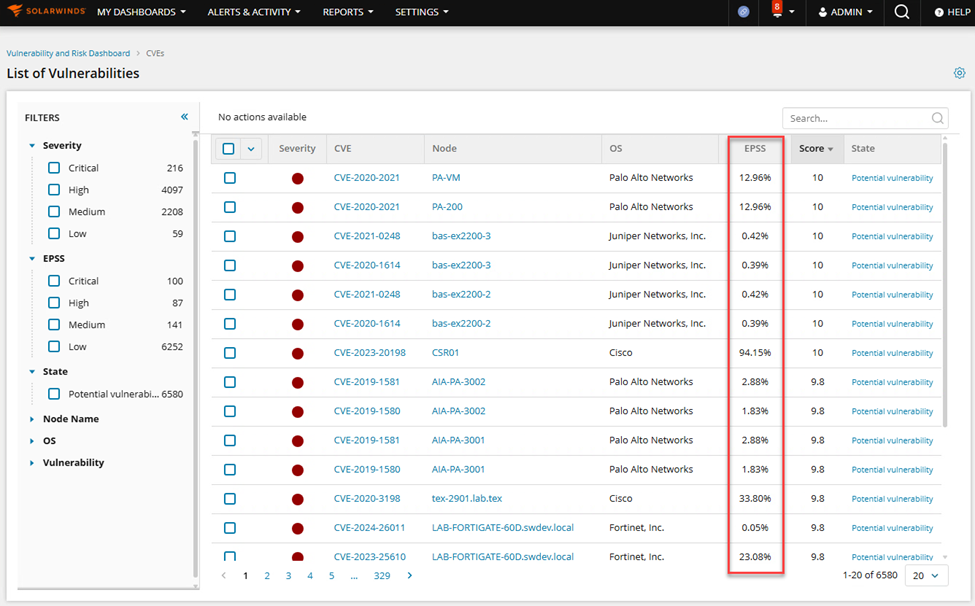
The Vulnerability & Risk Dashboard (My Dashboards → Security) now shows enhanced Risk Scores incorporating the EPSS metric. EPSS (Exploit Prediction Scoring System) adds real-world exploitability context to each CVE, ensuring that vulnerabilities are not rated purely on severity but on their real-world likelihood of being exploited. This makes the risk scoring more precise, relevant, and actionable.
Improved Support for Proxmox virtualization
In this version we’ve added support for storage information:
- Datastore performance metrics
- VM disk info
- Snapshot / Orphan information
And we’ve made credential management easier
Expanding Cloud Coverage
In the continued expansion of our coverage of Azure, AWS and GCP, we’ve added several new entities in this release. Customers can select these new cloud services in the cloud discovery wizard, each new entity instance will consume one license, and they will appear appropriately in all dashboards, reports and alerts.
- Azure:
- Functions – Monitor execution times, failures, and resource consumption
- AWS:
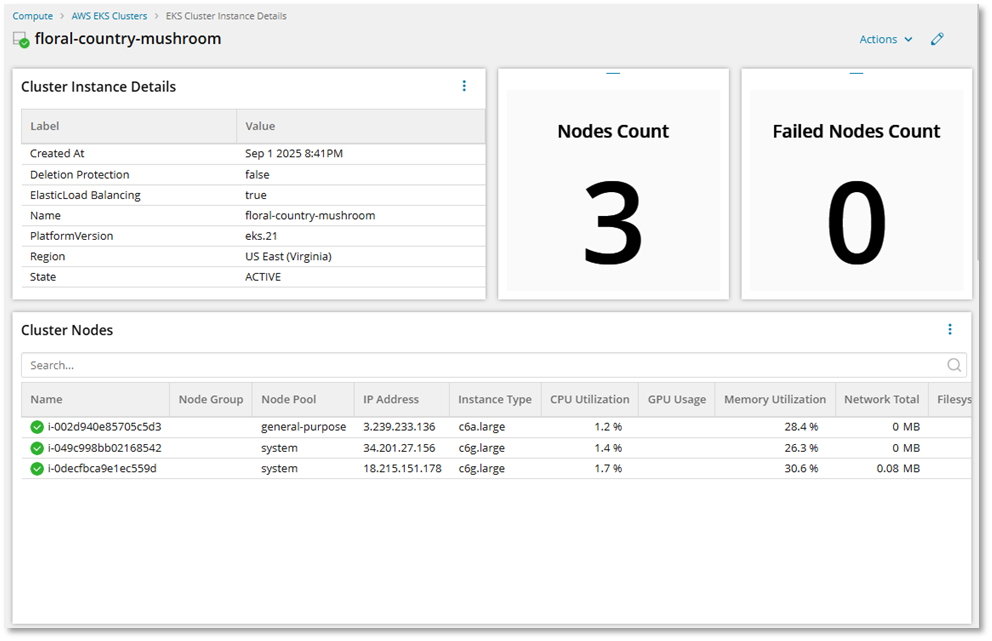
- EKS (Kubernetes) – Gain visibility into EKS cluster health, node performance, workloads, and resource usage
- Lamba – Monitor Lambda invocation metrics, errors, and performance trends to quickly identify bottlenecks
- GCP:
- MySQL and PostgreSQL – Get insight into CPU, memory, deadlocks, network lag, connections, Queries, Pages read and written, data and log syncs.
- Load Balancer – Monitor connection status, latency, network traffic, and traffic flow.
Observability Self-Hosted, Network, and Infrastructure Modules
Support SwitchStack monitoring for Juniper
We are extending multi-vendor coverage with support for Juniper switch stacks, providing visibility into stack topology, member health, and redundancy. With this release, you can view stack topology, member roles, uptime, and ring redundancy, and also monitor hardware health across all members. The platform detects stack membership changes, ring failures, and hardware faults in real time.
The new Switch Stack view shows details such as model, serial number, CPU/RAM utilization, and member status.


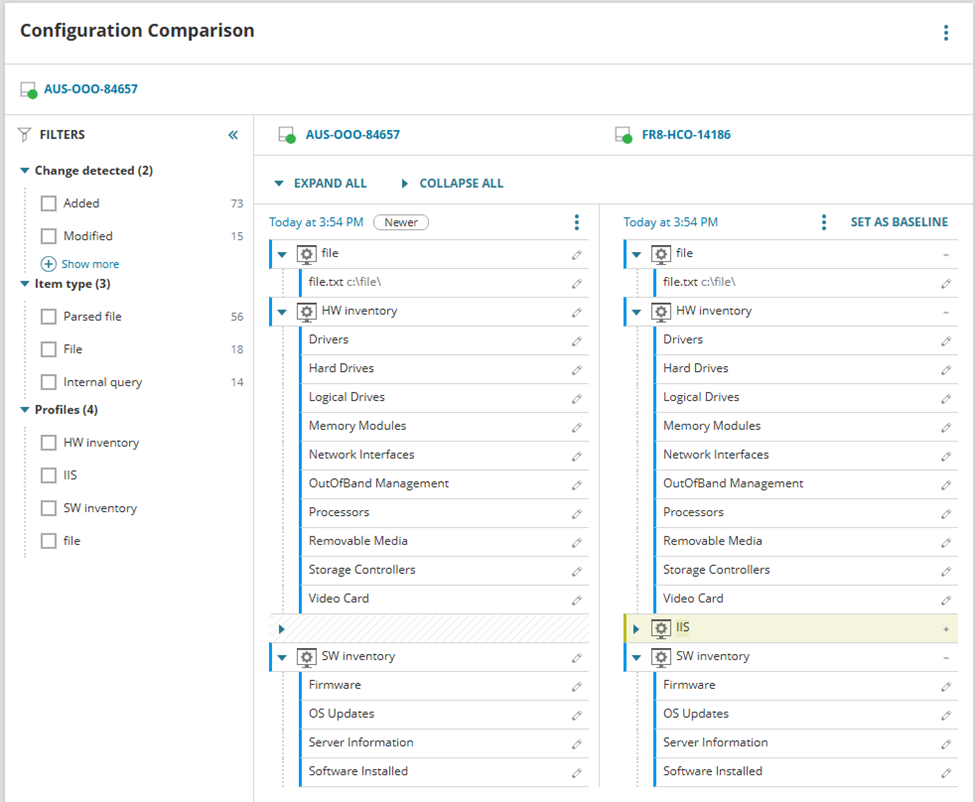
Compare the configuration of two servers
Customers can now check for configuration drift between their monitored servers, keeping the configuration of servers in sync with each other. For example, verify and sync configuration between a PR and DR servers in case of HA or a disaster management setup.
Manage IP addresses for KEA servers
IPAM now supports KEA as a DHCP server to manage scopes and IP address leases.
- Centralized DHCP scope management – create, edit, delete scopes, reservations, exclusions, and DHCP options directly from SolarWinds IPAM.
- Real-time monitoring & alerts – track scope utilization, active leases, exhaustion risks, and misconfigurations.
- Automatic discovery & synchronization – IPAM continuously imports and updates DHCP scopes, leases, and reservations from supported servers.
- Unified DHCP visibility in one interface for easier troubleshooting.
Support for CUCM v15.x
The highly requested support for v15.x for CUCM is now available!
SolarWinds Self-Hosted Platform (available to all products)
New All Active Alerts page
This highly used page has been migrated to the new GUI, offering greater customization than the legacy version. This is an optional switch that will be a per-user setting. The legacy All Active Alerts dashboard shows a notification that there is a new UI.

Clicking on that link will navigate you to the newly migrated All Active Alerts page.
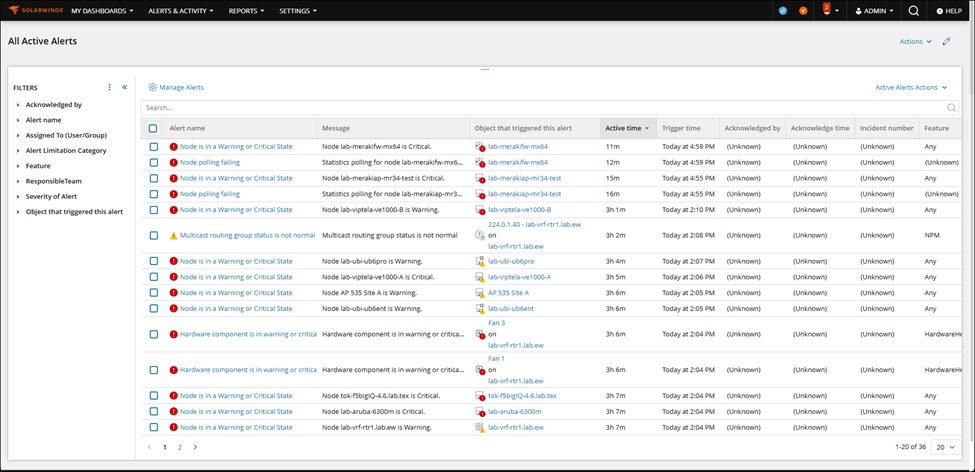
Once viewing this new page, it will become your default moving forward. Customers can revert back to the legacy page by clicking on the Action menu in the top right corner.

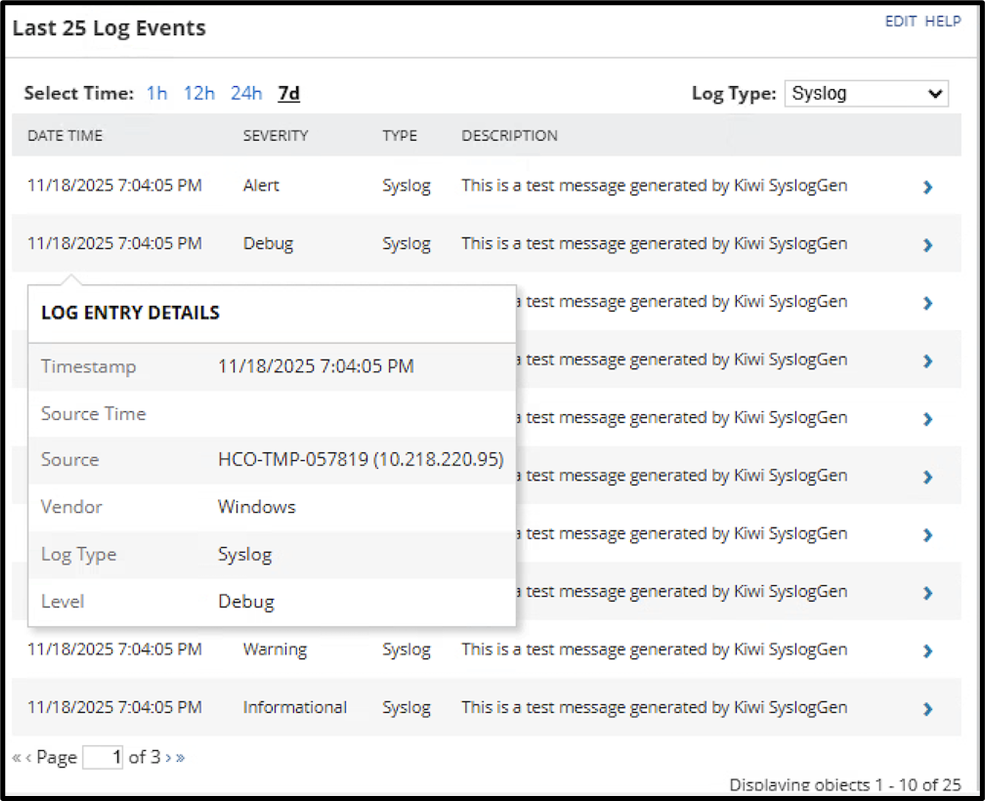
New log events widget for Node details page
We’ve finally added the long-awaited Log Events widget to the Nodes details page. The widget can be filtered by log type and severity, and each line item is clickable for additional info and users can drill down into Log Viewer directly from this widget with node filters pre-applied.
Custom Banners
This release provides the ability to create in-product banners which can be displayed at the top of each page. Users can define important information about their SolarWinds deployment, such as:
- Notification of scheduled upgrades
- Classification of government data
- Identification of deployments when multiple instances are deployed for a single customer
- Notification of a known issue or outage
Only 2 active banners are allowed at a time.


Integration with SolarWinds Incident Response
As a first step towards alerts-based integration with SolarWinds Incident Response (formerly known as Squadcast), Observability Self-Hosted alerts can now be sent to SolarWinds Incident Response. This is a unidirectional integration where alerts from OSH are forwarded, any acknowledgements on the Incident Response side will not be reflected on OSH yet.


Feature Adoption improvements
The feature adoption dashboard located in “My Deployment” has been updated with additional use cases to assist you in optimizing configuration of your environment. New areas include:
- Virtualization
- Storage
- Network Traffic
- Configuration Policies
- IPAM
- Call Quality
Intelligent Maps improvements
Additional improvements to Intelligent Maps:
- Bulk edit for multiple connections.
- Import From Network Atlas: Import linked background to Intelligent Maps.
- Additional format options for hyperlinks in maps.
- Hide auto-generated topology connections for all maps.
- Numerous Bug Fixes.
Note that Network Atlas is deprecated and will be removed in the near future. Continuing to use Network Atlas maps in your instance prevents you from moving to 64-bit IIS.
Improved Recurring Maintenance Windows
We continue to improve the maintenance windows feature:
- Users can assign Maintenance Windows to groups
- Groups are evaluated at the execution of the schedule, adapting to the current entities in the group.
- As maintenance windows are executed on groups, it limits the entities to those the assigning user can manage, so users can’t assign maintenance windows to machines they can’t manage.
- You can now require a reason be entered for a maintenance window, both scheduled and on demand (global setting).
- End a maintenance window after X occurrences (previously it was by date only)

Change a Node’s status when credentials fail
To help with diagnosing credential issues, we’ve updated the node status behavior so nodes with failed credentials will now change the node status to critical. Additional text will be provided in the Node Details widget that the status change was caused by a credential issue.

And the rest…
Here are more improvements in this release:
- EOC: New Summary screen
- Integration with ServiceNow now supports OAuth.
- In anticipation of our preview of the SolarWinds LLM, connecting to the SolarWinds cloud via Platform Connect was simplified.
- When upgrading to future releases, you’ll have the choice to upgrade to the latest or previous version in the GUI.
- PerfStack improvements: Units are now more human friendly
- Updated MAC OUI vendor table to get more up to date information on devices
Security Always
We focus on securely coding, building, and delivering software to you. SolarWinds Aims to Set New Standard in Software Development with Next-Generation Build System. Our choices in forging the SolarWinds Platform align with our Secure by Design philosophy, enhancing our ability to execute this vision now and in the future.
How to Download
The 2026.1 release candidate is a fully tested and supported version and is ready to install on a new server or update your current one.
- For all current Observability Self-Hosted customers, the release is available now. You can log in to your customer portal and download it.
- For all current module and bundle customers, the release is available now. You can log in to your customer portal and download it.
- If you don’t own Observability Self-Hosted but would like to try it or one of its new features, there are a couple of options for you:
- Download a 30-day free trial and install it on a new server.
- If you’re a current module or bundle customer, upgrade to 2026.1 first and use the instant evaluation feature to try Observability Self-Hosted for 30 days with a click of a button. You can switch back to your modules anytime.
To see everything included in the release, check out the Release Notes.
Not Quite Ready for the Release Candidate?
If you aren’t ready to upgrade to the Release Candidate, a 2025.4.1 Service Release is available – see the 2025.4.1 Release Notes for all the details.
What’s Next?
The 2026.1 release is another step forward, but there is always more to do. Check out our What We’re Working On post for what’s coming next for the SolarWinds Self-Hosted platform and products.
—The Observability Self-Hosted Team