When we manage SAM applications, there is a search bar in “Application Monitor Templates” Tab, but NOT in “Assigned Application Monitors” Tab.


I was looking for how this feature can be added to the “Assigned Application Monitors” and noticed there already are few the Feature Requests in Thwack, but no solution yet.
https://thwack.solarwinds.com/ideas/4957
https://thwack.solarwinds.com/ideas/3766
https://thwack.solarwinds.com/ideas/4735
https://thwack.solarwinds.com/ideas/1236
By using SWQL query I created a workaround to Manage Assigned Application Monitors with search function.
Here are the steps:
1. Create a new “Summary View” and add two resources: “Custom Query” and “Custom HTML”
2. Open the View in Solarwinds web console:
• For “Custom Query”, Click Edit
o In “Custom SWQL Query”, copy and paste the codes from file “ AppManager-CustomSWQLQuery.txt”
o Tick “Enable Search” and in “Search SWQL Query”, copy and paste the codes from file “AppManager-SearchSWQLQuery.txt”
o Click “submit” to save
• For “Custom HTML”, Click Edit.
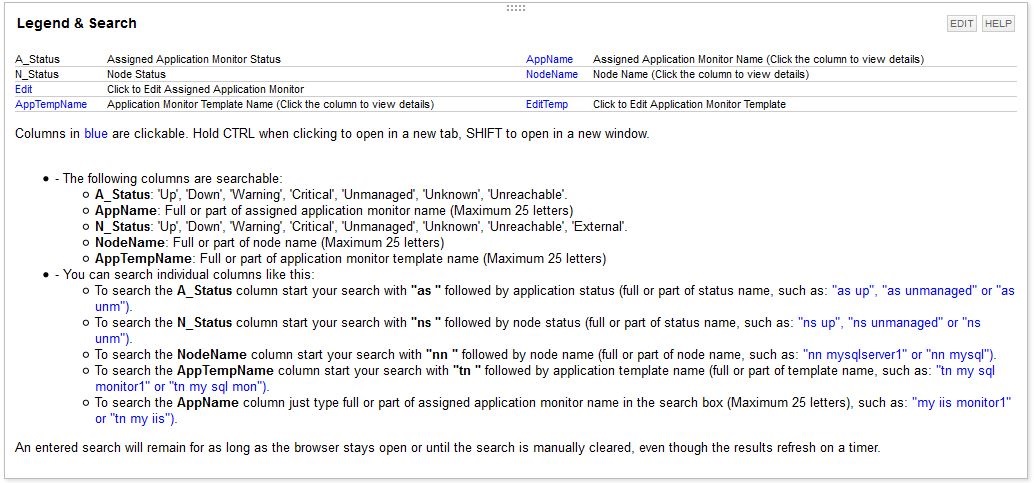
o Copy and paste the codes from file “AppManager-LegendSearch.txt”
o Click “submit” to save
Done! Please read “Custom HTML” to find out how to use search and edit functions.
Version 2: Two additional columns – Application ID and Application Credential
In “Zack Mutchler” Feature Requests https://thwack.solarwinds.com/ideas/5847, he suggests to be able to group assigned application monitors according to the credentials being used.
As the Credential is assigned to a component rather than the application monitor itself. Often an application monitor has more than one components, each of them can has its own credential. Those credentials can be same or different, or no credential at all. In my SWQL I use MAX(CredentialName) to pick up ONE Credential as the application credential, so Application Credentials listed here are not always correct
The steps: repeat the steps as above and replace the codes from the files below:
o AppManager-CustomSWQLQuery-V2-1.txt
o AppManager-SearchSWQLQuery-V2-1.txt
o AppManager-LegendSearch-V2-1.txt

If you like to view all credentials used by components in an application monitor, please do the following:
o Add another “Custom Query” recourse in the same view page
o In “Custom SWQL Query”, copy and paste the codes from file “CredentialsUsedByComponentMonitors-CustomSWQLQuery-V2-1.txt”*
o Tick “Enable Search” and in “Search SWQL Query”, copy and paste the codes from file “CredentialsUsedByComponentMonitors-SearchSWQLQuery-V2-1.txt”

From the “Manage Assigned Application Monitors with Search v2” table find the Application ID which you want to view and put in the search box in the table above and click search.
Hope this is helpful.
*Thanks aLTeReGo for his post “Credentials Used By APM Component Monitors” (https://thwack.solarwinds.com/docs/DOC-160488)