Hello,
I’ve been asked to evaluate DameWare to see if it will do what my company needs it to do. I am using your 14 day trial versions. On my virtual machines I have installed:
(1) DameWare Administration Console
(2) DameWare Mini Remote Control
(3) DameWare Remote Support
I have the DameWare Remote Support tool integrated with Active Directory in my VM environment. Everything looks to be okay. But when I launch DMRC it appears to launch in Stand Alone Version, instead of displaying the “DameWare Central Server Connection” popup and asking me for DameWare credentials, as in the screenshot below which I found on the internet:
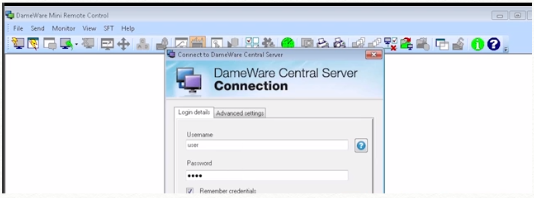
I note that the DameWare Server Administration Console shows that I have 0 users enabled for DameWare Mini Remote Control Centralized.... I suspect this is related:

Can someone point me in the right direction? How do I get DMRC to launch in Centralized mode?
Thanks in Advance


