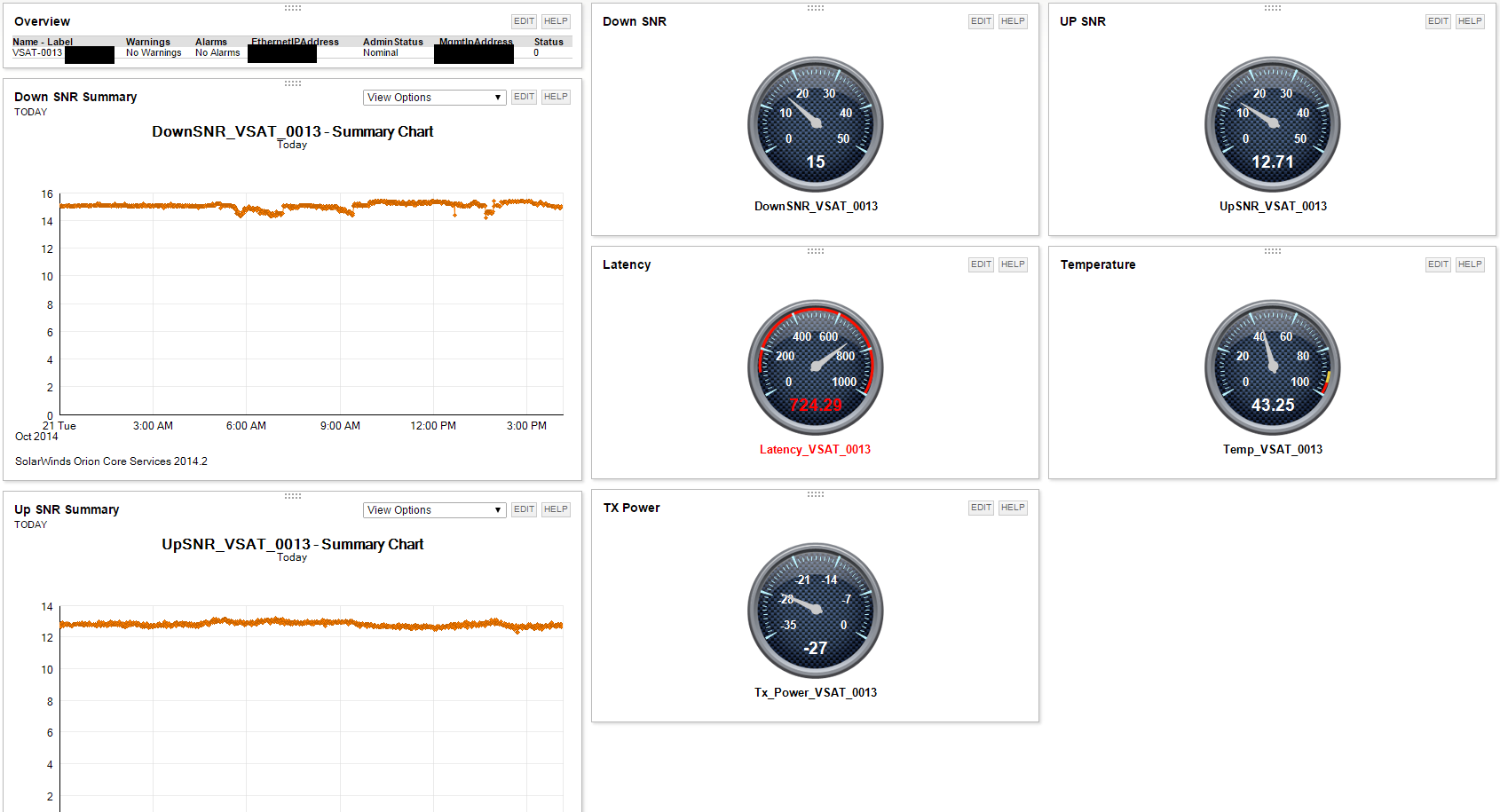
Has anyone every found a way to get meaningful stats from the iDirect SNMP proxy? With all the iDirect infrastructure out there, it would be great to to find a way to make this work.
I'm working on setting up Idirect SNMP into SolarWinds now. I haven't attempted to pull too much data, but have been able to import SNRs, IP Traffic, Power, status, and a few other administrative values.
Are you able to pull these stats from individual remote modems?
Yes. It's actually a project that I have been working on for the last few days. I was able to pull full tables that covered all remotes in the NMS and was able to pull statistics for individual remotes.
There are tons of details that I am still working out, but it seems to be going in the right direction.
At first I was just pulling the full tables using different OIDs, for instance OID 1.3.6.1.4.1.13732.1.4.3.1.3 used with the GET TABLE option (Orion Universal Device Poller) would pull the TX power for all remotes. After performing a MIB walk on for the NMS server I found that each remote had an value that could be appended to the end of that OID and used with the GET option to pull just the TX power for the individual remote 1.3.6.1.4.1.13732.1.4.3.1.3.XXXXXXXX
There may be a better way to accomplish this, but this is working for me at the moment
Very impressive. I had set this aside for a while because I wasn't making any progress. Looks like you are on the right track. Are you building a custom poller for every parameter for every modem? That would be a problem for us since we have 500+ iDirect modems. Am I missing something here (again)?
I have been forced to build a custom poller for each Modem for each parameter. The network I am monitoring is fairly small, but still requires quiet a few individual pollers. I can pull entire tables and filter them into only the remotes I want displayed on that table using minimal pollers, however using that method I am unable to isolate individual remote parameters into gauges or graphs. I am attempting to find a way to pull an entire table with one poller and then filter it as needed into individual statistics, but haven't had any luck yet. I will be working on this project for the next few days and will let you know if I find an easier solution.
I am also working on the same type of project. Once the custom poller's are built you can see the data as a table if you use a tabular resource when you customize the view.
The problem is filtering it for each individual node, and requires associating the nodeid with the correct rowed inside the custompollerstatus table.
Let me know if you care to discuss this and maybe we can help each other out.
I think I may be on the same path. I have found that I can import an entire table and display it in a tabular resource. Since my last post I noticed that custom graphs could be used along with display filtering to isolate a single node within that table . This allowed me to have a graph associated with each remote while only using one custom poller. I would like to be able to use this method with gauges, but I haven't quite figured that one out yet.
I have written a Perl script that will create Pollers XML files that can be imported. This creates RX and TX bandwidth graphs. You can run it for each netmodem that you want to add. This closely tracks what iMonitor indicates.
#!/usr/bin/perl -iw
use warnings;
use strict;
my $did;
my $serialnum;my $sitename;my $customername;
print " enter DID number of the netmodem\n";
chomp($did= <>);
print " enter netmodem serial number\n";
chomp($serialnum= <>);
print " enter Site name of the netmodem, e.g Enterprise\n";
chomp($sitename= <>);
print " enter Main Customerfor the netmodems , e.g US Navy\n";
chomp($customername= <>);
my @out;
open OUT, ">$did.idnc";
while (<DATA>){ $_ =~ s/Zcustomername/$customername/g;
$_ =~ s/Zsitename/$sitename/g;
$_ =~ s/Zserialnum/$serialnum/g;
$_ =~ s/rxotherZer/rxother$serialnum/gs;
$_ =~ s/rxicmpZer/rxicmp$serialnum/g;
$_ =~ s/rxtcpZer/rxtcp$serialnum/g;
$_ =~ s/rxudpZer/rxudp$serialnum/g;
$_ =~ s/txotherZer/txother$serialnum/g;
$_ =~ s/txicmpZer/txicmp$serialnum/g;
$_ =~ s/txtcpZer/txtcp$serialnum/g;
$_ =~ s/txudpZer/txudp$serialnum/g;
$_ =~ s/ZDID/$did/g;
push @out, $_;
}
print OUT @out;
sleep 1;
system "Notepad.exe $did.idnc";
__DATA__
<?xml version="1.0" encoding="utf-8"?>
<CustomPollers version="9.0">
<CustomPoller UniqueName="Zcustomername Zsitename s/n=Zserialnum RXTotal" Description="Total rx traffic for Zcustomername Zsitename" OID="" MIB="" SNMPGetType="Get" NetObjectPrefix="N" GroupName="iDirect" PollerType="F" Parser="None" IncludeHistory="True" Unit="" TimeUnitId="0" TimeUnitQuantity="0" DefaultDisplayTimeUnitId="0" Formula="({rxotherZer}+{rxicmpZer}+{rxudpZer}+{rxtcpZer})/8" LabelType="" LabelDetail="">
<Enumerations />
</CustomPoller>
<CustomPoller UniqueName="Zcustomername Zsitename s/n=Zserialnum TXTotal" Description="Total tx traffic for Zcustomername Zsitename" OID="" MIB="" SNMPGetType="Get" NetObjectPrefix="N" GroupName="iDirect" PollerType="F" Parser="None" IncludeHistory="True" Unit="" TimeUnitId="0" TimeUnitQuantity="0" DefaultDisplayTimeUnitId="0" Formula="({txotherZer}+{txtcpZer}+{txicmpZer}+{txudpZer})/8" LabelType="" LabelDetail="">
<CustomPoller UniqueName="rxicmpZer" Description="" OID="1.3.6.1.4.1.13732.1.4.1.1.4.ZDID" MIB="IDIRECT-REMOTE-MIB:rxicmp" SNMPGetType="Get" NetObjectPrefix="N" GroupName="iDirect" PollerType="C" Parser="Counter" IncludeHistory="True" Unit="1" TimeUnitId="2" TimeUnitQuantity="0" DefaultDisplayTimeUnitId="0" Formula="" LabelType="" LabelDetail="">
<CustomPoller UniqueName="txudpZer" Description="" OID="1.3.6.1.4.1.13732.1.4.1.1.9.ZDID" MIB="IDIRECT-REMOTE-MIB:txudp" SNMPGetType="Get" NetObjectPrefix="N" GroupName="iDirect" PollerType="C" Parser="Counter" IncludeHistory="True" Unit="1" TimeUnitId="2" TimeUnitQuantity="0" DefaultDisplayTimeUnitId="0" Formula="" LabelType="" LabelDetail="">
<CustomPoller UniqueName="txtcpZer" Description="" OID="1.3.6.1.4.1.13732.1.4.1.1.8.ZDID" MIB="IDIRECT-REMOTE-MIB:rxtcp" SNMPGetType="Get" NetObjectPrefix="N" GroupName="iDirect" PollerType="C" Parser="Counter" IncludeHistory="True" Unit="1" TimeUnitId="2" TimeUnitQuantity="0" DefaultDisplayTimeUnitId="0" Formula="" LabelType="" LabelDetail="">
<CustomPoller UniqueName="txotherZer" Description="" OID="1.3.6.1.4.1.13732.1.4.1.1.13.ZDID" MIB="IDIRECT-REMOTE-MIB:txother" SNMPGetType="Get" NetObjectPrefix="N" GroupName="iDirect" PollerType="C" Parser="Counter" IncludeHistory="True" Unit="1" TimeUnitId="2" TimeUnitQuantity="0" DefaultDisplayTimeUnitId="0" Formula="" LabelType="" LabelDetail="">
<CustomPoller UniqueName="txicmpZer" Description="" OID="1.3.6.1.4.1.13732.1.4.1.1.10.ZDID" MIB="IDIRECT-REMOTE-MIB:txicmp" SNMPGetType="Get" NetObjectPrefix="N" GroupName="iDirect" PollerType="C" Parser="Counter" IncludeHistory="True" Unit="1" TimeUnitId="2" TimeUnitQuantity="0" DefaultDisplayTimeUnitId="0" Formula="" LabelType="" LabelDetail="">
<CustomPoller UniqueName="rxudpZer" Description="" OID="1.3.6.1.4.1.13732.1.4.1.1.3.ZDID" MIB="IDIRECT-REMOTE-MIB:rxudp" SNMPGetType="Get" NetObjectPrefix="N" GroupName="iDirect" PollerType="C" Parser="Counter" IncludeHistory="True" Unit="1" TimeUnitId="2" TimeUnitQuantity="0" DefaultDisplayTimeUnitId="0" Formula="" LabelType="" LabelDetail="">
<CustomPoller UniqueName="rxtcpZer" Description="" OID="1.3.6.1.4.1.13732.1.4.1.1.2.ZDID" MIB="IDIRECT-REMOTE-MIB:rxtcp" SNMPGetType="Get" NetObjectPrefix="N" GroupName="iDirect" PollerType="C" Parser="Counter" IncludeHistory="True" Unit="1" TimeUnitId="2" TimeUnitQuantity="0" DefaultDisplayTimeUnitId="0" Formula="" LabelType="" LabelDetail="">
<CustomPoller UniqueName="rxotherZer" Description="" OID="1.3.6.1.4.1.13732.1.4.1.1.7.ZDID" MIB="IDIRECT-REMOTE-MIB:rxotherZer" SNMPGetType="Get" NetObjectPrefix="N" GroupName="iDirect" PollerType="C" Parser="Counter" IncludeHistory="True" Unit="1" TimeUnitId="2" TimeUnitQuantity="0" DefaultDisplayTimeUnitId="0" Formula="" LabelType="" LabelDetail="">
</CustomPollers>
I have discovered that a more accurate output is made by changing the /8 divisor in the script to /7.5.
I am also working on a project to integrate iDirect SNMP Proxy with SolarWinds. Has anyone created custom pollens that can be imported? The amount of work to add individual pollers and associate with the iDirect hardware such as linecards, modems, protocol processors, and hub would be extremely time consuming. Would like to work with someone to build all required custom pollers to fully monitor and manage an iDirect network using Solarwinds.
I know this is an old thread, but I am wondering if anyone can help me. We have customers that are landing in a commercial teleport with iDirect hubs. We cannot get access to the hubs to pull SNMP info, but the teleport operator is using SolarWinds to monitor the remotes. Is there any way to have either iDirect or SolarWinds forward SNMP info to my SolarWinds server? I want more than just traps, I would like it to look like we are directly polling the iDirect network on our SolarWinds server.
Thanks