Has anyone seen this error?
ERROR: Unable to get image filename "{IOS version}" from firmware upgrade storage
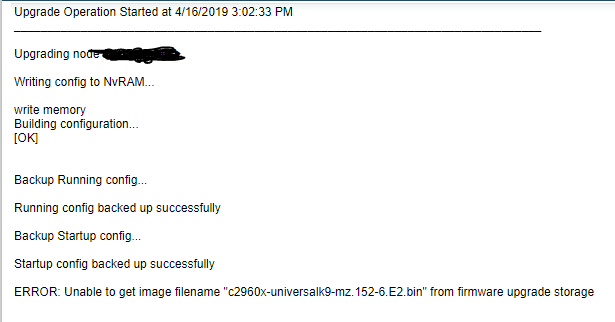
I thought that maybe the issue was that the files were locked. Sure enough, the files were not unblocked. I unblocked them, and ran the upgrade process again. Same error. I looked it up on the Customer Portal, and found this in the Success Center. Success Center
It states:
NCM users sometimes get the following error when using the Firmware upgrade feature: ERROR: Unable to get Image filename "xxx" from firmware upgrade storage
EnvironmentSelect the products and versions this article pertains too. NCM 7.2 - EOL;NCM 7.3 - EOL;NCM 7.4 - EOL;NCM 7.5 - EOL;NCM 7.6;NCM 7.7;NCM Evaluation;NCM 7.8
Cause
The TFTP-Root folder has restrictions that prevent it from being accessed by the Firmware upgrade feature.
Resolution
Change the Firmware Upgrade Network Share on the Firmware Upgrade Storage Settings. Save the firmware in a different directory.
Fair enough, so I go look at the files and directory, and don't see any restrictions. So, I log into the switch, and run the command I copied from the Firmware Upgrade script, "copy t10.6.2.13/c2960x-universalk9-mz.152-6.E2.bin flash:/"
The command works perfectly; it downloads the file from the tftp server without issue. So the problem does not seem to be an inability to access the file.
Any suggestions anyone?