The ability to type in a serial number and have it return the node that it belongs to.
Very helpful to management when they do audits and maintenance contracts.
I've had to create custom query for this but would prefer a better search resource like the one ipam uses.
Would you feel comfortable uploading the query? I am pathetic at SQL and I'm sure many more are that use Orion so it would help us tremendously!
Isn't this dependent on whether serials can be read with snmp. I know even with Cisco devices this isn't 100% consistent... I suppose that's no reason not to try. I have reports that list them for Dell Servers and Cisco devices but I don't get them for all. Also some of my Cisco devices have 40 serial numbers if you consider all the modules. I assume you guys are saying the chassis serial number... which for some Cisco devices is almost debatable.
My thought was the chassis serial number. My management has a nightmare of a time every year when maintenance contracts come due. Finding what was replaced and what changed is hard but if he can lookup a sn# and know its online, that would help tremendously.
And thats just the main reason...
I would remove the columns (from both) that you don't need or plan for this to be a full page width audit. One limitation of Custom SQL resource is no export so let me know if you need the SQL for a report version so you can add &dataformat=xls for your end of year node audits?
Custom SWQL Query:
SELECT n.caption as Node, '/Orion/NetPerfMon/NodeDetails.aspx?NetObject=N%3a' + ToString(n.nodeid) AS [_LinkFor_Node], '/Orion/images/StatusIcons/Small-' + n.StatusLED AS [_IconFor_Node], h.ServiceTag, n.customproperties.assettag, n.vendor, n.machinetype, h.manufacturer, h.model, n.location, n.contact
FROM Orion.HardwareHealth.HardwareInfo h
left join orion.nodes n on h.nodeid=n.nodeid
Search SWQL Query:
SELECT n.caption as Node, '/Orion/NetPerfMon/NodeDetails.aspx?NetObject=N%3a' + ToString(n.nodeid) AS [_LinkFor_Node], '/Orion/images/StatusIcons/Small-' + n.StatusLED AS [_IconFor_Node], ServiceTag, n.customproperties.assettag, n.vendor, n.machinetype, h.manufacturer, h.model, n.location, n.contact
where n.caption like '%${SEARCH_STRING}%' or
h.ServiceTag like '%${SEARCH_STRING}%' or
n.customproperties.assettag like '%${SEARCH_STRING}%' or
n.vendor like '%${SEARCH_STRING}%' or
n.machinetype like '%${SEARCH_STRING}%' or
h.manufacturer like '%${SEARCH_STRING}%' or
n.location like '%${SEARCH_STRING}%' or
n.contact like '%${SEARCH_STRING}%'
;
This is based on the Hardware Health being polled - I have some Cisco 4948's which don't report due to an IOS error - in that case add a node custom property for serial number and add that to the above script (like my assettag) then you can manually enter them all for tracking...
What you did here is basically an inversion of the way I have been handling this, instead of searching all the random places you can find serial numbers I create a custom property called serialnumber and have a sql script that checks all the tables that I've seen in NPM, NCM, and SAM that hold serial numbers. I'll go ahead and share it since I think it may prove useful to others. Feel free to critique my sql style, it could probably use some more conditional logic but it does the job for me. One glaring area I've been struggling with has been that I can't seem to find where solarwinds can get the serial number from ASA firewalls, so if you know please pass it along so i can update the script. I usually set this job to run once every night to sync up any new devices.
/****** Script for populating the SerialNumber custom property based on the many different places serial numbers can be indentified in the database ******/
--sets the database, could be solarwindsorion, netperfmon, or something specific to your environment
use NetPerfMon
update n
set n.SerialNumber = c.chassisSerialNumber
-- for Cisco NCM Nodes NCM_Cisco_Chassis.chassisserialnumber seems to be the preferred value
FROM NCM_Entity_Physical e
join NCM_NodeProperties b on b.NodeID=e.NodeID
join Nodes n on n.NodeID=b.CoreNodeID
join NCM_Cisco_Chassis c on c.NodeID=b.NodeID
where c.chassisserialnumber is not null and c.chassisSerialNumber!=''
set n.SerialNumber = c.chassisid
-- where ChassisSerialNumber is null NCM_Cisco_Chassis.ChassisID often works
where c.chassisserialnumber is null and (c.chassisID is not null and c.chassisID!='')
set n.SerialNumber = s.HardwareSerialNumber
-- I believe this table requires SAM
FROM AssetInventory_ServerInformation s
join Nodes n on n.NodeID=s.NodeID
where s.HardwareSerialNumber is not null and s.HardwareSerialNumber!=''
set n.serialnumber='N/A - VM'
--VM's don't have a serial number and they are usually migrated away from physical devices when there are problems at the host level so I give them a static placeholder
from nodes n
join VIM_VirtualMachines v ON n.NodeID=v.NodeID
set n.SerialNumber = h.ServiceTag
-- for Nodes with hardware health polling enabled, includes windows and esxi hosts if they have hardware health/asset inventory working
FROM APM_HardwareInfo h
join Nodes n on n.NodeID=h.NodeID
where h.ServiceTag is not null and h.ServiceTag!=''
set n.serialnumber = s.Status
--for any devices that we have set up a UNDP poller that can discover serial numbers we use that, just have to ensure the UniqueName of the poller includes the word Serial
from CustomPollerStatus s
join CustomPollerAssignment a on s.CustomPollerAssignmentID=a.CustomPollerAssignmentID
join CustomPollers p on p.CustomPollerID=a.CustomPollerID
join nodes n on n.nodeid=a.nodeid
where p.UniqueName like '%serial%' and (s.Status is not null and s.status!='')
Hi all
I am a bit confused here, and I am hoping that you smart people in here can help me out.
I can see in my NPM that I ca search for SerialNumber but this is set for text. So I read through your great idea here and I would like to do this, since we would like to search for serial numbers also.
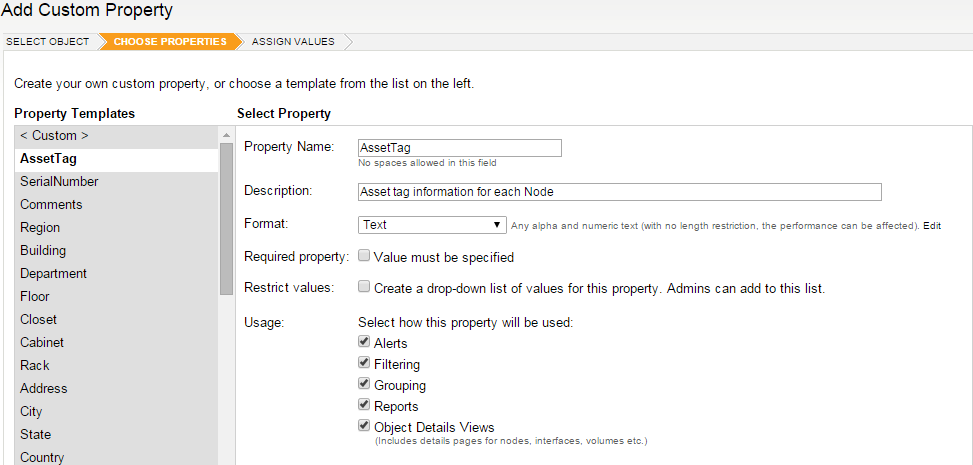
So here is where I am getting a bit stuck.... When I am making my custom properties and I have choosen my nodes and put in assettag what then?
What should I chose here??
And where is it that I can link some of the above scripts to this custom properties?? I am missing the link here I think..
So I am hoping that your smart guys can help me on this matter, maybe step by step...
Thanks for all the greats scripts that you are doing here.
#bumpsquad
You can do this more than one way too... snmp or with NCM. I just wish Cisco was more consistent. Maybe they're getting better... idk?