I would like a way to add the netpath picture/map/path onto a dashboard providing a true end-to-end look including applications, WPM transactions, HTTP IPSLA's, and the like
Good one. I've been looking in to something similar for a THWACKer, who asked if you could get a path up as a map. A lot of head scratching later, I have to admit defeat. I can get it working by using a custom HTML resource which embeds a specific path URL, which could work in a NOC view (of the width and high HTML code is set accordingly), but it's fiddly to do.
I thought I was missing a trick, and downloaded the latest Atlas, hoping it would be a simple matter of locating the paths and dragging them, but they only appear as status icons, not the full paths
Please add this in!
+1 for silverbacksays. My vision of the future for NetPath is a map view of all of the endpoints and their status checks. If one of those points happens to be yellow/red then you could drill into it and investigate which service was generating the path degradation.
I think that would be especially valuable for outside-in monitoring for web services hosted by a company but would be equally powerful for geo-distributed locations that relied on SaaS solutions to operate. (Think Salesforce.com or other business critical apps.) I imagine a tie-in with the WPM and/or Pingdom would be a natural progression as well.
Could you imagine the awesomeness of Pingdom alerting you to some sort of change in the response time of a website and then, via hoverover, getting a DPI-esque compass that said "Yep, NetPath degradation is occurring" and then being able to dig into the network side or "Yep, it is some sort of non-network infrastructure (aka not tied to NetPath)" and then being able to dig into AppStack to investigate the root cause?
It makes me giddy just thinking about it!
Everyone should be on board with this... Vote Up!
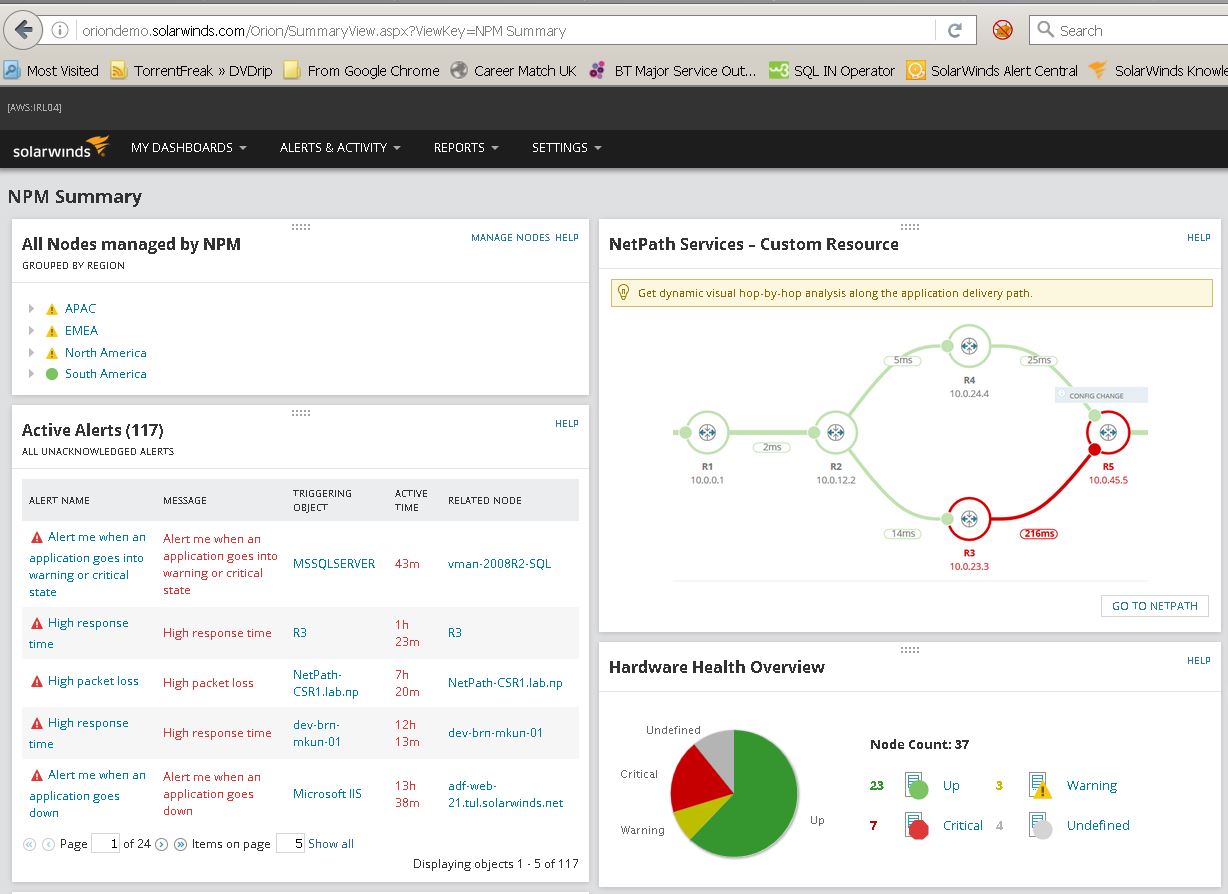
It's certainly possible... the oriondemo.solarwinds.com displays it on the NPM sumary page. But recreating it is not being the easiest to setup..Any instructions would be gratefully received
The OrionDemo is just using a PNG file. They created a custom resource and pointed to an image of the NetPath services.
<a href="/ui/netpath/"><img src="../DemoServer/images/custom_resources/netpathCustomResource.png" title="NetPath" width="475" height="270"/></a>
Aye, they cheated
And there's my hopes dashed!
Well let's hope it's and easy feature to implement
jbiggley GREAT idea, the potential is endless. Also, I think the ability to alert on a netpath status would be helpful. A resource with all your paths in mini form for a summary dashboard and then the alerting for when one is in distress....
Thank you very much for the information.
sad to know that you can not configure
I don't give up that easily. Lets see if we can cheat like they did. I don't have 12 running yet, but I will soon, so lets think this through.
1. We need to capture the page into a screenshot, my goolge-fu says that there are powershell and python examples out there.
Make web (or sharepoint) pages screenshots with Powershell - Home
(link might cheat and use a Cmd line tool, but whatever I care about results)
webkit2png
http://khtml2png.sourceforge.net/
2. We need to crop and maybe resize the image. Resize seems easy in powershell:
Resize-Image A PowerShell script to resize image files
In Python it seems like people might have had thoughts like this before, cropping example at:
How to crop an image in OpenCV using Python - Stack Overflow
And resize: Resize an Image (Python) - Software Development | DaniWeb
3. *Bonus step* - If we are successfully taking screenshots of the chart and croppping them, we will likely do this every few minutes as a re-occuring task. If we do that, we will have a history. Lets roll the Screenshots into an animated gif
GIF animation in Python in 3 Steps | SukhbinderSingh.com
4. Copy the file we want to show to the location that you want to link to.
Obviously this isn't a usable thing yet, but I think it can be done. I also think that despite being a Powershell guy, most of the heavy lifting thought wise has been done in python already. I know that almost anything can be done in Powershell but I will bounce my thoughts off a few .Net coders I know and see what they think, then I will give one of the two script type a try. My goal is to have a scheduled task that runs the script, takes the screen shot and updates the image file.
If I get anything close to usable I will post it back here.
1. Customize the page
2. Add Resources
3. Add Customize HTML
4. Create basic html with iframe tag
Thats a good work around and I use that for many things, but I still feel that a resource is needed for keeping things reasonably simple.
If we do everything with techy custom solutions then only techy people will be able to use it.
Solarwinds products are so awesome because anyone can use them. Hence why I would like to see the resource, for the common folk like me :-)
Great!!!!!!!
Nice luishandy!
I used something similar myself, but as familyofcrowes rightly says, the "Average Joe" would not be comfortable enough with html to go with it in production.
That's why I created this idea. NetFlow is so awesome, it's output deserves it's own set of Orion resources, something akin to the various map resources we have for use with things produced in Atlas.
Hi All,
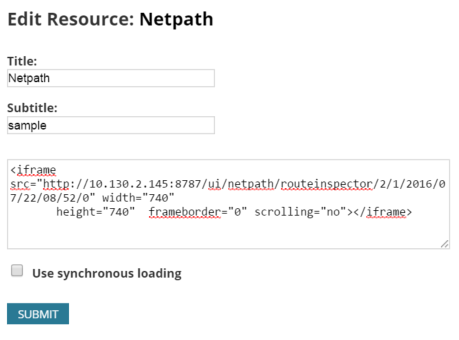
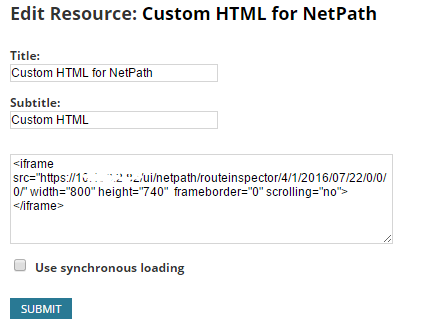
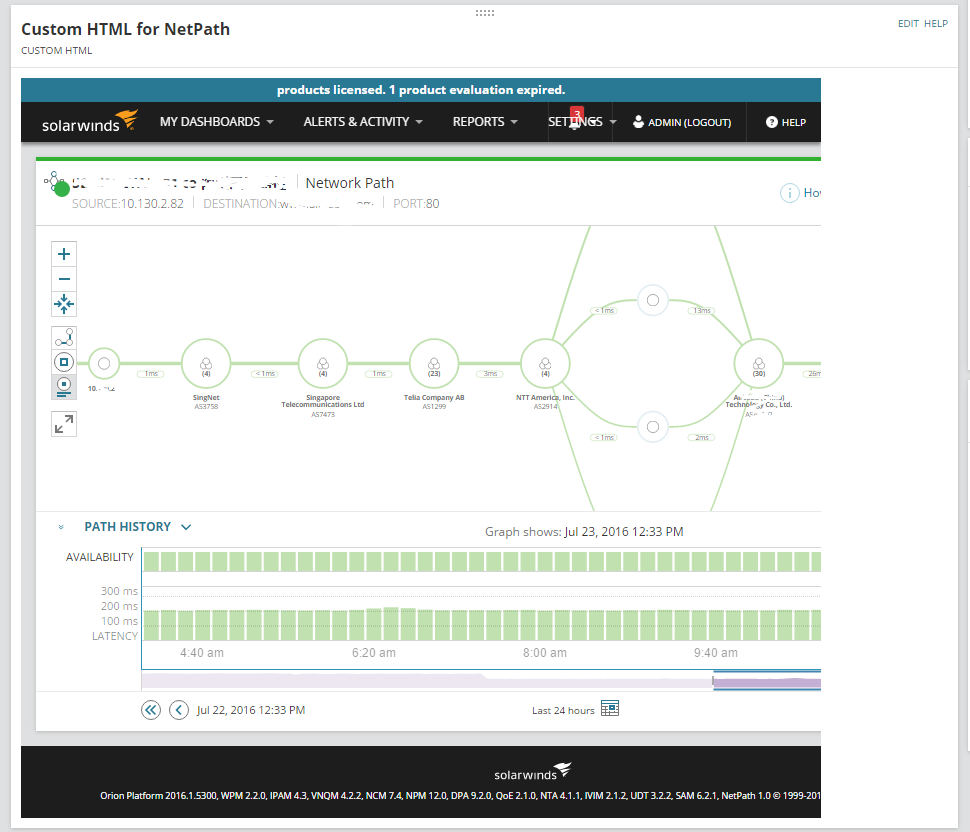
We can do this via the custom html resource and <iframe>. Not the best (as in it will not be on the resource for netpath only) but it will be real live data and you can move the netpath around.
Steps are as per below.
1. Create a Custom HTML resource
2. Create the NetPath required
3. Create the <iframe> with src = "http://yournetpathurl"
4. Define your height and width for the <iframe>
End Result :
Any other ideas are welcome too!
Hey YangQing,
I tried your workaround, but I just notice that the url is dynamicly updating (incrementing) itself with each poll. so you are stuck with an old view of the netpath. It's not updating itself in my case and I can't force "live mode ON".
Not very usefull for me.
Alex
#bumpsquad
beautiful 60 degree and sunny bump....
I didn't give up with my screenshot band aide, but I haven't gotten it working the way I want. That said here is what I have, maybe someone else will be able to take it further.
In the PowerShell below obviously you want your server and the Netpath item you want (adjust the /1/1/ part), the date time is built, and it opens IE, goes to the URL, saves it and kills IE. You'd likely need to change the boarders for each system you use it on to get a good screenshot as well.
$Url = "http://<yourserverhere>/ui/netpath/routeinspector/1/1/"+ (get-date).ToUniversalTime().ToString("yyyy/MM/dd/hh/mm/")
$ie = New-Object -ComObject InternetExplorer.Application
$ie.height = 1200
$ie.width = 1600
$ie.Top = 0
$ie.left = 0
$ie.Visible = $true;
$Website = $ie.navigate($Url)
Start-Sleep -Se 5
$file = "C:\Scripts\screenshot\Map.bmp"
Add-type -AssemblyName System.Drawing
$bitmap = New-Object System.Drawing.Bitmap 1500, 800
$Graphics = [System.Drawing.Graphics]::FromImage($bitmap)
$Graphics.CopyFromScreen(30, 180, 0, 0, $bitmap.Size)
$bitmap.Save($File)
Get-Process iexplore | Stop-Process
Right now I don't like that it uses the logged in session, and I don't like that I have to end IE forcefully. It does save the map to an image so you could run it as a scheduled task, then have your page load that image. So far I am not happy enough with it to use it.
Hump Day Bump
its tuesday.... vote for me....
now its thursday .... bump
bump
It's unfortunate this has to be submitted as an idea/request and wasn't just included as part of the upgrade.
#bump
Bump
pretty please BUMP....
bump day
BUMP!!
#BOING
Subscribed... #Bump
#Bump
Does anyone know if this has been entered as a feature request?
#BUMP
I/We will look forward to seeing the future development of NetPath.
It seems it would be relatively easy to create a custom web page, or even a resource within NPM's front page, that shows an NPM view of a specific NetPath resource.
+1
I raised a case with solarwinds and was pointed to this thread so I've voted it up. Below is the response I got.
From my understanding you would like to have the NetPath services on the NOC View that can rotate between them but never "log out", correct?I found a feature request on thwack for a Resource about NetPath that can be displayed on a NOC view:https://thwack.solarwinds.com/ideas/7115#start=25If this is what you are looking for, I can generate a internal feature request to raise the importance of this feature to the Dev team, because this feature is not in the product at this moment.
From my understanding you would like to have the NetPath services on the NOC View that can rotate between them but never "log out", correct?
I found a feature request on thwack for a Resource about NetPath that can be displayed on a NOC view:
https://thwack.solarwinds.com/ideas/7115#start=25
If this is what you are looking for, I can generate a internal feature request to raise the importance of this feature to the Dev team, because this feature is not in the product at this moment.
At the moment I'm at the point where it either auto logs me out even though NPM keeps me logged in or it drops out of live mode if I use a tool to auto reload the page. A resource would solve this, I'd also like to see a resource that includes the latency over time bar at the bottom.
Hopefully it'll help push this up the priority list, netpath is great but the presentation of ti is lacking at the moment.
thanks.
Thank you.
Monday morning groggy foggy BUMP....
Really looking forward to have Netpath Data as a resource, we can get the idea from Maps.
In Netpath Resource it should give ability to select which service to show on the resource (like in Maps we are able to select which Map to show).
BUMP. Need to be able to get Netpath Stats data, show Netpath objects without the beautiful map. Currently the options are to use an Atlas map and hyperlink the full netpath page. If we want to see netpath status and uptime over time, it's not easy to show in a consumable way.
That sounds like GREAT information to have in a report!
maybe even if we had the ability to show netpath status.... kinda like application status, 100 up, 2 in critical and 3 in warning.... even just that would help on a dashboard....
I'll trade you 100 AppStacks for one NetPath.
Bump ..
Bump IT!
Bump.
If you're testing the NPM 12.3 beta, you're seeing the first steps in this direction.
Anyone get a work around going on this? I would like to do a rotating NOC view if possible?
This might hopefully provide some options for you. With 12.3 release we added a resource that allows you to roll up status of specific entities. A NetPath Service would be considered an entity.
Simple NetPath Summary Widget
Would love to see this as a widget on a NOC view. Bump
Would this update for every polling cycle?
I definitely would love to have this feature as well. Taking the suggestions already provided with using the iFrame, I came up with this basic javascript code that links to the latest live version of the NetPath. You may need to have to change the offset for your location.
<script>
var urlPath = "https://YOURSOLARWINDS.PATH.COM";
var pathID = "1";
var pollingEngineID = "1";
var offset = 60000;
var vwidth = 1200;
var vheight = 800;
var d = new Date();
var utc = d.getTime() + (d.getTimezoneOffset() * offset);
var nd = new Date(utc);
var path = urlPath + "/ui/netpath/routeinspector/" + pathID + "/" + pollingEngineID + "/" + nd.getFullYear() + "/" + ( nd.getMonth() + 1 ) + "/" + nd.getDate() + "/" + nd.getHours() + "/" + nd.getMinutes() + "/0";
document.write('<iframe src="' + path + '" width="' + vwidth + '" height="' + vheight + '" frameborder="0" scrolling="no"></iframe>');
</script>
I then just added this code to a Custom HTML widget for the dashboard. Modifying the pathID or pollingEngineID for the NetPath that I wanted to display.
I've updated the code a little. One, to add in an automatic refresh of the iframe, with the latest version. As even though the iframe gets loaded in the live mode, it doesn't refresh as often as I would like. Two, to add some comments of what the script is doing. Three, to automatically get the URL vice putting it in, as we have our main computer name to access the web portal, but can also access it via a shortened URL. With the address hard coded, if you go to the other URL it wasn't bringing up the iframe, likely due to the cross site restrictions in the browser. This way the url is the same as the one that you are currently accessing. Four, to take advantage of jquery, since its already being used in SW, to modify the CSS of the iframe window to hide the header and footer and adjust the padding to make the NetPath page fill the iFrame. I also removed the width attribute and made it 100% to fill the space in the dashboard widget column.
In the example below I am now performing multiple NetPaths in the same Custom HTML widget.
We have successfully added this to our NOC Dashboard. Though on the NOC page, we only do one NetPath per widget.
//////////////////////////////////////////////
//////////////// Variables
// Refresh period for the iframe 1 second X 60 = 1 minute (iFrame Refresh)
var refreshPeriod = 1000 * 60;
// Refresh period for the iframe 1 second X 4 = 4 seconds (CSS wait time)
var cssWait = 1000 * 4;
// GMT Offset
// iFrame height
// NetPath Array (first value is the NetPathID, second value is the PollingEngineID)
var NetPaths = [];
NetPaths[0] = [2,1];
NetPaths[1] = [10,1];
//////////////// Process Array to Build DIVs and iFrames
jQuery.each(NetPaths, function(index, item) {
document.write('<div id="NetPathDiv' + index + '"></div>');
// Initial load of the iframe
$("#NetPathDiv" + index).html(updateDIV(index, item[0], item[1], offset, vheight));
setTimeout(function(){ hideHF(index); }, cssWait );
// Reload of the html iframe based on refresh period
var myVar = setInterval(function() {
$("#NetPathDiv"+index).html(updateDIV(index, item[0], item[1], offset, vheight));
}, refreshPeriod);
});
//////////////// Functions
// Function that determines the current date and time, adjusts for the GMT offset and then formats the iframe HTML with the latest URL
function updateDIV(id, pathID, pollingEngineID, offset, vheight){
// Automatically pulls the current hostname
var urlPath = "https://" + window.location.hostname;
return '<iframe id="NetPathiFrame' + id + '" src="' + path + '" width="100%" height="' + vheight + '" frameborder="0" scrolling="no"></iframe>';
}
// Hides the Header and Footer from the Netpath iframe
function hideHF(id){
var frameContents = $("#NetPathiFrame"+id).contents();
frameContents.find(".sw-mega-menu").css("display","none");
frameContents.find(".sw-footer").css("display","none");
frameContents.find("#content").css("padding-top","0px");
frameContents.find(".xui-page-content").css("padding","0px");
I'll jump on the Bump train here too... My execs would drool over this in a tabbed dash / noc view.
Next week I'm going to have to try the code above... curious how that looks.
The ideas and the brains on this page are amazing! You guys are AWESOME!!
BUMP
And the ability to use multiple NetPath sets as part of a scrolling NOC view would surely be beneficial to several organizations.
While not a perfect solution we are using a Chrome Extension called Revolver Tabs for our big screens up on the walls. It just cycles through all of the tabs that are open on the browser. You do need to resize the Netpath screens if the machine gets rebooted, but it did get around
a lot of the limitations that you have with showing a window inside of an Iframe. This works especially well if you want to display pages from several different tools.
Please, Please, Please
I need to create a NOC view for our App support team and being able to have Netpathing on these dashboards is a requirement.
I am not sure really how to do it right now!
Seriously why has this not happened yet? 3 year & absolutely no added functionality for this service?
It would be nice with a regular logo, and decoration. Not just a button. I would definitely use my points for a USB fan with a good THWACK design on it.
The beta version of the new Orion Maps allows you to add a summary icon for as many Netpaths as you want, which I think is a step in the right direction. It's not as visually appealing as a full-blown Netpath but in my opinion a NOC view should have summarized and consolidated information as opposed to wasting an entire screen on a single path, so I'm looking forward to the new release!
KEEP IN MIND THIS IS A SCREENSHOT FROM A BETA so what you see here may not necessarily reflect the final product. You can see the map that contains three Netpath summary icons in the bottom right:
KMSigma gave us this gem a while back. NetPath Custom Query Widget - it's a great start, and goes hand in hand with the new maps.
Native please and BUMP!
Need this ASAP!
#bumpsquad
In 2020.2.5, iframes may undergo changes that make this request more important. (Using CSS elements in a Custom HTML widget. - Forum - The Orion Platform - THWACK (solarwinds.com)
any more votes getting a bit ridiculous
Another vote in the hope this gets implemented. Do SolarWinds even look at these?
Just submitted a ticket for help with implementing a Netpath dashboard widget, support punted and told me to go to THWACK for assistance.
Well here I am!!
So I see this has been a feature request for 10 years.