Hello Thwacksters
Does any one know if the SolarWinds Configuration Wizard able to use SQL server alias for the SQL server connection string? I've not been able to configure this myself.
Thanks
Brand new install or connecting to an existing database ?
I have usually used the Domain then ComputerName to directly connect to a SQL server or to a SQL Listener for a SQL Cluster. I see no reason why a DNS alias would not work. Permissions issues? The account needs to be DB_Owner at a minimum after the installation but the initial install may require SA unless you have pre-created blank databases to attach to. The initial install creates new databases by default. Some possible thoughts.
Hey Bob,
Existing install. I am trying to change the SQL Server value under Database Settings in the Configuration Wizard to a SQL Alias instead of the <ServerName>\<InstanceName> format.
I have no issues with actually getting the configuration wizard to work if I use the <ServerName>\<InstanceName> format, but it seems like it won't accept an alias.
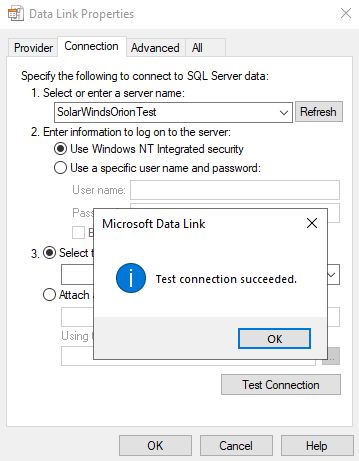
I agree it should "just work", but sadly it doesn't. If I test the connection with a .UDL file it tests successfully.
I've created the alias using the cliconfg.exe tool.
Maybe it has something to do with the automatic SqlConnectionFormater that the Config Wizard is doing?
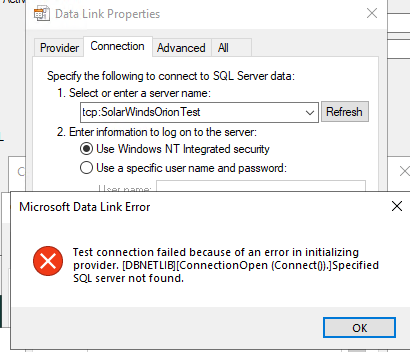
Because using the corrected string in the .UDL file doesn't work as well:
What port is your SQL instance listening on?
When you set up a named instance, <ServerName>\<InstanceName>, the instance by default listen on a random tcp port. Whan an application tries to connect to a named instance, the application asks the SQL Browser service on port UDP/1434, what port that instance is listening to. Then the application can connect to the correct port.
If you have a DNS alias, the SQL Browser service does not know what instance you are asking for. Giving no reply and the application will try to default TCP/1433.
So, make sure your instance is listening on TCP/1433 if you want this to work, OR write this in your server field: "SolarWindsOrionTest,50001" if 50001 is your listening port. And yes, you have to change the port on your instance so it uses a static port, otherwise it will change after next restart.
Can this be the issue?
Hi Lofstrand
Thank you for taking time to give your thoughts on this matter. And I agree that it very well could've been the issue, but looking at the configuration for the instance it seems to be listening on 1433. The other instance behind the greenbox, is not listening on anything, so it can safely be ignored.
Am I misunderstanding, or does this look OK to you as well?
Hi, almost correct.
"TCP Dynamic Ports" should be blank if you want that instance to listen on 1433. Like this example where I have the instance listening on port 50001:
You can also check what port SQL is listening on. This webpage gives a few examples on how: Identify SQL Server TCP IP port being used
Hi
I removed the dynamic ports as suggested, but still no luck.
Here's a screenshot of which port the instance is listening on.
What's interesting to me is that I was able to generate the exact same error message using the .NET TCP provider using Powershell.
This code can successfully connect IF the connection string omits the "tcp:" in front of the alias in the connection string. But when I add "tcp:" to the string, it fails just like the configuration wizard.
Is there something to this?
EDIT: Just noticed one of the screenshots were wrong. It has been updated.
So, from the SolarWinds server you are trying to connect to the SQL server with the DNS alias "SolarWindsOrionTest". That seems to work from your PS script but not from Config Wizard. Correct?
I always try with the simplest things first. Test if the server can reach the TCP port. Using the PS command "TNC SolarWindsOrionTest -port 1433". That will tell if the server can reach the port, the simplest things....
Other thing, have you tried disable encryption?
Correct. The thing is, I've not created a DNS alias, so it cannot be resolved by DNS therefore TNC fails.The alias has been created in the cliconfg.exe tool.
If I were to remove this alias both the .UDL file and the Powershell code would fail too, so it is doing something.
I tried without encryption too, this didn't change anything sadly.
Ok, two things here:
* Have you configured this in both 32 and 64-bit? There is two different config applications. * Not sure that this .net application cares about what is configured in there. I don't think those configs are used.
If 32/64 bit config is not working. Try just add the hostname to the host-file, see if all things work then. Then you have your answer
Yep, my thought too since the Configuration Wizard seems to be running in 32-bit. I did configure the alias for both 32-bit and 64-bit. I agree. It seems like the .NET application doesn't care.
Adding the SQL server IP address to the host file actually made the config wizard continue
Perfect, then we learned something today as well