Hi - need some SWQL for
1 - disk volume usage for modern dashboard
2 - Which widget would be the best to use
thanks
Sorry that's my bad!!!! I forgot to add the "where" statement.
This should do the trick.
FROM Orion.Volumes AS vwhere v.Node.CustomProperties.CoreProductionSystem LIKE '%YES%'with nolock
Hi @jasonford1971 it all depends on what you want it to display you can do a straight forward table or you can build a Perfstack and put it in the Modern Dashboard.
Hi Jasonford1971, while I agree with LebeauUK I would be very careful with the PerStack option. Personally, I would only suggest that if you want to show of 4-5 drives, any more than that then you could potentially see a web performance degradation at least on that page/tab.
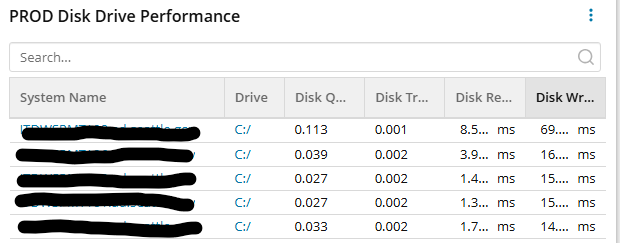
Here's my 3 standard modern drive performance widgets that I build for all of my customers. Side note, there are a few variances like disposition & system drive versus non-system drives. But all-in-all my customers love these.
Here's my standard production/system drive query:
SELECTv.Node.Caption AS [System Name]--**remove the below line if you don't care about system/non-system drives.**,CONCAT(v.DeviceId,'/') AS [Drive], round(v.DiskQueueLength * 1.0 ,3) as [Disk Queue Length], round(v.DiskTransfer * 1.0 ,3) as [Disk Transfer], round(v.DiskReads * 1.0 ,3) as [Disk Reads], round(v.DiskWrites * 1.0 ,3) as [Disk Writes], v.Node.DetailsUrl AS LinkForNode, v.DetailsUrl, v.Icon, v.StatusIconFROM Orion.Volumes AS vWHERE 1=1 and (v.DeviceId = 'C:') --**If you use custom properties for you teams replace lines below with your own custom property. --**the script below covers systems with or without a responsible team custom property. and (v.Node.CustomProperties.Responsible_Team = 'Server_OPS' or v.Node.CustomProperties.Responsible_Team is NULL) --**The lines below cover disposition based off of our custom properties. and (v.Node.CustomProperties._Disposition = 'PROD' or v.Node.CustomProperties._Disposition is NULL)with nolock
Here's what this widget looks like:
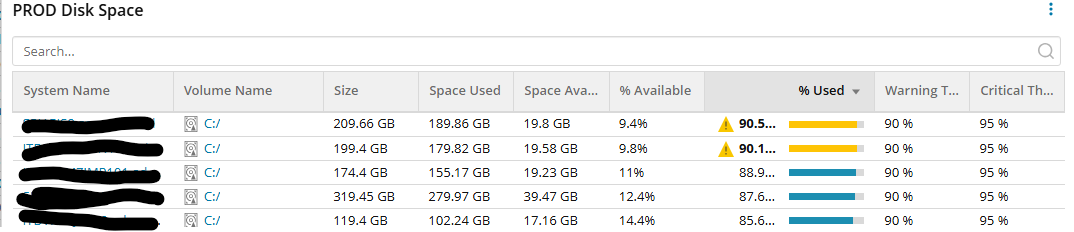
Here's my widget for drive space, again I'm focused on the system drive, production systems and systems supported by a certain team.
SELECTv.Node.Caption AS [System Name],CONCAT(v.DeviceId,'/') AS [Drive],CASE WHEN V.size >= 1099511627776 THEN CONCAT(ROUND(V.size/1099511627776,2), ' TB') WHEN V.size >= 1073741824 THEN CONCAT(ROUND(V.size/1073741824,2), ' GB') WHEN V.size >= 1048576 THEN CONCAT(ROUND(V.size/1048576,2),' MB') WHEN V.size >= 1024 THEN CONCAT(ROUND(V.size/1024,2),' KB') Else '0' END as [VolumeSize],CASE WHEN v.VolumeSpaceUsed >= 1099511627776 THEN CONCAT(ROUND(v.VolumeSpaceUsed/1099511627776,2), ' TB') WHEN v.VolumeSpaceUsed >= 1073741824 THEN CONCAT(ROUND(v.VolumeSpaceUsed/1073741824,2), ' GB') WHEN v.VolumeSpaceUsed >= 1048576 THEN CONCAT(ROUND(v.VolumeSpaceUsed/1048576,2),' MB') WHEN v.VolumeSpaceUsed >= 1024 THEN CONCAT(ROUND(v.VolumeSpaceUsed/1024,2),' KB') Else '0' END as [Space Used],CASE WHEN v.VolumeSpaceAvailable >= 1099511627776 THEN CONCAT(ROUND(v.VolumeSpaceAvailable/1099511627776,2), ' TB') WHEN v.VolumeSpaceAvailable >= 1073741824 THEN CONCAT(ROUND(v.VolumeSpaceAvailable/1073741824,2), ' GB') WHEN v.VolumeSpaceAvailable >= 1048576 THEN CONCAT(ROUND(v.VolumeSpaceAvailable/1048576,2),' MB') WHEN v.VolumeSpaceAvailable >= 1024 THEN CONCAT(ROUND(v.VolumeSpaceAvailable/1024,2),' KB') Else '0' END as [Space Available],CONCAT(round(V.VolumePercentAvailable,1),'%') AS [Percent Available],ROUND(VolumePercentUsed, 2) AS [Percent Used], CONCAT (v.PercentDiskUsedThreshold.Level1Value,' %') as [Warning % Threshold], CONCAT (v.PercentDiskUsedThreshold.Level2Value,' %') as [Critical % Threshold], '/Orion/images/ForecastingIcons/volumeutilization.png' AS [_IconFor_Volume], '/NetPerfMon/images/Volumes/' + v.icon AS [_IconFor_VolumeSize], '/Orion/images/StatusIcons/Small-' + v.StatusLED AS [_IconFor_Percent Used], v.Node.DetailsUrl AS LinkForNode, v.DetailsUrl AS LinkForVolumeFROM Orion.Volumes AS vWHERE 1=1 and (v.DeviceId = 'C:') and (v.Node.CustomProperties.Responsible_Team = 'Server_OPS' or v.Node.CustomProperties.Responsible_Team is NULL) and (v.Node.CustomProperties._Disposition = 'PROD' or v.Node.CustomProperties._Disposition is NULL)with nolock
and here's what this widget looks like:
Lastly, for the hat-trick I supply this forecast widget
SELECTN.Caption as [System Name],N.DetailsUrl as [Node Link],N.Volumes.DetailsUrl as [Drive Link],CONCAT(n.Volumes.DeviceId,'/') AS [Drive],CASE WHEN F.DaysToWarningAvg is NULL THEN tostring('Not Calculated') WHEN F.DaysToWarningAvg <= 0 then tostring('Now') WHEN F.DaysToWarningAvg >= 1825 THEN tostring('> 5 Years') WHEN F.DaysToWarningAvg >= 365 THEN tostring('> 1 Year') WHEN F.DaysToWarningAvg >= 90 THEN tostring('> 90 Days') WHEN F.DaysToWarningAvg >= 60 THEN tostring('> 60 Days') WHEN F.DaysToWarningAvg >= 30 THEN tostring('> 30 Days') ELSE tostring(tostring(F.DaysToWarningAvg) + ' Days') END AS [Warning], CASE WHEN F.DaysToCriticalAvg is NULL THEN tostring('Not Calculated') WHEN F.DaysToCriticalAvg <= 0 then tostring('Now') WHEN F.DaysToCriticalAvg >= 1825 THEN tostring('> 5 Years') WHEN F.DaysToCriticalAvg >= 365 THEN tostring('> 1 Year') WHEN F.DaysToCriticalAvg >= 90 THEN tostring('> 90 Days') WHEN F.DaysToCriticalAvg >= 60 THEN tostring('> 60 Days') WHEN F.DaysToCriticalAvg >= 30 THEN tostring('> 30 Days') ELSE tostring(tostring(F.DaysToCriticalAvg) + ' Days') END AS [CRITICAL], CASE WHEN F.DaysToCapacityAvg is NULL THEN tostring('Not Calculated') WHEN F.DaysToCapacityAvg <= 0 then tostring('Now') WHEN F.DaysToCapacityAvg >= 1825 THEN tostring('> 5 Years') WHEN F.DaysToCapacityAvg >= 365 THEN tostring('> 1 Year') WHEN F.DaysToCapacityAvg >= 90 THEN tostring('> 90 Days') WHEN F.DaysToCapacityAvg >= 60 THEN tostring('> 60 Days') WHEN F.DaysToCapacityAvg >= 30 THEN tostring('> 30 Days') ELSE tostring(tostring(f.DaysToCapacityAvg) + ' Days') END as [AT CAPACITY]FROM orion.forecastcapacity Fleft join Orion.Nodes N on f.NodeID = n.NodeIDWHERE 1=1 and ((N.CustomProperties.ITD_Responsible_Team = 'Server_Ops' or N.CustomProperties.ITD_Responsible_Team is NULL) and (N.CustomProperties._Disposition = 'PROD') or N.CustomProperties._Disposition is NULL) and ((N.Volumes.DeviceId BETWEEN 'C' and 'Z') and (F.DaysToCapacityAvg is NOT NULL))order by F.DaysToCapacityAvg ASCwith nolock
which looks like this:
I hope these help. If you want I can this view and post it on resource share.
thanks for replies - very much appreciated, are the above table widgets ?
Yes, widgets for a modern dashboard. This is what it looks like when put all together.
Have tried the above and the SWQL is not working - Provided SWQL query is not valid is the error being displayed
Hi Jason,
I just uploaded the dashboard to the Content Exchange Dashboard area.
Modern Dashboards - The SolarWinds Platform - THWACK
In case you need information on how to import a modern dashboard, here's the link. Just beware that you'll need SWQL Studio.
Import and export modern dashboards
OK - Thanks, but i dont have SWQL studio access
Ok, np. I'll supply each code individually. Please note that I removed the paratheses in the WHERE clause. If you do nothing else copy-past this SWQL command, remove all lines with -- or --**** and the query will work.
You can rebuild the query to match your environment by using my example.
Drive Performance query:
SELECTv.Node.Caption AS [System Name],CONCAT(v.DeviceId,'/') AS [Volume Name], round(v.DiskQueueLength * 1.0 ,3) as [Disk Queue Length], round(v.DiskTransfer * 1.0 ,3) as [Disk Transfer], round(v.DiskReads * 1.0 ,3) as [Disk Reads (ms)], round(v.DiskWrites * 1.0 ,3) as [Disk Writes (ms)], v.Node.DetailsUrl AS LinkForNode, v.DetailsUrl AS LinkForVolumeFROM Orion.Volumes AS vwhere 1=1--**** Leave this section blank if you do not need to segregate drives by team, function or drive. ****--**** Below is an example of a team filter. simply replace the custom property field with something you have in your SW instance. **** --and v.Node.CustomProperties.Team = 'Team X'--**** Below is an example of if you just want to focus on the system drive, for non-system drive simply swape the deviceID or omit for all drives. **** and DeviceId = 'C:'--**** Below is an example of omitting the disk deviceid seeing all drives. In which case you'll want to just look at fixd disks. **** and v.type = 'Fixed Disk'--**** Below is an example if you just want to focus on a Windows 2016 server. **** -- and v.Node.MachineType like 'Windows 2016%'with nolock
Drive Space query:
SELECTv.Node.Caption AS NodeName,CONCAT(v.DeviceId,'/') AS [Drive],CASE WHEN V.size >= 1099511627776 THEN CONCAT(ROUND(V.size/1099511627776,2), ' TB') WHEN V.size >= 1073741824 THEN CONCAT(ROUND(V.size/1073741824,2), ' GB') WHEN V.size >= 1048576 THEN CONCAT(ROUND(V.size/1048576,2),' MB') WHEN V.size >= 1024 THEN CONCAT(ROUND(V.size/1024,2),' KB') Else '0' END as [VolumeSize],CASE WHEN v.VolumeSpaceUsed >= 1099511627776 THEN CONCAT(ROUND(v.VolumeSpaceUsed/1099511627776,2), ' TB') WHEN v.VolumeSpaceUsed >= 1073741824 THEN CONCAT(ROUND(v.VolumeSpaceUsed/1073741824,2), ' GB') WHEN v.VolumeSpaceUsed >= 1048576 THEN CONCAT(ROUND(v.VolumeSpaceUsed/1048576,2),' MB') WHEN v.VolumeSpaceUsed >= 1024 THEN CONCAT(ROUND(v.VolumeSpaceUsed/1024,2),' KB') Else '0' END as [Space Used],CASE WHEN v.VolumeSpaceAvailable >= 1099511627776 THEN CONCAT(ROUND(v.VolumeSpaceAvailable/1099511627776,2), ' TB') WHEN v.VolumeSpaceAvailable >= 1073741824 THEN CONCAT(ROUND(v.VolumeSpaceAvailable/1073741824,2), ' GB') WHEN v.VolumeSpaceAvailable >= 1048576 THEN CONCAT(ROUND(v.VolumeSpaceAvailable/1048576,2),' MB') WHEN v.VolumeSpaceAvailable >= 1024 THEN CONCAT(ROUND(v.VolumeSpaceAvailable/1024,2),' KB') Else '0' END as [Space Available],CONCAT(round(V.VolumePercentAvailable,1),'%') AS [Percent Available],ROUND(VolumePercentUsed, 2) AS [Percent Used], CONCAT (v.PercentDiskUsedThreshold.Level1Value,' %') as [Warning % Threshold], CONCAT (v.PercentDiskUsedThreshold.Level2Value,' %') as [Critical % Threshold], '/Orion/images/ForecastingIcons/volumeutilization.png' AS [_IconFor_Volume], '/NetPerfMon/images/Volumes/' + v.icon AS [_IconFor_VolumeSize], '/Orion/images/StatusIcons/Small-' + v.StatusLED AS [_IconFor_Percent Used], v.Node.DetailsUrl AS LinkForNode, v.DetailsUrl AS LinkForVolumeFROM Orion.Volumes AS vwhere 1=1--**** Leave this section blank if you do not need to segregate drives by team, function or drive. ****--**** Below is an example of a team filter. simply replace the custom property field with something you have in your SW instance.**** --and v.Node.CustomProperties.Team = 'Team X'--**** Below is an example of if you just want to focus on the system drive, for non-system drive simply swape the deviceID or omit for all drives. **** and (DeviceId = 'C:')--**** Below is an example of omitting the disk deviceid seeing all drives. In which case you'll want to just look at fixd disks. **** and v.type = 'Fixed Disk'--**** Below is an example if you just want to focus on a Windows 2016 server.**** -- and v.Node.MachineType like 'Windows 2016%'with nolock
Disk Forecast query:
SELECTn.Caption as [System Name],n.DetailsUrl as [Node Link],n.Volumes.DetailsUrl as [Drive Link],CONCAT(n.Volumes.DeviceId,'/') AS [Drive],CASE WHEN F.DaysToWarningAvg is NULL THEN tostring('Not Calculated') WHEN F.DaysToWarningAvg <= 0 then tostring('Now') WHEN F.DaysToWarningAvg >= 1825 THEN tostring('> 5 Years') WHEN F.DaysToWarningAvg >= 365 THEN tostring('> 1 Year') WHEN F.DaysToWarningAvg >= 90 THEN tostring('> 90 Days') WHEN F.DaysToWarningAvg >= 60 THEN tostring('> 60 Days') WHEN F.DaysToWarningAvg >= 30 THEN tostring('> 30 Days') ELSE tostring(tostring(F.DaysToWarningAvg) + ' Days') END AS [Warning], CASE WHEN F.DaysToCriticalAvg is NULL THEN tostring('Not Calculated') WHEN F.DaysToCriticalAvg <= 0 then tostring('Now') WHEN F.DaysToCriticalAvg >= 1825 THEN tostring('> 5 Years') WHEN F.DaysToCriticalAvg >= 365 THEN tostring('> 1 Year') WHEN F.DaysToCriticalAvg >= 90 THEN tostring('> 90 Days') WHEN F.DaysToCriticalAvg >= 60 THEN tostring('> 60 Days') WHEN F.DaysToCriticalAvg >= 30 THEN tostring('> 30 Days') ELSE tostring(tostring(F.DaysToCriticalAvg) + ' Days') END AS [CRITICAL], CASE WHEN F.DaysToCapacityAvg is NULL THEN tostring('Not Calculated') WHEN F.DaysToCapacityAvg <= 0 then tostring('Now') WHEN F.DaysToCapacityAvg >= 1825 THEN tostring('> 5 Years') WHEN F.DaysToCapacityAvg >= 365 THEN tostring('> 1 Year') WHEN F.DaysToCapacityAvg >= 90 THEN tostring('> 90 Days') WHEN F.DaysToCapacityAvg >= 60 THEN tostring('> 60 Days') WHEN F.DaysToCapacityAvg >= 30 THEN tostring('> 30 Days') ELSE tostring(tostring(f.DaysToCapacityAvg) + ' Days') END as [AT CAPACITY]FROM orion.forecastcapacity Fleft join Orion.Nodes n on f.NodeID = n.NodeIDWHERE 1=1--**** Leave this section blank if you do not need to segregate drives by team, function or drive. ****--**** Below is an example of a team filter. simply replace the custom property field with something you have in your SW instance. **** --and n.CustomProperties.Team = 'Team X'--**** Below is an example of if you just want to focus on the system drive, for non-system drive simply swape the deviceID or omit for all drives. **** --and n.Volume.DeviceId = 'C:'--**** Below is an example of omitting the disk deviceid seeing all drives. In which case you'll want to just look at fixed disks. **** and n.Volumes.Type = 'Fixed Disk'--**** Below is an example if you want to omit the system but don't want to filter out the disk type. For example, between ('C' and 'E') would give you just drives C:,D:, & E: but ignore F: and n.Volumes.DeviceId BETWEEN 'C' and 'Z' --**** Below is an example if you just want to focus on a Windows 2016 server. **** -- and n.MachineType like 'Windows 2016%' and F.DaysToCapacityAvg is NOT NULLwith nolock
ok -so i have the disk space query now on my dashboard -i need to amend the swql so it only picks up the following - (n.CustomProperties.CoreProductionSystem LIKE '%YES%') - how would i swql look - thanks
AWESOME!!!
For drive performance & drive space it you'll want this:
where v.Node.CustomProperties.CoreProductionSystem LIKE '%YES%'
For drive forecast you'll want this:
where n.CustomProperties.CoreProductionSystem LIKE '%YES%'
If your CoreProdcutionSystem custom property is a nice and clean YES/NO then I would highly recommend changing the query to:
where v.Node.CustomProperties.CoreProductionSystem = 'YES'
where n.CustomProperties.CoreProductionSystem = 'YES'
sorry but where about in swql would i enter where v.Node.CustomProperties.CoreProductionSystem LIKE '%YES%'
Don't be sorry, this is how we learn.
For Drive Performance & Drive Space widgets you'll want it right between "From..." & "with nolock", see below.
FROM Orion.Volumes AS v
v.Node.CustomProperties.CoreProductionSystem LIKE '%YES%'
with nolock
For drive forecasting, it needs to be sandwiched between the join statement and the with nolock see below.
FROM orion.forecastcapacity F
left join Orion.Nodes n on f.NodeID = n.NodeID
WHERE 1=1
and n.CustomProperties.CoreProductionSystem LIKE '%YES%
and F.DaysToCapacityAvg is NOT NULL
If it helps this is how SQL/SWQL was explained to me when I first started to learn how to do it. This is an overly simplified foundational explanation.
Again, overly simplified example:
Select dog
From shelter
where dog size = tall and hair color like brown%
so tried it for Drive Performance & Drive Space
FROM Orion.Volumes AS v v.Node.CustomProperties.CoreProductionSystem LIKE '%YES%'with nolock
but (it may be me!) getting the error message - Provided SWQL query is not valid. Details: undefined
got it - its working for me - thank you very much