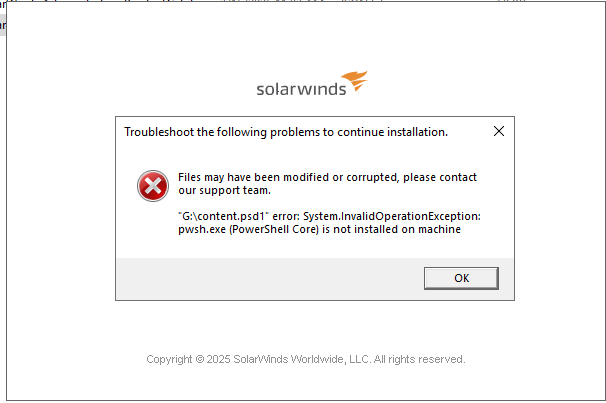
During the upgrade install the SolarWinds Offline installer may throw below error: kindly helps us to resolve this issue..
Worth checking the status of Powershell on the machine.To resolve this error and continue with your SolarWinds upgrade:
Install PowerShell Core (pwsh.exe):
Download the latest version of PowerShell Core (7.x or above) from the official GitHub releases or Microsoft website.
Run the installer (MSI) and follow the prompts. The default installation path is typically C:\Program Files\PowerShell\7\pwsh.exe
C:\Program Files\PowerShell\7\pwsh.exe
Ensure pwsh.exe is in the System PATH:
The installer usually adds PowerShell Core to your PATH automatically. If not, manually add the installation directory to your system's PATH environment variable
Restart the Installer:
After installation, rerun the SolarWinds upgrade or installation process.
Optional: Restart Services or Machine:
If issues persist, restart any relevant services or the machine to ensure the new PATH and executable are recognized by all processes.See if that fixes it.Adam
I recommend opening a support case to help with this issue if the documentation @donrobert5 provided does not resolve your issue.
https://solarwindscore.my.site.com/SuccessCenter/s/article/GPO-is-blocking-powershell-and-impacting-Orion-Upgrade?language=en_USthwack.solarwinds.com/.../304417
I wanted to share a new dashboard a co-worker ( @mblackburn ) came up with to help us better view groups of interfaces and various metrics for each. Using a single HTML widget, we are able to visually compare numerous different interfaces by populating each interface dataset onto its own graph. We are able to view…
PALO-ALG - Logging.xmlPalo Alto Networks ALG Security Technical Implementation Guide :: Version 2, Release: 3 Benchmark Date: 27 Oct 2022
Alert Cleared.htmlHello, I would like to share the HTML template details we have prepared so that Solarwinds alarms can become more meaningful. It can list alarm object details and connected device details separately in HTML template. Except for object and device details, you can easily add custom property information…
Cisco ASR Devices.pollerCisco ASR Devices