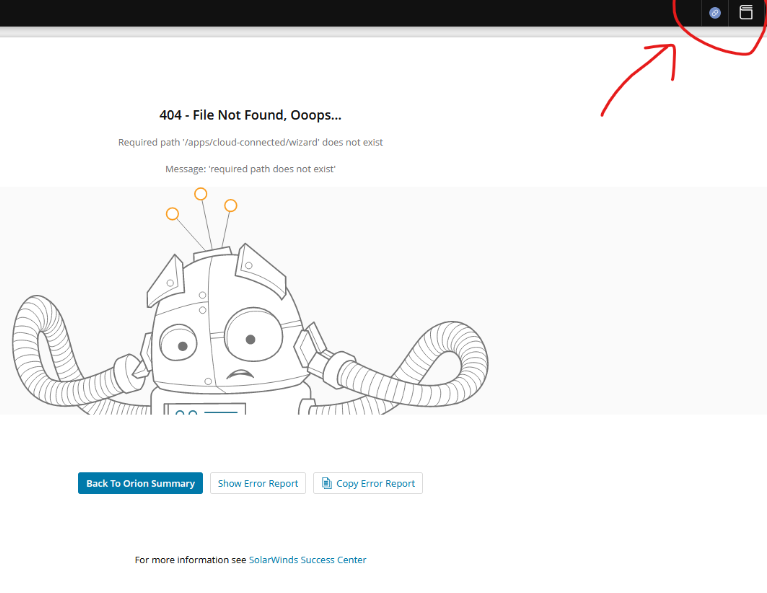
Hi Guy, Is there a way to hide or remove this icon, so that users can't see and click on it?
it will hide the web page element .sw-platform-connect-info so this should touch just the icon.I don't expect any side effect.
As a workaround for a big part of OrionWeb console, you can modify CSS this way:edit file\Program Files\SolarWinds\Orion\Web\SolarWinds.cssat this row to the end:.sw-platform-connect-info {display:none;}edit file\Program Files\SolarWinds\Orion\Web\ui\Views\Shared\_Layout.cshtmlat this row to the end:<style>.sw-platform-connect-info {display:none;}</style>After the change, force refresh Orion in browser.This should fix it for most parts of OrionWeb console.To fix other parts, you need to modify multiple files this way:
$orionWebsitePath = "C:\Program Files\SolarWinds\Orion\Web\apps\apps\"$fixPageStyle="`r`n.sw-platform-connect-info {display:none;}"Get-ChildItem -literalPath $orionWebsitePath -Recurse -Filter index.html | Foreach-Object { $content = Get-Content -LiteralPath $_.FullName $content += $fixPageStyle Set-Content -Path $_.FullName -Value $content}
I wanted to share a new dashboard a co-worker ( @mblackburn ) came up with to help us better view groups of interfaces and various metrics for each. Using a single HTML widget, we are able to visually compare numerous different interfaces by populating each interface dataset onto its own graph. We are able to view…
PALO-ALG - Logging.xmlPalo Alto Networks ALG Security Technical Implementation Guide :: Version 2, Release: 3 Benchmark Date: 27 Oct 2022
Alert Cleared.htmlHello, I would like to share the HTML template details we have prepared so that Solarwinds alarms can become more meaningful. It can list alarm object details and connected device details separately in HTML template. Except for object and device details, you can easily add custom property information…
Cisco ASR Devices.pollerCisco ASR Devices