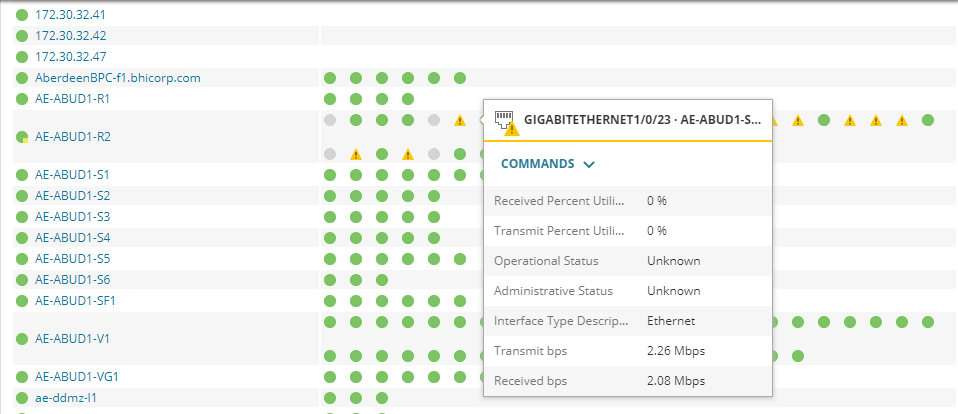
Can I recreate Network overview page and customize it to show particular group of nodes with all interface status?
Certainly not. I mentioned a number of different tools/ widgets that could be used to create a custom Network Overview above. One that was left out which could be helpful was Status Summary widget too. In general, Network Overview is somewhat of a subjective term. However, if the desire is to recreate the exact same visualization of data as the ootb Network Overview, then my recommendation was to use Orion Maps. Currently the Network Overview dashboard is not an editable page/view itself. Using Orion Maps you could certainly create something similar.
The only way to create a network overview is to uses maps?
I would actually recommend using Orion Maps. Take a look at the "Parting Shots" examples in this post: An Orion Map to Success
These are just general examples, but thats the power of this feature! You could certainly recreate this exact view if truly desired. I will try and mock an example up if I get time.
Thank you for the suggestion. I'm actually trying to recreate the "Network Overview" dashboard where it shows all the nodes and the problematic interfaces along with it. But i cant find a way to create a similar dashboard as there is no option to customize the same. Please see the below format.
Yes you can easily create a Network Overview Page in a variety of ways. Using Custom Properties will be an important concept to allow you to filter on those particular elements you want on this specific dashboard. Top XX widgets, Orion Maps Widget, Custom Table, Custom Chart, and PerfStack Widgets are some that I would recommend utilizing. If you can be a bit more specific around what you are looking to do, we may be able to provide further detail.
I wanted to share a new dashboard a co-worker ( @mblackburn ) came up with to help us better view groups of interfaces and various metrics for each. Using a single HTML widget, we are able to visually compare numerous different interfaces by populating each interface dataset onto its own graph. We are able to view…
PALO-ALG - Logging.xmlPalo Alto Networks ALG Security Technical Implementation Guide :: Version 2, Release: 3 Benchmark Date: 27 Oct 2022
Alert Cleared.htmlHello, I would like to share the HTML template details we have prepared so that Solarwinds alarms can become more meaningful. It can list alarm object details and connected device details separately in HTML template. Except for object and device details, you can easily add custom property information…
Cisco ASR Devices.pollerCisco ASR Devices