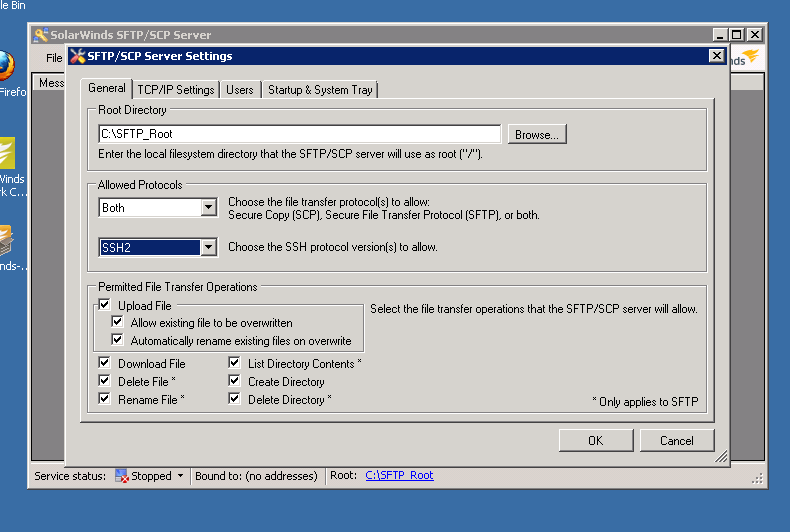
Can the use of ssh v1 on this server be turned off, but the use of ssh v2 still function?
It's a security review thing . . . our security team would prefer that ssh2 be used, and ssh1 be turned off.
It's possible!
You must rdesktop to your NCM server, run the SFTP/SCP server (Start -> ...), and go to File - > Configure.
Regards,
Jiri
Hi,
You can not use ssh1 but you can't forbid using ssh1 with NCM. You can post a feature request, if you want.
I think you meant . . .
It is an option to not use ssh1, but it is NOT an option to disable or prohibit the use of ssh1.
Is It an option to make NCM use a different ssh server?
Exactly, it is only an option not to use ssh1 but you can't prohibit it.
NCM uses SSH client, the device plays the role of SSH server. So if you configure all your devices to use SSH2 only, that could help.
My issue is not principally devices, it is only with the server itself.
I am trying to get my system into production by having it pass vulnerability scanning tests. This item basically flunks, ‘cuz the scanner picks up the presumed-vulnerable-by-design ssh1. I need this thing (the ssh server) to not respond to ssh1.
but, as you already said, this would need to be a feature request.
thanks for your help!
Sorry, now I understand what you are talking about. You are talking about the SCP server... Sorry, should have read the title . Maybe there's something we could do. Will find out and post back.
hmmmm . . .
I downloaded and installed SCP/SFTP Server 1.0.2.4.
I see the configuration option “Choose the SSH protocol version(s) to allow.” in the File | Configure | “SFTP/SCP Server Settings” dialog. I can change it. But when I go click on the OK button, the button animates, but the dialog does not close and no config change is committed. This occurs whether the service is started or stopped.
Anything I should know before I call support?
Did you happen to find the solution or will you contact support?
thanks for asking . . .
Indeed I contacted support. The collective answer:
(1) the version I was running to start with (at the beginning of this thread) indeed was old; the version now running, 1.0.2.4 downloaded last week, has this option.
(2) On my problem of not being able to commit the ssh2-only change, it was found that the problem existed only for a particular Windows user on the domain of which the server running sftp/scp is a member (but not local to that server). I was successful in committing an ssh2-only config by using a different Windows user, but even that user was still a user on the domain (still not a local user on the server).
On (2), I assume that there was some permissions difference between the two users that prevented config commit in one case, but allowed it in the other. We did not explore that issue further in the call.
So if I understand you correctly, the problem has been resolved, right?
yes, it has been resolved.
Good to hear that and thanks for posting the solution.