Hi,
I'm creating a record where the website has a security certificate pop-up when logging in. I already tried to use the XY condition, but still to no avail.
Appreciate your response. Thank you.
Regards,
Manilyn
Hello Manilyn,
if you mean "client certificate" that user uses to authenticate on the website, then WPM has built-in support for that. It is able to save certificate with recording and use it during playback. There should be nothing special needed for that, it's transparent for user.
Can you post some screenshot of how exactly it looks like in WPM?
Hi Jiri,
Thank you for your response.
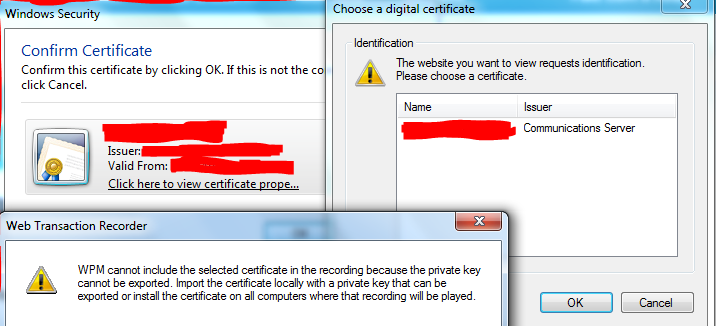
I meant the web user certificate. We only used our account to access the workstation which is different certificate. So when I tried to use the WPM recorder, I've seen two certificates (communication certificates where it prompted the user certificate that I logged in and the confirm certificate from the web). I wasn't able to get through when i clicked the OK Button. I was successfully accessed the web in IE browser by the way.
PSA for your reference.
I see the issue now. In order to include cetificate in WPM recording, WPM has to be able to export that certificate with private key. The error says that your current certificate does not have private key marked as exportable. In that case there are two options.
So unless you have many players, it may be easier to go, log into each player and install client certificate on each of them.
Thank you for your advice. I already exported and imported the web user license. However, the license doesn't exist only on the WPM recorder because I already tried this using IE browser and I was successfully accessed the web.
Can you open the certificate and check if it has "Enhanced Key Usage" containing "Client authentication (1.3.6.1.5.5.7.3.2)"? If you open certificates console, go to properties for particular certificate and select "Details" tab, there is a filed "Enhanced Key Usage". If it does not contain "Client Authentication" then WPM does not see the certificate and does not know how to use it.
hi Jiri,
Actually the certificate that we are using to access the web has no client authentication
Is there a way to still monitor that kind of web
At this point it's not possible with WPM. We already track this as a feature request FB203877.
Is the website and certificates are under your control? If yes, you should be able to generate one new certificate that will be used by WPM and that will use Client Authentication attribute.
I'm having an issue with WPM and certificate authentication. I'm not sure if a windows update or the latest update to the orion platfrom or something else happened in the last month or two but this no longer works. I have a certificate with "Enhanced Key Usage" containing "Client authentication (1.3.6.1.5.5.7.3.2)" and the private key is exportable. WPM still never see's the step where the cert window pops up to select a cert. This use to work but like I said all of a sudden its no longer working. I tried running without any GP applied to the server as well as having all my security software disabled and still nothing. Is there any additional troubleshooting that can be done?
please provide me with answer to this q: You do not see certificate selection popup during recording in WPM recorder or some old recording stops working and it is down ?
If issue is in recording: If WPM does not provide a certificate popup, it is either not installed at all, it is not in user personal store or it does not have Client Authentication OID. Keep in mind that you are running recorder most likely under some other account than accounts, which will be used for actual playback from location.please describe where your issue occurs more with more details in case that your problem do not occurs in WPM Recorder during recording.
Thanks for the response, I took a quick screen shot. As you can see from the steps where the arrow is, there should be a step to select the certificate. The windows security window pops up outside of WPM and can't be recorded so that step is skipped.
And this select certificate popup do not actually find any certificate ? And just for sure, in IE I suppose it works, correct ? It seems to me like some permission/security issue. Are you running recorder with recommended settings ? If you run recorder with recommended settings, does it work than even in IE after applying of these changes ?
This can be caused by many things, so in case that you have feeling that this troubleshooting do not show any way, what can cause issue, feel free to open support case for your issue. In this case one small, but important note how to collect logs:
Right on, I just bumped up logging and am opening a support case. Thanks for he assist!