I'm trying to add a cisco 2900 to solarwinds. I have created a RO community string but the test still fails in solarwinds when I try to add the switch. What else do I need to do? I'm a little new to cisco conifgs.
What version of SNMP are you trying to use?
Heres what i add to my 2921's
snmp-server community public RO
snmp-server enable traps
snmp-server host <ip> version 2c public
Have you created a host configuration on the 2900 that points to the PM server?
What does your PM config look like?
I tried entering this:
User Access Verification
Password:switch>enablePassword:INTSW#config tEnter configuration commands, one per line. End with CNTL/Z.switch(config)#snmp-server community "string" roswitch(config)#snmp-server enable trapsswitch(config)#snmp-server host x.x.x.x version 2c "string"
switch(config)#
whats the PM?
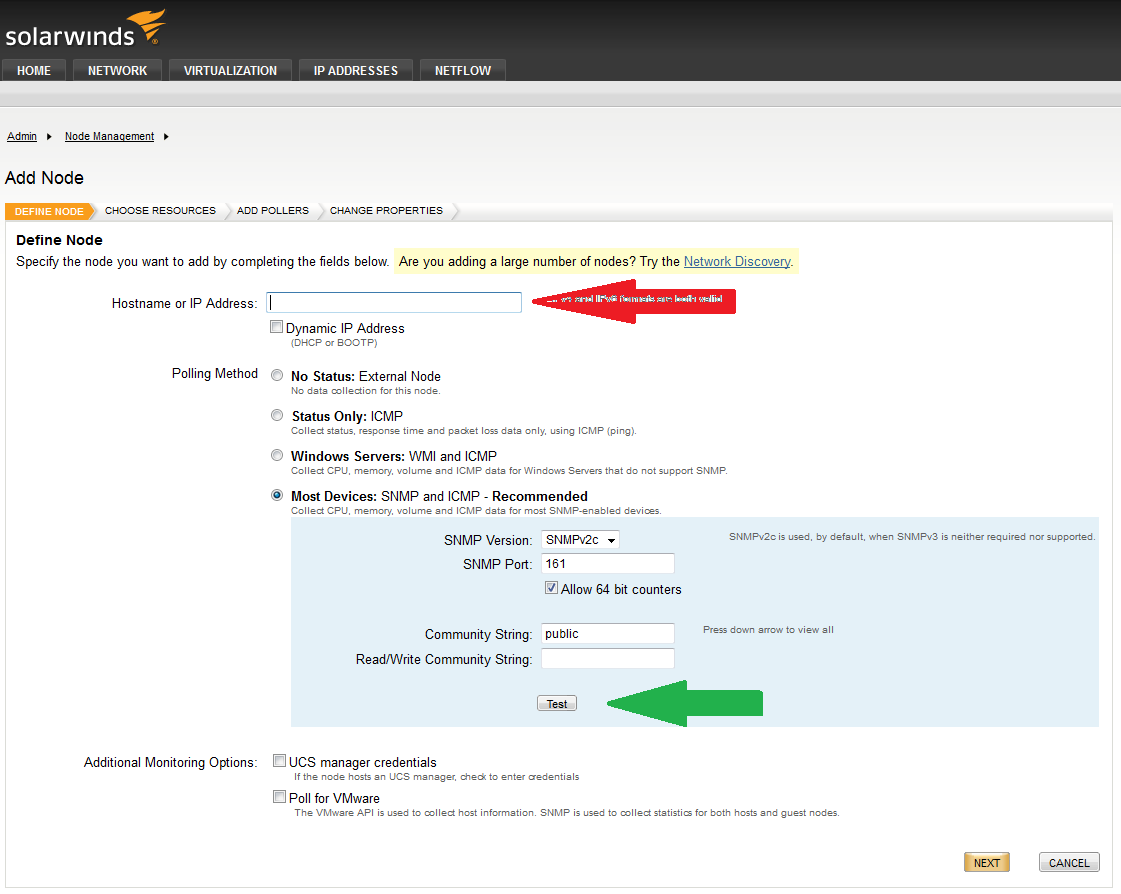
Go to Manage Nodes, then click on Add Node, and you will get this screen:
Put your IP address where the red arrow is pointing to, and click on the Test button where the green arrow is. If you don't get a successful message, then you need to check the connectivity between your Orion server and your device.
this is what i did. I'm able to ping the device from my orion server.
Then check your firewall settings and/or access lists on the device.
how do I check access lists?
Before you do that, try this: go to the SolarWinds server. Run "c:\Program Files (x86)\SolarWinds\Orion\snmpwalk.exe". Put in your IP address, then click Scan. Do you get any results?
I ran the snmp walk and recieved no results.
I tried to telnet to the switch on port 161 from a laptop plugged directly into the switch and it would not connect. So I do not think it's my firewall either. How do I print the access lists?
I entered show access-lists and did not get any output.
Did you change the community string from "public" to something else? I was assuming you were using "public", but if you weren't, you would need to enter that string when you run the snmpwalk.
By the way you can't telnet to 161 to check access - SNMP uses UDP and the telnet command attempts to make a TCP connection.
You could conceivably telnet from the router to SolarWinds on 162 to see of the trap port is open in that direction.
<< This (TCP/162) doesn't seem to work for SOLARWINDS as it doesn't seem to have TCP/162 open. Other SNMP servers may have use TCP/162, however. Use of UDP for SNMP traffic is much more common than TCP>>
Hi
a script that can send an sms (message by phone) during an alertI do not use and I can not use the software Orion NCM Web Console Is there another solution that allows you to do what I seen
Can you give me more information on Solarwinds Alert Manager (win32 app) on the use of script and receiving sms message by phone thank you
Bilel
bilel,
I have answered you on this same question here. Please keep your questions limited to a single thread.
Thank you,
Danielle