I want to add a node to the VNQM module (Previously IPSLA),how to add a CLI credential or the SNMP Read/Write credential?
You need to add the node into NPM first and that's where you assign the CLI & SNMP credentials.
To add a device for monitoring in the Orion Web Console:
Thanks.
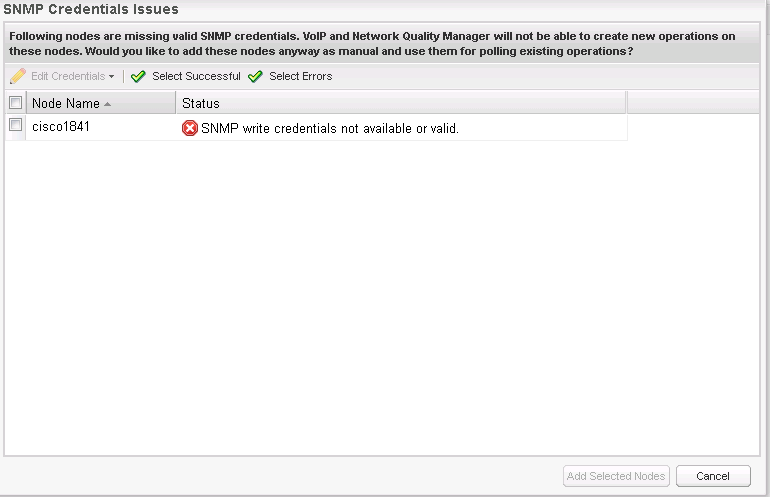
It's already ok for adding the node. But I want to add this node as an IPSLA. when I add in VoIP and Quality setting / node manages IPSLA / Manually add nodes to VoIp and Network Quality Manager .When then I click on add node, there is the following error:
What do I do?
Thank you very much for your help.
Set the credentials in NPM. Once they are set there correctly, it will work fine in VNQM.
I do not know how to set the credentials in NPM.Can you help me .I'm a beginner in using NPM.
Go to manage nodes. Put a tick next to the node in question. Then click on Edit Properties.
In Polling Method you'll see the SNMP credentials section.
Then scroll down. If you have the device managed by NCM, then you'll see the CLI details.
But having said all that, in your image above, if you tick next to the device and then select Edit Credentials, what do you see? It may take you straight to what I've described in this post.
The SNMP credentials is OK but CLI credentials not yet,there was an error following:
Thank you for your help.
Those credentials are for UCS. Don't fill them out.
This is how you add in CLI credentials except point 3 should say click on "Remove nodes from VOIP and Network Quality Manager.
Then select the device you want and click on Edit. It will then allow you to set up the credentials.
http://www.solarwinds.com/documentation/en/flarehelp/vnqm/content/orionipslamanageradministratorguide-configuringclicred…