For whatever reason I cannot get this to fire. I believe I have the trigger set correctly. Thoughts?
Thanks
Resolved I removed
(Volumes.FullName <> '/dev/backuplv') AND
(Volumes.FullName <> '/dev/oraclelv')
)
And replaced it with
(Volumes.Caption <> '/dev/backuplv') AND
(Volumes.Caption <> '/dev/oraclelv')
Works like a charm..Thanks for all the help
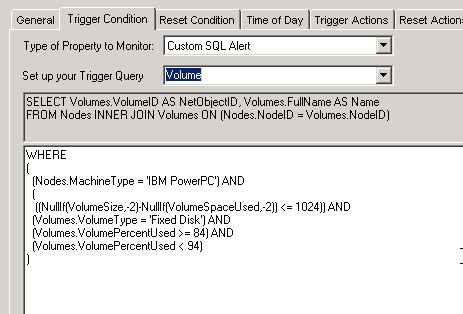
Can you change the drop-down option to 'Custom SQL Alert' and then post a screenshot of the full query?
Sure thing...
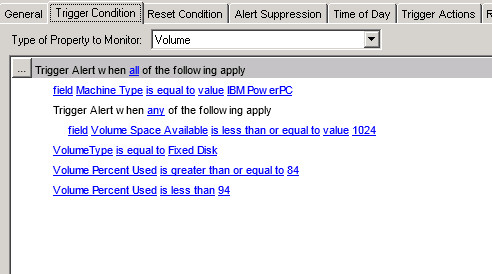
You're problem here is your grouping level.
You have the following under your ALL condition
MachineType = 'IBM PowerPC'
VolumeType = 'Fixed Disk'
VolumePercentUsed >= 84
VolumePercentUsed < 94
And the following under your ANY condition
VolumeSpaceAvailable <= 1024
So right now this will only trigger if the Machine type is equal to exactly 'IBM PowerPC' AND the VolumeType is exactly 'Fixed Disk' AND the VolumePercentUsed is greater than or equal to '84' AND VolumePercentUsed is less than 94 AND VolumeSpace Available is less than or equal to '1024'. The way this is currently configured there is no need for the ANY statement.
When you add new basic or complex condition you need to make sure that you have the condition group you want it under highlighted. The up/down arrows or right-click commands do not change the condition group a statement is in... it just moves it vertically in the list.
This is a very specific logic and considering the size of fixed disk drives it is unlikely that you'll have a volume with between 84 and 93 percent utilization that has 1024 or less bytes of space available.
bingo. Nice explanation!
So its in bytes? I was going on that it was based on MB hence the 1024 (1GB) This could be my issue
Definitely bytes.
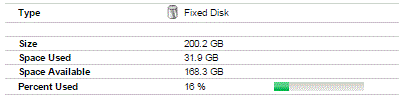
For this drive
The following is stored in the Volumes table (the table being used in the alert select)
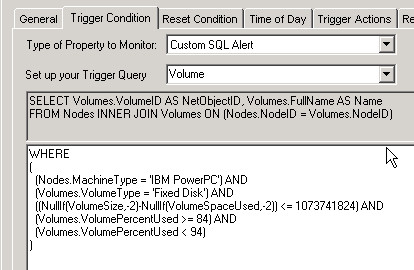
Totally makes sense now. I've removed the "any" statement and converted to bytes.The reason for the < 94 is that I created a second critical alert for > 95 and didn't want to double dinged with two alerts. So logically this should fire
Logically is should fire now when the Machine type is equal to exactly 'IBM PowerPC' AND the VolumeType is exactly 'Fixed Disk' AND the VolumePercentUsed is greater than or equal to '84' AND VolumePercentUsed is less than 94 AND VolumeSpace Available is less than or equal to '1073741824' (bytes).
When all of those are true at the same time.
Let us know if that got you there or not. If not we'll take another look at it.
Well now that the bytes piece was addressed it still wasn't alerting. I had two lines in alert suppression. because I don't want it to alert on Oracle file systems and Backup file systems. I removed those and flood gates opened (255 alerts). I'm trying to get only meaningful alerts and excluding those two file systems would be optimal.
Currently i have this in place and well it doesn't exclude the backuplv and oraclelv I don't know if the wildcard works or even should work. I did it without as well.
WHERE
(
(Nodes.MachineType = 'IBM PowerPC') AND
(Volumes.VolumeType = 'Fixed Disk') AND
((NullIf(VolumeSize,-2)-NullIf(VolumeSpaceUsed,-2)) <= 1073741824) AND
(Volumes.VolumePercentUsed >= 84) AND
(Volumes.VolumePercentUsed < 94) AND
(Volumes.FullName <> '*/backuplv') AND
(Volumes.FullName <> '*/oraclelv')
Try adding some parens to group your where clauses logically:
WHERE ( (Nodes.MachineType = 'IBM PowerPC') AND (Volumes.VolumeType = 'Fixed Disk') AND ((NullIf(VolumeSize,-2)-NullIf(VolumeSpaceUsed,-2)) <= 1073741824) AND ( (Volumes.VolumePercentUsed >= 84) AND (Volumes.VolumePercentUsed < 94) ) AND ( (Volumes.FullName <> '*/backuplv') AND (Volumes.FullName <> '*/oraclelv') ))