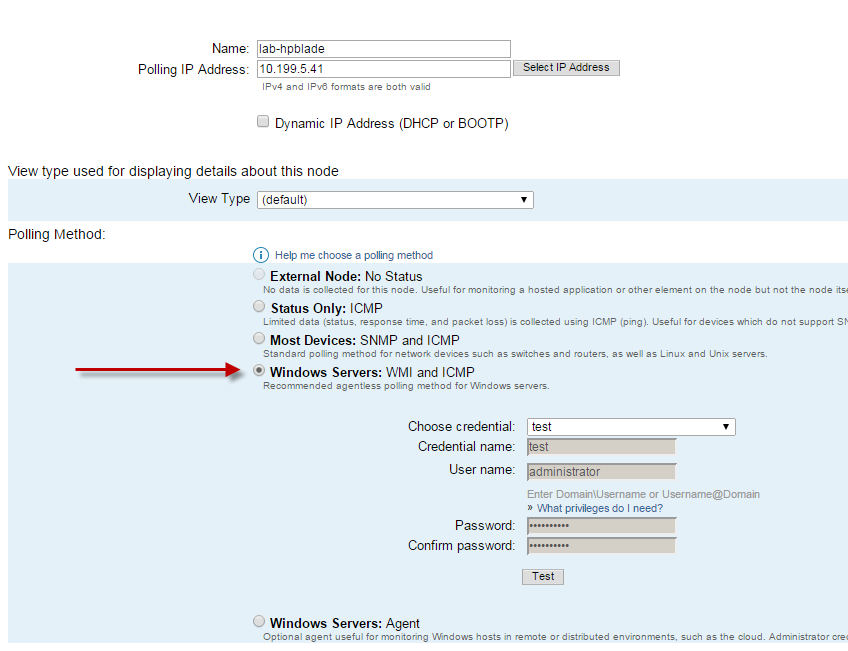
Currently I just want to monitor whether my 2 node DAG server is up. I am using SNMP and have configured correctly; however our Solar persons says they only can contact one of the members in the DAG.
What are we doing wrong
No sir. That's the beauty of WMI. It doesn't require any additional configuration or features that must be enabled. Provided the credentials supplied are "administrator" or equivalent and no firewalls are blocking WMI traffic then it should work without issue.
Can you provide a screenshot of what you're seeing in the Orion web interface?
aL TeReGo
I am not the one who is the administrator for Solar Winds
However, I setup snmp on both of the DAG members. The Solar Winds admin said that only one DAG member was responding to SNMP Community Name string.
I would recommend adding the Exchange servers in the DAG as WMI Managed Nodes rather than SNMP.
I will forward to our solar winds admin. Do I have to anything on the Exchange Servers before WMI is setup?
thanks
We have a new Exchange 2013 DAG that consists of 7 servers, all servers are mailbox roles, with 77 databases spread across all of them. I've configured and applied Appinsight for Exchange on all 7, which works great, but wondered if this is necessary to have all 7 application monitors running in parallel across all servers (redundant) as each monitored node in DAG, seems to show info also of other members, or if we can simply apply to one to get the entire DAG health and performance?!?. This is a DAG that will be used internationally for over 50,000 users, and want to ensure I have comprehensive health and statistics for not only setting baselines for alerting but also for detailed reporting for management. I opened a ticket with support on this and was told I should be using a Exchange 2010 DAG template instead of Appinsight? Can you help clarify, I want the comprehensive Appinsight details for performance/availability, and creating custom reports our messaging teams wants every morning.
-------------begin message:
Doug,
You would want to use a template specific to DAG. We have one on our To find and use it, got to settings, SAM settings -> Manage templates. On the manage template page, select "shared templates on thwack" and do a search for "DAG" - select and import (you will need a login to thwack.solarwinds.com"Exchange 2010 Database Availability "The has some requirements. Please see http://www.solarwinds.com/documentation/apm/docs/Configuring_and_Integrating_PowerShell.pdf