Is there an easy way to view a table such as the following?
Are you looking for something like this? http://thwack.solarwinds.com/docs/DOC-167089
Yes, but that has the latest releases.
I'm looking for something more customized. I want to view only the patches we are deploying. That is, I want to view the current version we have published, and view the latest released version. The idea is to make it easy to see if I need to download/publish any new packages. I get the sync notification email, but it only says which packages were updated, and sometimes this doesn't necessarily mean a new version was released.
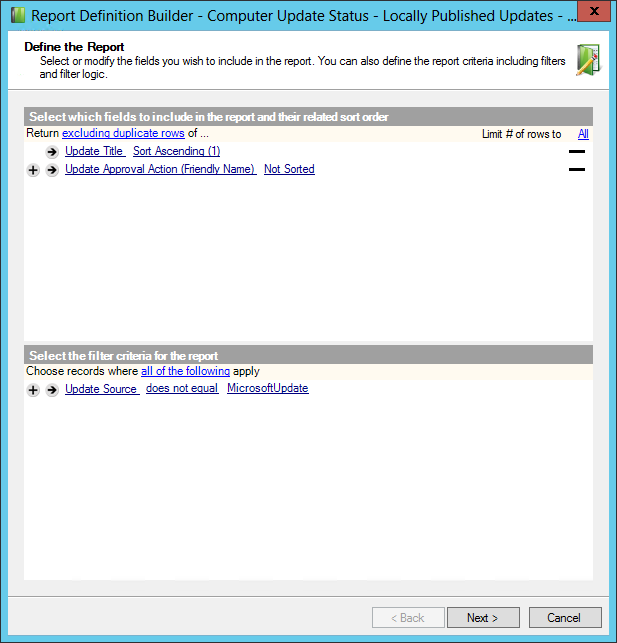
There's not currently a method to automate the aggregation of this specific data that I am aware of, but it wouldn't be too difficult to combine the results from a Patch Manager report with the table of third party patches spreadsheet. To pull the currently published third party updates I started off with this report, and made the modifications as shown below.
http://thwack.solarwinds.com/docs/DOC-167269
From here it's just a matter of exporting the report results to xls, and combine the 2 resources together.
This looks like what I'm looking for! Can you walk me through the steps on how to set that up?
Certainly. The steps would be the following:
1. Grab the report located on http://thwack.solarwinds.com/docs/DOC-167269
2. Import the above report into the Windows Server Updates Services Analytics reporting category.
3. Modify it to look exactly like the report in the screenshot below:
4. Run the report and export the results to xls.
5. Grab the latest Table of Third Party Patches from http://thwack.solarwinds.com/docs/DOC-167089
6. Open both documents and combine them in a way that meets your needs.
Ahhh I see. Yes, I could manually find all the information and generate the report, but I want to have a dashboard type thing where it updates automatically. How are people dealing with having to search for the latest versions of things all the time and making sure the latest version is actually in patch manager?