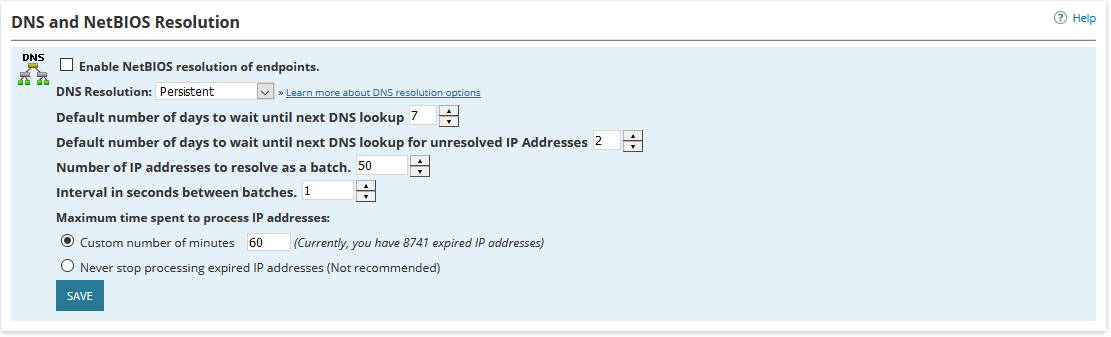
NTA list some nodes Host name with the IP address. How do I change it to the computer name?
In the NTA settings, check "Enable NetBIOS..." It's a little misleading, but that does the DNS lookups.
jrsitman,
You've posted this is the User Group forum. Please place this request in the NTA forum to get better visibility.
D
done
I do not see this setting. Exactly where is it?
Provided you are an admin, it's Settings -> All Settings -> NTA Settings
I thought I was in NTA but I was not. Found it.
Thanks
the nodes are still listed with IP and not DNS
Are you talking about the Netflow sources themselves, or the nodes in the conversations? The settings above are for the conversations, as long as you have DNS entries for the IPs, they should resolve (otherwise you have a DNS issue). If you are talking the netflow sources, these are just NPM nodes and the name is listed however you have them in NPM.
In NPM they show the DNS name. It's NTA that show the IP. The conversations show the DNS. The Top 10 show the IP
Based on this information, it appears you are talking about the Netflow sources; the above solution was for the conversations. There are 2 solutions to get the Netflow sources to reflect the name, not the IP.
Solution 1 (preferred in my opinion):
- Configure the device itself to use the appropriate IP/Interface when sending data to NTA, the appropriate IP/Interface is the same one used for monitoring via NPM. If Cisco, the config could look like:
flow record NTArec
description IPv4 monitor
match ipv4 tos
match ipv4 protocol
match ipv4 source address
match ipv4 destination address
match transport source-port
match transport destination-port
match interface input
collect routing source as
collect routing destination as
collect routing source as peer
collect routing destination as peer
collect routing next-hop address ipv4 bgp
collect interface output
collect flow direction
collect counter bytes
collect counter packets
collect application name
!
flow exporter NTAexp
destination <IP of NTA server>
source GigabitEthernet0/1/1 <Interface with IP the NPM uses to poll data>
transport udp 2055
template data timeout 60
option application-table timeout 60 <if you collect NBAR data>
option application-attributes timeout 300 <if you collect NBAR data>
flow monitor NTAmon
exporter NTAexp
cache timeout inactive 60
cache timeout active 60
record NTArec
interface GigabitEthernet0/1/1 <put these commands on each NTA data Interface>
ip flow monitor NTAmon input
ip flow monitor NTAmon output
ip nbar protocol-discovery <if you collect NBAR data>
Solution 2 <NTA Settings page>