Is this product capable of monitoring another applications log files for keywords? If I have an application that writes a log file and I want to know if any ORA errors are written, is that possible?
there are two answers: effectively "big" and "small"
"big" means purchasing Logfile and Event Manager (LEM, formerly Trigeo). This is is an extremely full-featured module that can do a wide range of tasks that goes far beyond monitoring a single text file for specific strings.
"small" means purchasing Server & Application Manager (SAM) and using one of the user-generated templates that let you scan via PowerShell, Vbscript, or Perl.
Thanks, we already own SAM and it's really a small portion of a legacy application that needs to have some log files scanned. Is there a place I can get more info on the user-generated templates.
thanks
The following templates are included out-of-the-box and allow for simple log file monitoring as you describe.
We have SAM, and trying to find a Perl based script for our Unix boxes that will trigger on only any NEW occurrence of a keyword within a log file. I implemented a basic template I found in thwack which searches the path and finds keywords for OLD errors we , but not new ones recently appended. It sounds like the Log Parser discussed may resolve that challenge, or is there a better template you know I should be looking at?
Nope, aLTeReGo 's template is the one you want. There's a commandline switch to tell it to scan only new lines, so that's the one you need.
Leon, Thanks for following up. New to scripting, so for the commandline switch your talking about, how would I properly set up trigger threshold so this will ignore existing keywords in files that are present on a given unix box now (show ‘UP’ green status), and only alert on any new entries with said keyword in file?
Are you talking about the 2nd component in the script below for Number of Newly Found String is what I need to use?
Total Number of Strings Found
This monitor shows the total number of strings that match the search criteria in the entire log file. Additionally, in the message field, this monitor returns all strings that match search criteria. In the returning message, this component returns all lines that match the search criteria divided by ";"
This monitor uses the following arguments:
perl $ LogFilePath RegularExpression where LogFilePath - This is the path of the target log file on the target server. The path can contain spaces. RegularExpression - This is used for regular expression searches to find a desired string in the log file. Searches are case sensitive and can contain spaces. Below is an example using the Command Line field: perl $ "/etc/inittab" "init"
Number of Newly Found Strings
This monitor shows the number of newly found strings after the last script execution. Additionally in message field this monitor returns all strings that matches search criteria. In the returning message, this component returns all lines that match the search criteria divided by ";"
Found String in # Position
This monitor shows the number position of the string found from the end that matches the search criteria, as well as the string itself. By default, this counter also shows the last string.
perl $ LogFilePath RegularExpression where LogFilePath - This is the path of the target log file on the target server. The path can contain spaces. RegularExpression - This is used for regular expression searches to find a desired string in the log file. Searches are case sensitive and can contain spaces. Position - This value determines the position from the last string of the log file. By default value 1 will return last found string. Below is an example using the Command Line field. The Position argument is employed as “1”. perl $ "/etc/inittab" "init" "1"
I have a scripting resource here at work to assist, but want to ensure which component monitor we’re talking about.
Thanks,
Doug
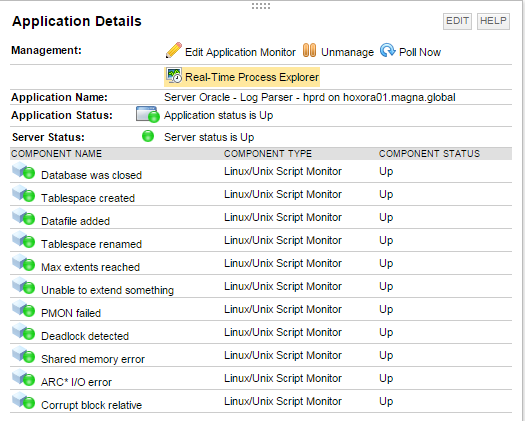
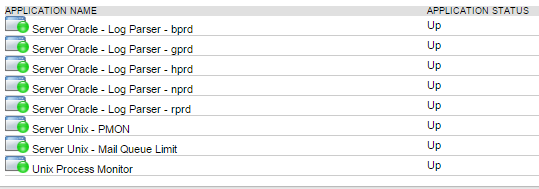
I've got this template working for some Oracle log file monitoring on a couple of Oracle servers, and wondered if there is a better way I could be more efficiently executing monitoring. In the template, I have 11 unique individual 'newly discovered' keyword string component monitors, however, I need to search for these strings across 5 unique log files, located in different directories on same node. So, in order to search for each of the 11 unique strings, I created a master template for one of the five paths to a given alert_* file, then copied the master to create the other four, each updated individually with it's respectively different file path. So, though the templates appear to be working, I have the same '11' keyword/string components x 5 = 55 elements, polling against the same server (not to mention other templates also running on this node). I staggered the polling frequency for each of the templates so they don't all hit at the same time, but this seems very inefficient. What I would like is for one template, to be able to poll across all 5 unique directory paths. I played with using asterisk thinking it would wildcard the search across multiple paths (/orabase/*/diag/rdbms/*/*/trace/alert*.log), but failed (not a perl programmer). Interestingly, in order to get this script to work, I had to copy the script out on the target node, and have Orion executing the script remotely.
1.) Is there a better approach/strategy perhaps I'm overlooking, as I know often get dreaded 'unknown' status for polls with this many elements hitting the same box on other application monitors.
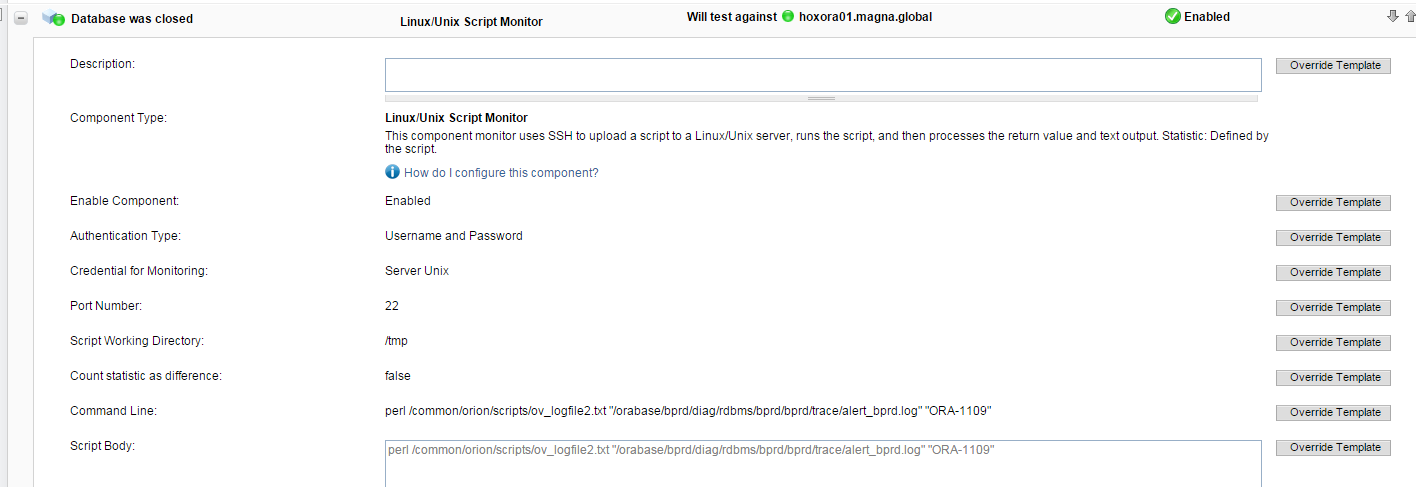
2.) Executing the script remotely appears to work, but not sure I've populated the script correctly having both the argument and script fields filled (see below).
See screenshots below.
list of components, list of application templates applied, example component monitor.
Copying the script locally to the Orion server is certainly the most efficient method since SAM is not copying the script across the wire each poll for every component monitor. Wildcards matching is not supported in this template today, but this is an existing feature request you can vote on here -> https://thwack.solarwinds.com/ideas/4108. I recommend voting for this feature request and adding any comments noting any additional requirements you might have.