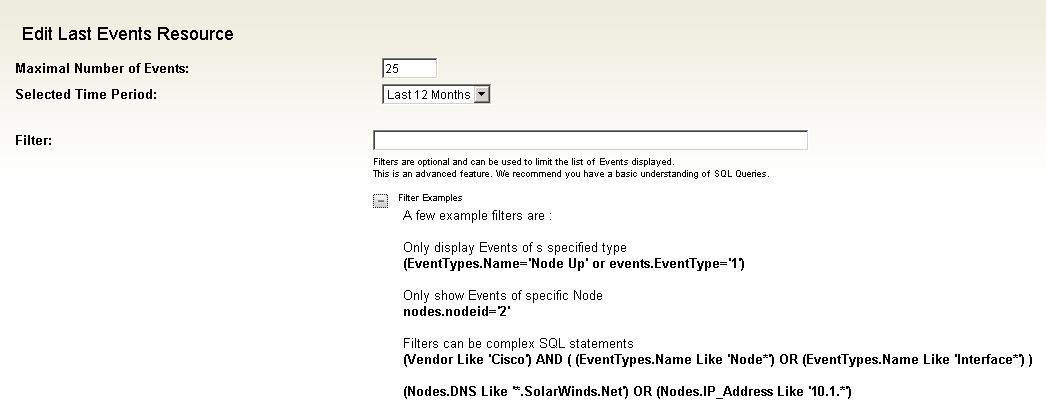
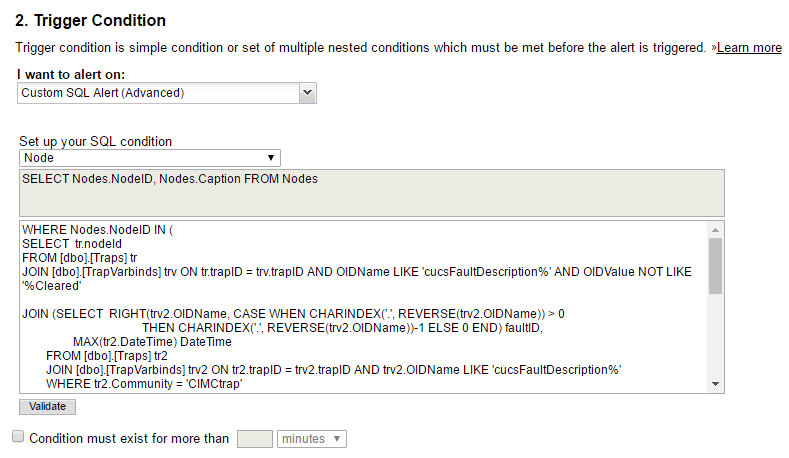
Hi. Try to run Configuration Wizard, select Website only. After that add my resource, search by word Filtered
Will this work with Version 10?
Works great with 10.5 too.... :-)
This looks so helpful. If i need to filter out only Critical Events, would the filter command be (EventTypes.Name='Critical')
Please advise.
Thanks
Pierre
Thank you so much for this!
Works perfectly for me in NPM v10.3.1 too. Thanks for the original post.
Hi there,
I realise this is an old post but hopefully someoen will see and be able to help. Just installed this as instructed and added the resource to my summary screen however i recieve the following error.
There was an error rendering: Last Events. Filtered » View Details
I am trying to filter the events report to include everything apart from events from interfaces marked as Unplugged and have applied the following in the filter field-(unpluggable <> 1)) . I am new to sql so please be gentle. is this all i should need to add to enable this functionality.
I have installed this, but it is not working for me. I have just upgraded to 10.5, so do you know if this resource compatible with 10.5? All of the directories that I placed the files in were in the same location as the folders were in when I downloaded it. When I go to find it in the resources to add to a page, however, it does not show up. I have added other custom objects to NPM before, such as custom pollers, and I remember them just working and showing up when I placed the file in the directory.
Nevermind. It just showed up today after I didn't do anything to it.
Hi guys have managed to get this working now and it has helped make our front screen event view much more useable. However i have a question which i wonder if anyone has managed to do. The default solarwinds event summary groups the events to minimise the view space that is used(See Below).
Is there anyway of modifying this resource so it would group the filtered events in the same way?
Thanks in advance guys
I have had the same thing happen in version 10.5. The new resource does not show up on the resource page. I have added it to both my main NPM server and my additional web server. I have also restarted IIS. Any ideas?
It has been acting strangely for me. Like I mentioned, it would never show up in the resources list. Then all of a sudden when I checked back a day or two later, it was magically there. I had done absolutely nothing to it, but it just happened to show up. So I added it to my pages where I wanted them. I was happy that it finally showed up. However, I go back a day or so later and want to add it to a different page. Well, it is gone from the resource list again. My filtered event resources that I already put on the page are still there and working, so I don't know exactly what is going on with it. I have not checked to see if it is in the resource list as of recently, so I don't know if its status has changed.
Guys I am having some issues getting this to work in 10.5. I have copied all the files into the proper directories but I am not seeing the Last XX Events Filtered in my resource list. Any ideas what I might be doing wrong. This is something we have been wanting for a while now.
Mike
Been using this for years. It is also working for the 10.6 RC2
Is there some magic trick to get these to show up in V10.5? i opened a ticket and was told they do not support customizations
i got them to work by opening the files and saving them must have something to do with time stamps or something like that
I have installed according to the path on v10.6. But, I do not see anything on the WebConsole. Can some one please provide more details on what to perform after the install to the appropriate folders - any deletions of other files, etc.?
Hey man,
Any chance of getting this working on 10.7
Installed on version 11.0.1 and it's awesome. Great job. Thanks.
Anyone put this on V12 yet?
I just tested it and it is working great so far!
Only issue is that Solarwinds changed the font color to blue. This is fine with the default events resources, but with this resource it makes it hard to see the words. I change the event type background and any red makes the blue hard to read.
The new event resources do not use the background color in the database table 'event types' to color the whole section, it is used to color the background of the icon only. This looks clean, but alerts don't really grab your attention for big screens in the NOC.
I keep plying with color background, but the numbers don't seem to relate to any color graph I have found.
This filtered resource NEEDS to be a standard. Please vote it up here:
Anything special you made to make it works on V12?
I've copied files as asked, then ran the Config Wizard ... but still nothing on Customization/Ressources list box.After that i've checked files i've copied before executing the wizard ... but surprise ... files have disappeared...
Thanks in advance !
Anyone running this in 12.0.1?
anyone? Buller? Buller?
Anyone get this working on V12.0.1?
We cannot upgrade without this.
My DEV system will not work with this....
I've been poking at it in my spare time. I think the code itself is still valid, but the 12.x update (maybe 11.x) changed some table names so there are invalid references. I don't think it will be too difficult to update once I figure out where all the fields got moved to.
Matt, you may become my new hero!!....
Any success in getting this ported to newest release?
Same question!!!
I am running 12.1 RC2 on my dev system but I have not been able to get this to work. I have a few more things to try on Monday...
Help make this a supported part of Orion: https://thwack.solarwinds.com/ideas/2121#start=25
matt.matheus let us know if we can help in any way.
make sure you: Deleted the "WebResourceCache.xml" file, located in the "\ProgramData\Solarwinds\Orion\" folder. Then recycled the IIS App Pool for SolarWinds.
Then it works in 12.1
Thanks to wluther
****Edit: don't use this version of the query, see the replies below regarding how filtering to top 25 gives unexpected errors in results****
Here is a swql version, i think its a lot easier to manage than adding custom resources that may or may not work in future releases.
SELECT top 25 EventTime
, Message
,'/Orion/View.aspx?NetObject=' + netobjecttype + ':' + tostring(netobjectid) as [_linkfor_Message]
,'/netperfmon/images/event-'+tostring(eventtype)+'.gif' as [_iconfor_Message]
--the following lines are useful for building your filters for the types of events you don't want to see
--, eventtype, netobjectid, netobjecttype
FROM Orion.Events e
join orion.EventTypes et on et.EventType=e.EventType
--and message like '%${SEARCH_STRING}%'
order by eventtime desc
mesverrum, This seems to be just giving me the up/down status of groups that the node whos node details I'm viewing. How would I get it to show me any up/down events in the last 30 days?
So I think we just ran into some kind of weird display bug. I loaded the query up onto my lab and got similar results as you describe, lots of group events, a handful of random other ones and tons of missing events. When I ran the exact same query in SWQL studio everything works as expected. Spent some time poking at it to try and figure out the issue and realized that somehow the web custom SWQL resource is doing something to the 'TOP 25' part of the query. Even though it is supposed to be sorting by the timestamps it is doing something unexpected and instead filtering on some other kind of logic that I'm not seeing. .Anyway I got it to work correctly by dropping the 'top 25' part and instead using a where condition to filter based on dates. Seems slower to load since there are so many events but looks correct this time around. You might filter it to the most recent 24 hours if 7 days is too much data.
SELECT tolocal(EventTime) as [Event Time]
where daydiff(e.EventTime,getutcdate())<7
Also, to answer your more specific question about using this on a node details page, I would just add to the where condition like so
and e.netobjectid = ${nodeid} and e.netobjecttype = 'n'
Saludos, mi nombre es Omar Lanfranco le hablo de republica dominicana,
Alguien me podria dar el link de esta plantilla para la version 12.2 de orion por favor.
Nadie ha hecho que esto funcione para 12.0+, en su lugar puede usar esto en el recurso "Custom Query". Perdona mi mal español