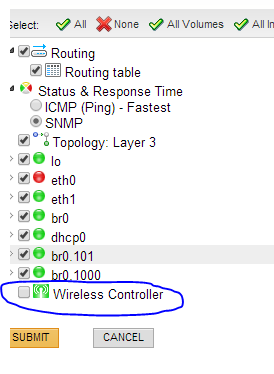
How i can enable wireless controller using API or SDK located in list resources. Also some devices have storage when you run list resources i want to enable this as well. Please help.
You'll need to add a new object in the Orion.Pollers entity with the following parmeters:
Orion.Poller
Best bet is to look at one where you've already "checked" this in the poller entity and capture that poller type name. Should be something with "wireless" in the name..
In PowerShell it would look something like this:
New-SwisObject -SwisConnection $SwisConnection -EntityType 'Orion.Pollers' -Properties @{ Enabled = $true; NetObject = "N:34"; NetObjectID = 34; NetObjectType = "N"; PollerType = "PollerNameGoesHere"}
I have a similar question. I would like to disable Wireless Controller from all devices with the manufacturer Fortinet. How can this be done?
Query to get URI's of Wireless Pollers for Fortinet devices:
SELECT [Pollers].UriFROM Orion.Pollers AS [Pollers]INNER JOIN Orion.Nodes AS [Nodes] ON [Pollers].NetObjectID = [Nodes].NodeID AND [Pollers].NetObjectType = 'N' AND [Pollers].Type = 'N.WirelessAP.SNMP.Generic' -- Or whatever is shown when you list this out AND [Nodes].Vendor = 'Fortinet'
Then take that URI and run:
Set-SwisObject -SwisConnection -Uri $EachUriFromAboveResponse -Properties @{ 'Enabled' = $false }
Note: I do not have any Fortinet devices, so I can't be 100% sure of the code above, but logically it should work. Your mileage may vary.