I'm seeing objects show up and do not see anything enabled for network discovery, also how do you see who added an object please?
You can also pull the information from your Audit Logs via SWQL.
SELECT [AuditLog].TimeLoggedUtc , [AuditLog].AccountID , [AuditLog].AuditEventMessage , [AuditLog].Arguments.ArgsValue AS NodeFROM Orion.AuditingEvents AS [AuditLog]WHERE [AuditLog].TimeLoggedUTC >= DATETRUNC('year', GETDATE()) -- Everything in the current year AND [AuditLog].AuditingActionType.ActionTypeDisplayName = 'Node added' AND [AuditLog].Arguments.ArgsKey = 'ObjectName'ORDER BY [AuditLog].TimeLoggedUtc DESC
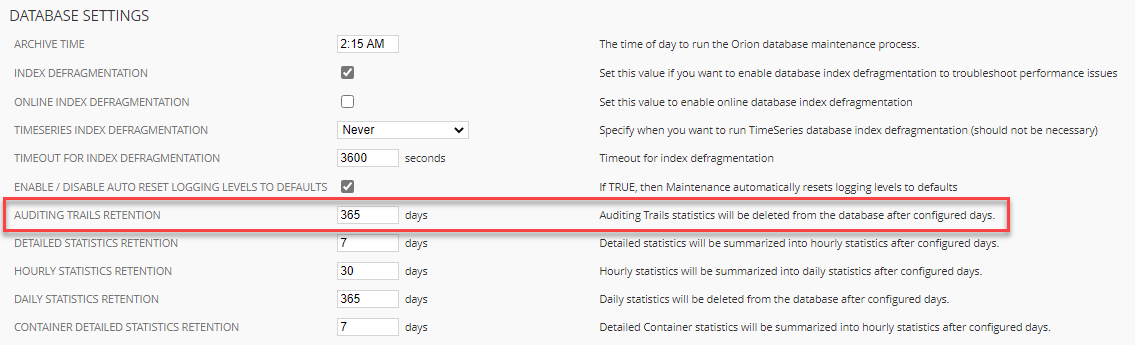
There's also a chance that your audit logs don't go back that far...
(From Settings \ All Settings, Thresholds & Polling, Polling Settings)
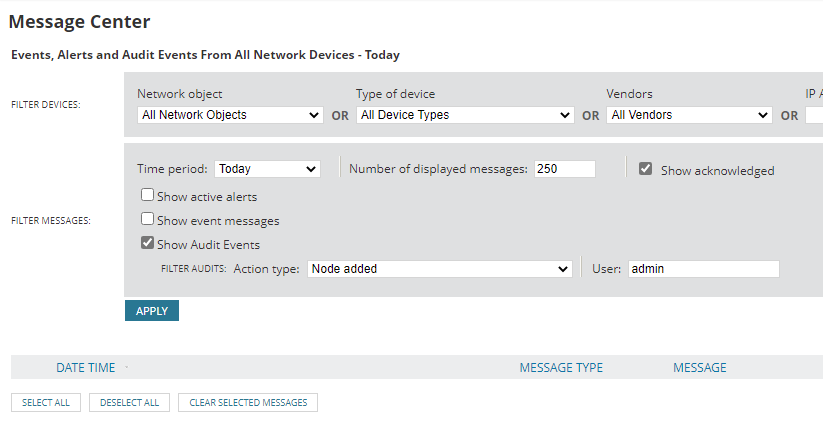
You can go to your audit log (Alerts & Activity \ Message Center).
Just change the time period, show "Node added," and blank out the username field. You should get the date/time that node X was added by user Y.
If you want a history of the recent discovery jobs, you can drop a custom query widget on a page and use this SWQL query to pull the records:
SELECT [DiscoLogs].Profile.Name , [DiscoLogs].Profile.Description , [DiscoLogs].FinishedTimeStamp , [DiscoLogs].AutoImport , [DiscoLogs].ResultDescription , [DiscoLogs].ErrorMessageFROM Orion.DiscoveryLogs AS [DiscoLogs]WHERE [DiscoLogs].FinishedTimeStamp >= GETDATE() - 30 --show the last 30 daysORDER BY [DiscoLogs].FinishedTimeStamp DESC
Thanks for the information, I do not see any user information however.
Did you change the time period off of "Today" (I think that's the default).
Also, if you unfilter the audit logs and blank the user, do you get any information at all?