Recently were were trying to create an alert using an Audit Event that triggered on a Created Node audit message as shown below
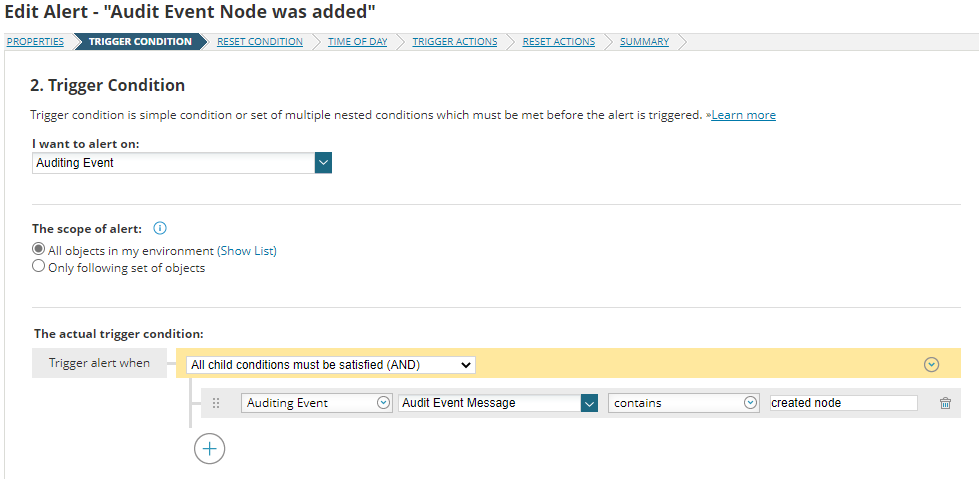
The purpose of the alert was to sync the Orion Inventory to that of another external system using the IP and Caption fields.
When we to the Trigger Actions portion the variables for IP and Caption were not available out of the box (or at least I couldn't find them) so we decided to use the
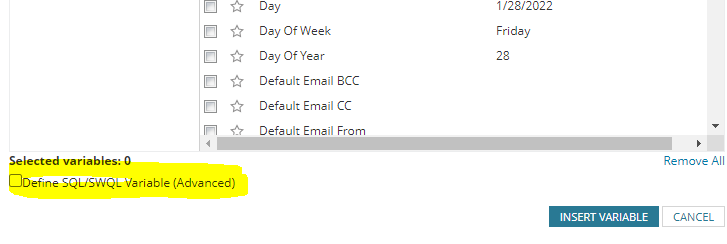
"Define SQL/SWQL Variable (Advanced)" feature to create the variables. After some testing we discovered the proper method to create these. This example required two SWQL queries
that inner-joined the tables to get the correct data. Each variable required a unique query.
Select TOP 1 IP_Address AS IP
FROM Orion.AuditingEvents VAR1
INNER JOIN Orion.nodes VAR2 on VAR1.NetObjectID = VAR2.NodeID
Where AuditEventMessage LIKE '%created node%'
Order BY TimeLoggedUTC desc
--This grabs the IP address and renames it IP
Select TOP 1 Caption AS Host
FROM Orion.AuditingEvents VAR1
INNER JOIN Orion.nodes VAR2 on VAR1.NetObjectID = VAR2.NodeID
Where AuditEventMessage LIKE '%created node%'
Order BY TimeLoggedUTC desc
--This grabs the Caption and renames it Host
Once pasted in as an Advanced SQL variable Orion will encapsulate the queries as shown. This can be used in your alert text for your email, write to file, alert text etc.
using the "Insert Variable" and "Define SQL/SWQL Variable (Advanced)" shown in yellow below.
${N=SWQL;M=Select TOP 1 IP_Address AS IP
FROM Orion.AuditingEvents VAR1
INNER JOIN Orion.nodes VAR2 on VAR1.NetObjectID = VAR2.NodeID
Where AuditEventMessage LIKE '%created node%'
Order BY TimeLoggedUTC desc
}
${N=SWQL;M=Select TOP 1 Caption AS Host
FROM Orion.AuditingEvents VAR1
INNER JOIN Orion.nodes VAR2 on VAR1.NetObjectID = VAR2.NodeID
Where AuditEventMessage LIKE '%created node%'
Order BY TimeLoggedUTC desc }

These variables will show the IP and Caption in your alert text.
