Using the script from Lab #93 I am able to get a chart that shows information. I added a filter using the AND statement against a CP however it's not filtering. The COUNT also should report back as 111 unique items with the specific CP however as you can see my the screenshot I am getting over 900k for some fields. Any help would be appreciated.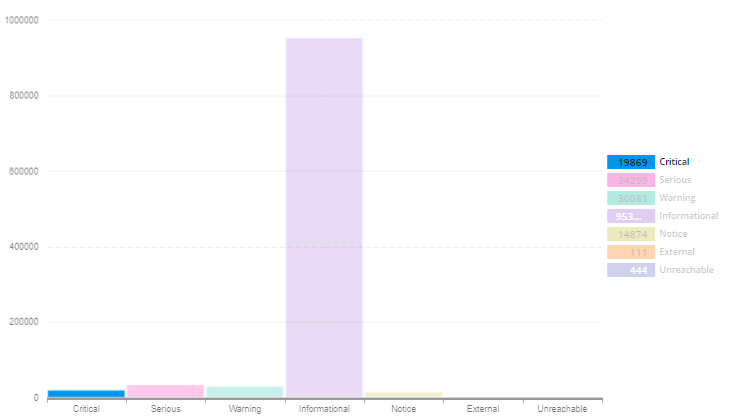
-- Added sorting mechanism during live presentation
SELECT COUNT(Status) AS Quantity
, Status AS SevNumber
, CASE
WHEN [OriNode].Status = 1 THEN '#0079AA'
WHEN [OriNode].Status = 3 THEN '#EBFC03'
WHEN [OriNode].Status = 14 THEN '#FCA01D'
WHEN [OriNode].Status = 2 THEN '#FC2403'
WHEN [OriNode].Status = 9 THEN '#6B98FF'
END AS [Color]
, CASE
WHEN [OriNode].Status = 1 THEN 'Informational'
WHEN [OriNode].Status = 12 THEN 'Unreachable'
WHEN [OriNode].Status = 11 THEN 'External'
WHEN [OriNode].Status = 3 THEN 'Warning'
WHEN [OriNode].Status = 14 THEN 'Critical'
WHEN [OriNode].Status = 2 THEN 'Serious'
WHEN [OriNode].Status = 9 THEN 'Notice'
END AS [Severity]
, CASE
WHEN [OriNode].Status = 1 THEN 4
WHEN [OriNode].Status = 12 THEN 7
WHEN [OriNode].Status = 11 THEN 6
WHEN [OriNode].Status = 3 THEN 3
WHEN [OriNode].Status = 14 THEN 1
WHEN [OriNode].Status = 2 THEN 2
WHEN [OriNode].Status = 9 THEN 5
END AS [SortOrder]
FROM Orion.NodesCustomProperties AS [CP], Orion.Nodes AS [OriNode]
WHERE [OriNode].Status is not NULL
-- Added filter for XXXXXXXXXXX
AND [CP].TeamView = 'XXXXXXXXXXX'
GROUP BY [OriNode].Status
ORDER BY [SortOrder]
I am using the above script as the one I had someone create for me causes the webpage to take forever to load. I understand the script below is horrible however it was a starting point that lead me to ask for help here. This script filters off 8 groups which I will use the above script to break out into their own charts.
SELECT count(*) as kpi_numbre
FROM orion.nodes N, orion.nodescustomproperties p
WHERE n.nodeid = p.nodeid
  AND (
    P.Teamview = 'XXXXXXXXX'
    or P.Teamview = 'XXXXXXXXX'
    or N.Caption like 'XXXXXXXXX'
    or P.Teamview = 'XXXXXXXXX'
    or P.Teamview = 'XXXXXXXXX'
    or P.Teamview = 'XXXXXXXXX'
    or P.Teamview = 'XXXXXXXXX'
    or n.CustomProperties.TeamView LIKE 'XXXXXXXXX'
    )
Thank you,
Charlie