Issue: the already installed, valid and working SSL certificate is not showing in the list of available options in "Enable HTTPS" UI in SolarWinds Configuration Wizard.
The only two options are "Generate Self-Signed Certificate..." and one CA-issued expired one - but not the one that was installed according to "manual steps" in "Troubleshoot issues with the Orion Web Console's SSL certificate".
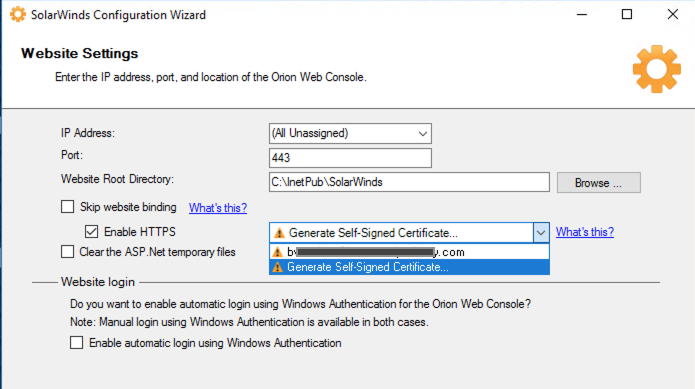
Why is that and how do I fix it?
To reiterate, the cert is working fine on our SolarWinds website - all green, valid, no warnings. Just not showing up in the Configuration Wizard. The instructions to "review how certificates are categorized ... if the certificate does not show in the list" in Step 6 in "Configure the Orion Web Console to use HTTPS" don't make sense to me as the only category I can think of is "valid".
The issue has been going on for a couple of years now - I didn't get to it sooner because it seems to affect nothing but the Configuration Wizard.
Thanks!