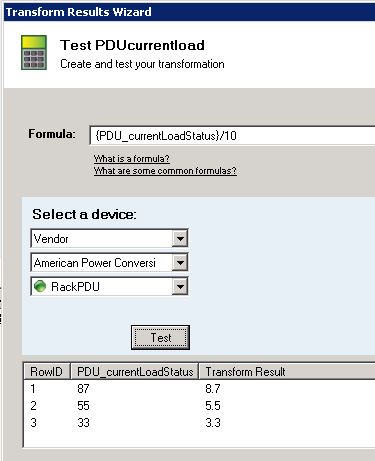
I have created poller with the help of Transform result. applied it on same node. but not getting any data in chart & in table.
while testing it giving the exact data what we want.
Vijay,
Have you clicked the edit button on your chart and changed the poller to the transformed poller?
Dave Burton
Loop1 Systems
Make sure both the poller and the transform poller are enabled and assigned to the node. If you only have the transform poller enabled, but not the poller you are trying to transform, then there is no value to transform. The transform poller does not actually poll the device it's assigned to. It pulls the poller value from the database and converts it based on your transform formula. To make sure the data is in the database, the poller, in your case the PDU_CurrentLoadStatus, needs to be enabled and assigned.
Yes I assigned both poller to PDU node. while testing transform poller it give me output but on graph it show Data is not available.
Issue is resolved. I delete that both pollers & recreate again and assigned to same node. Now its showing transform value in graph as well as in table.
Issue was with the polling.
I am having the same issue now. What do you mean by "Issue was with the polling"?
I have similar experience with some custom pollers
delete and recreate it and it works
Running Orion Platform 2017.3.5 SP5 ..... I experienced the same issue (but after making sure the poller and transform is assigned to the nodes) i was able to uncheck the option in the Web Display(Right-Click the Poller and click Web Display) page "Do not show this poller if it is not assigned". Once I clicked finish and then refreshed my Node Details Page, the transform results was properly displayed in the Radial Gauge. Hope this helps someone.