I really like being able to group elements within Orion to slice and dice the way I handle management. It’s a feature that lends itself to providing better insight to your monitoring infrastructure. I’ve heard tell of customers with dozens or hundreds of groups. That got me thinking about how they are organized when the counts get this large.
You can easily search for groups in the dependency mapping area of Orion and that’s great for an admin, but not for the standard person who just consumes the monitoring that Orion provides. I decided what I wanted was a searchable widget on the Group summary page.
Here’s how you can do the same thing.
On the Groups Summary page, click the pencil to edit the page, then click on “Add Widgets.” Search for “Custom Query” and drag it to a place on the page. Then click “Done Adding Widgets” and “Done Editing.”
Then you should have a very boring Custom Query box on your page.

Click on “Edit” in the top-right side to setup this widget.
I’ll give you what I used to fill it out as a basis and you can go from here.
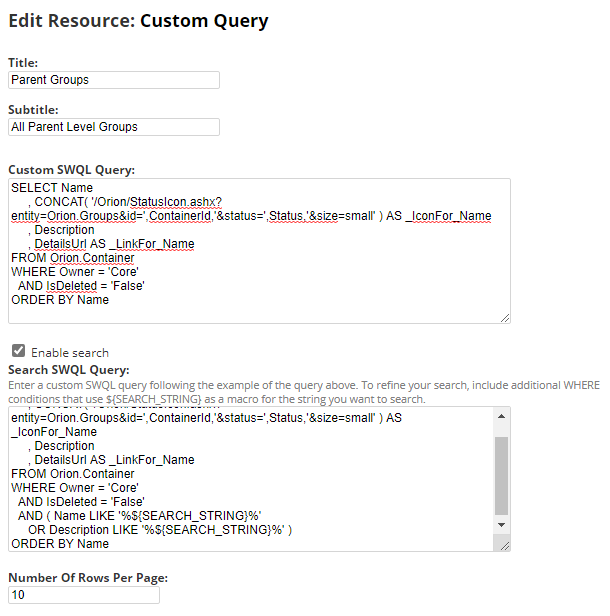
Title: Parent Groups
Subtitle: All Parent Level Groups
Custom SWQL Query:
SELECT Name
, CONCAT( '/Orion/StatusIcon.ashx?entity=Orion.Groups&id=',ContainerId,'&status=',Status,'&size=small' ) AS _IconFor_Name
, Description
, DetailsUrl AS _LinkFor_Name
FROM Orion.Container
WHERE Owner = 'Core'
AND IsDeleted = 'False'
ORDER BY Name
Enable Search:
Search SWQL Query:
SELECT Name
, CONCAT( '/Orion/StatusIcon.ashx?entity=Orion.Groups&id=',ContainerId,'&status=',Status,'&size=small' ) AS _IconFor_Name
, Description
, DetailsUrl AS _LinkFor_Name
FROM Orion.Container
WHERE Owner = 'Core'
AND IsDeleted = 'False'
AND ( Name LIKE '%${SEARCH_STRING}%'
OR Description LIKE '%${SEARCH_STRING}%' )
ORDER BY Name
Number Of Rows Per Page: 10
Submit your changes.
What you end up with is a quick and easy widget that’s searchable against the name and description of the Orion groups.


