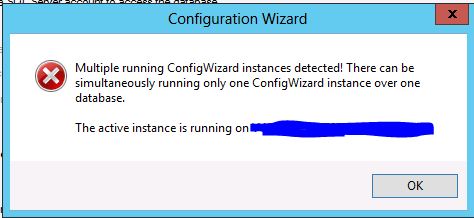
Is there a way on how to terminate the configuration wizard that was already canceled?
Thank you.
You can also delete the instance from the database (that's what is causing this error).
Backup Your Database First!!!
I don't have any configuration wizards running to test the syntax, but to find the issue you can try a query like this:
SELECT * FROM Settings WHERE SettingID LIKE 'CW-ActiveInstance-%'
If that returns any results, then you've found the issue. You would then just delete that row from the table.
-ZackM
Loop1 Systems: SolarWinds Training and Professional Services
It show image finish.
How are the precess??? Can you show image here?
I canceled my configuration wizard on the server that won't supposed to run. And when I tried to run the configuration wizard on the server that was supposed to run, it prompted the below screenshot
The message there is another CW running.You can open the gerneciador tasks and finalize everything that is related to it.If this is the first installation of the Orion module, remove all restarts the server and again.
Manilyn Ramos welcome back
have you tried rebooting the server (the one that's on the error message)?
Once done did you try running the CW again on the server you wish to continue CW?
Can you kill the process from taskmgr "Solarwinds.ConfigurationWizard.Host (32 bit)"
I didn't see that service on the orion server as I think the reason was I canceled running the Configuration Wizard.
Hi janene16, how are you?
With regard on your suggestion, any other way around instead of reboot or run the configuration wizard on the server? Thank you.
I got the same Error when I was installing a AWS (Additional Web Server).
Follow the instructions on the Main Orion Server (running NPM and other modules) to locate the Row, delete the row in the Database (actually the row dated is more than 2 months ago).
then continue to run config Wizard on the AWS.
Thanks again.