Under the Filter tab in the report writer I see a hyperlink with variables... None of the node names, or anything else...in ANY of my reports have ever had hyperlinks. How do I make this work?
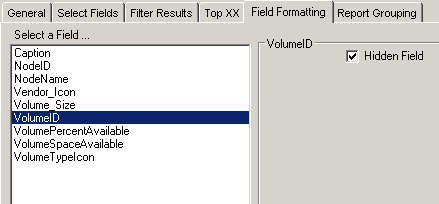
If you include NodeID, InterfaceID, etc, you can choose to hide those fields and it will create the hyperlink for you. So, next time you open the report up in the web console you will be able to click said node, interface, etc to take you to the relevant details page. Hope this helps.
Thanks,
Chrystal Taylor
http://www.loop1systems.com
Well for a volume space available report, I added VolumeID and made it hidden. No hyperlinks...
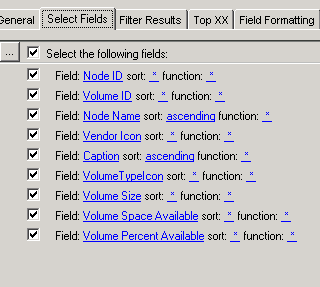
Well I am not sure why that would not work for you. This is a report we have for volume space available. Type of report is Current Status of Node, Volume, etc.
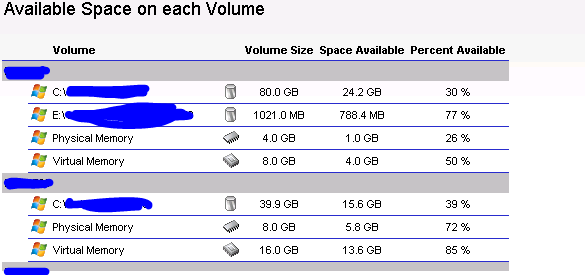
In the website, it looks like this:
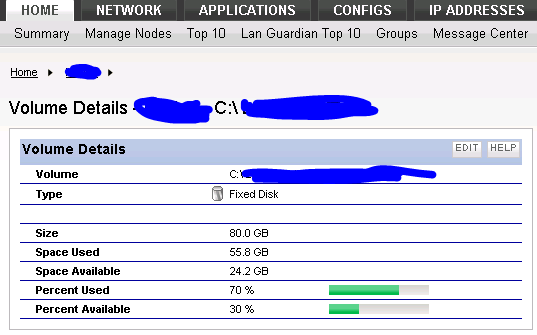
When you click on the volume, it takes you to volume details.
So, if that does not work for you then I would suggest opening a ticket with support.