Hello Community,
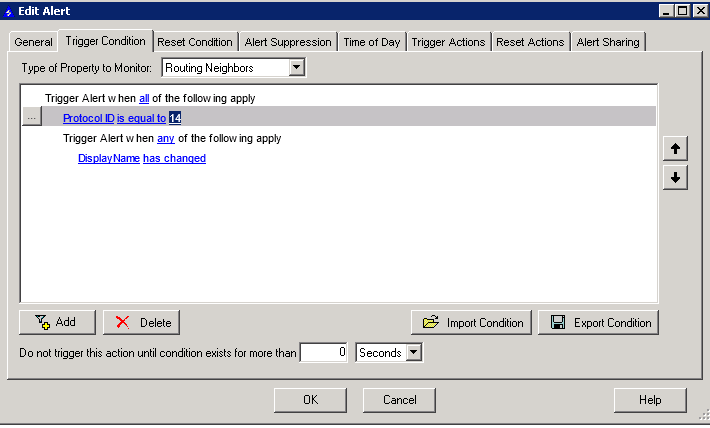
I have configured a BGP change alert as instructed by support, see image. However, the alert failed to send an email or activate when our BGP connection changed state.
Any thoughts?
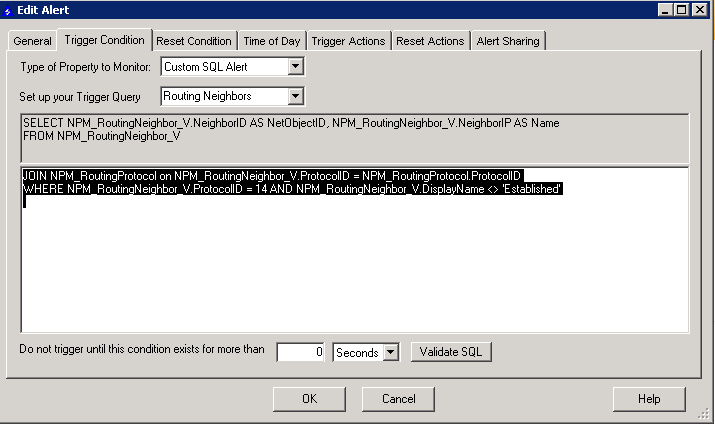
Using a Custom SQL alert you could do something like this:
SELECT NPM_RoutingNeighbor_V.NeighborID as NetObjectID, NPM_RoutingNeighbor_V.NeighborIP as Name
FROM NPM_RoutingNeighbor_V
JOIN NPM_RoutingProtocol on NPM_RoutingNeighbor_V.ProtocolID = NPM_RoutingProtocol.ProtocolID
WHERE NPM_RoutingNeighbor_V.ProtocolID = 14 AND NPM_RoutingNeighbor_V.DisplayName <> 'Established'
That should get you what you need.
The problem with the alert you have is that has changed is programmatically only usable for node reboot or Cisco IOS alerts. The has changed condition is specified to look at those two specific options.
Wow!
This is beyond me - never got involved with SQL Custom alerts before.
Should I just paste that in here:
Change the Set up your trigger query to Routing Neighbors from Nodes then just paste in everything after the From statement so just
Hello mate,
I'm afraid it didn't work ;-(
JOIN NPM_RoutingProtocol on NPM_RoutingNeighbor_V.ProtocolID = NPM_RoutingProtocol.ProtocolIDWHERE NPM_RoutingNeighbor_V.ProtocolID = 14 AND NPM_RoutingNeighbor_V.DisplayName <> 'Established'
The JOIN statement can safely be removed from your query.
EDIT:
When I say "JOIN statement, I meant the whole JOIN line:
Here is what i use to alert on routing issues (BGP/IPv4 or OSPF)
which equates to:
WHERE
(
(NPM_RoutingNeighbor_V.OrionStatus = 2) AND
(NPM_RoutingNeighbor_V.IsDeleted = 0) AND
(NPM_RoutingNeighbor_V.DisplayName <> 'Idle')
)
Note: the columns in the routing neighbor polling are oddly named, and mismatched between the UI and the SQL code that is generated
[whoever implemented this needed a pair-programmer to tell them this is being silly]
OrionStatus = the actual status of the peering
isMissing/isDeleted == peering has been administratively shutdown
idle == the idle BGP state, which is not active, connect, or established (e.g. a passive BGP peering, where the other side has to bring up the peering session)
/RjL
and another followup... I need to add a condition to not alert if the node with the ip address of the neighbour is down, because I get a couple of hundred alerts when a carrier drops circuits to several school districts and I lose both the nodes and the routing peering with them)
Just a thought - when you say it doesn't work, do you mean the alert isn't triggering on you are not receiving an email? Have you configured a trigger action?
I use the alert function in Syslog Viewer. I monitored for BGP syslogs and email an alert on that. Easy to setup provided you are receiving syslogs from your devices.
One benefit is that this syslog alert is instantly so you can see flaps easily. Advanced Alert Manager slows the process down so some BGP down alerts are missed.
HI Stuart & Everyone helping out
Sorry for the delayed response ... I'm over in London
Anyway, to answer your question, the alert isn't triggering and I'm not receiving an email. I definitely have configured a trigger action, which works on any other trigger.
I'm going to test your other suggestions above
Are you sending Syslog entries to your Orion server? If so, why not monitor and trigger an email on the corresponding messages?
Terry,
I think that is my only option .....
I was hoping to achieve the alert with the trigger condition
Richard,
Thanks for letting me test your trigger. However, it doesn't work. :-(
Your latest trigger condiotion is correct. If you can, initiate a failure and leave it for at least 15 minutes and see if it triggers. If it doesn't, leave the failure in place and paste the output from this command in database manager:
SELECT TOP 1000 * FROM [dbo].[NPM_RoutingNeighbor] where protocolid ='14' and protocolstatus <> '6'
If you get no results, NPM hasn't detected the fault and will therefore not trigger the alert
Stuart,
First, thanks for sticking with me on this issue.
I'm going to try your suggestion now.
Out of interest, why 15mins? Can I not test it for a shorter time-frame?
Cheers
I can assure you it does work; I have 2221 BGP peers on my network, and right now I see that 12 of them are down for one reason or another.
Time to answer the standard litany of questions: FGA: Please follow the standard litany when giving a problem report.
Next, we need to follow the debugging rules: http://www.debuggingrules.com/debuggingrules.jpg; I believe we're at step 3 "Quit thinking and look"
Go into the log adjuster on your applications server, turn the logging up on the Alert process to Debug, and look in the logfile to see the actual SQL being executed for your alert.
Take that SQL and paste it into the Database Manager on the SQL server and see what result you get.
e.g. the last 6 columns of this query on my system
select * from NPM_RoutingNeighbor_V WHERE( (NPM_RoutingNeighbor_V.OrionStatus = 2) AND (NPM_RoutingNeighbor_V.IsDeleted = 0) AND (NPM_RoutingNeighbor_V.DisplayName <> 'Idle'))
[this is the Where clause from the SQL generated by my alert]
generates:
Note: BGP session state toggles between Active and Connect states: Border Gateway Protocol - Wikipedia, the free encyclopedia
It certainly does work - am I'm using it now.
I was about to send you a message to say thanks
Stuart, I would also like to say thank you for you're continued support.....
Cheers guys