Over the years I have spent a lot of time setting up tools to automate certain tedious Orion admin tasks and so this is one example. Not going to get into the weeds of explaining all the code since there are many posts on those topics. I'm just putting this out there as an example of how you can bring it all together to make your life easier. It assumes you have at least some familiarity with powershell and SQL/SWQL since this relies on all three for various pieces.
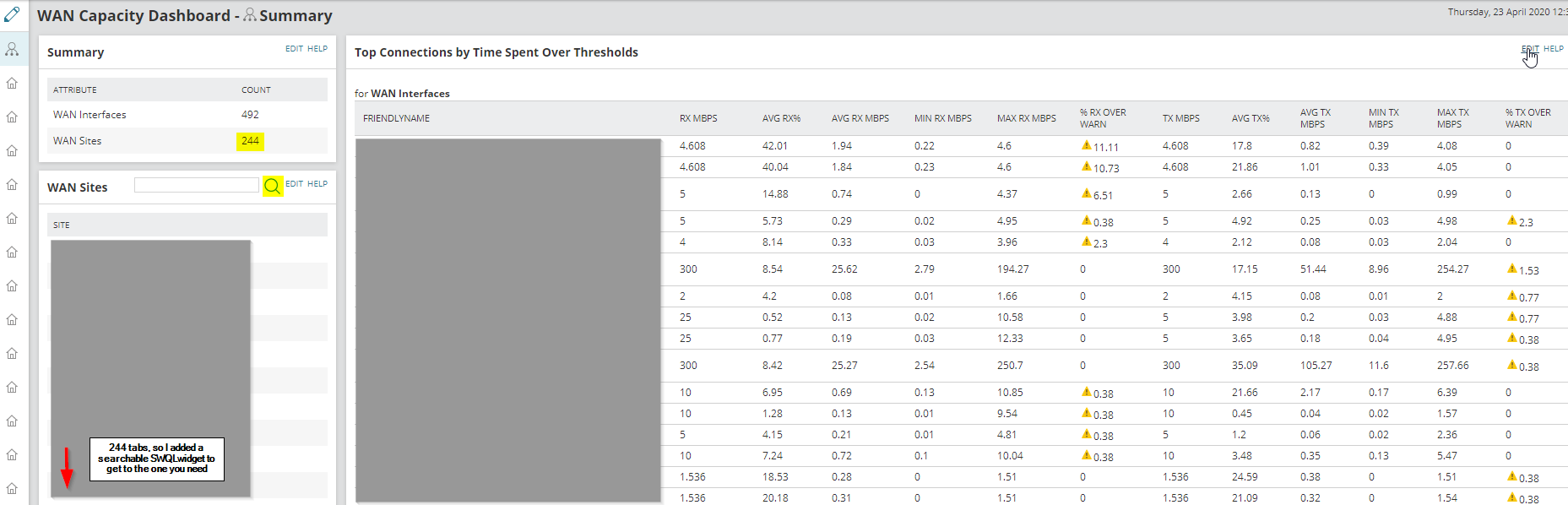
A common request I get is for dashboards relating to wan capacity at various branch offices. Once you get more than a few sites things start to get cluttered so then people want to start breaking them up into separate tabs. for each location. Then after a year or two the locations have changed, the WAN ports aren't the same and the dashboards start to fall apart. I had to delete several views like this when I came on board because the objects that they were associated with were no longer around and when I was consulting I would often see dashboards that had fallen into irrelevance from neglect.
This script is part of a process I set up for my environment to automatically keep things tight and up to date. If you have views that need to be updated or have tabs added over time you can steal some chunks of this code to produce a similar automation.
I have a few scheduled SQL queries that will automatically tag all the necessary interface and node custom properties based on the rules the network team gave me and this script references those properties, compares them to a custom SQL table I created that holds onto all my Service Now CMDB location data, and decides if any new sites need to be added to the view group tabs, or if any should be removed because the site was decommed or whatever.
I set it to run as a windows scheduled task under a service account on my main Orion server but it could be changed to run from anywhere as long as it can reach the Orion server.
It also writes a transcript to a log file every time it runs so I can spot check anything unusual in the future.
You can also check out the latest version here: https://github.com/Mesverrum/MyPublicWork/blob/master/ExampleDynamicViewTabs.ps1
Summary page
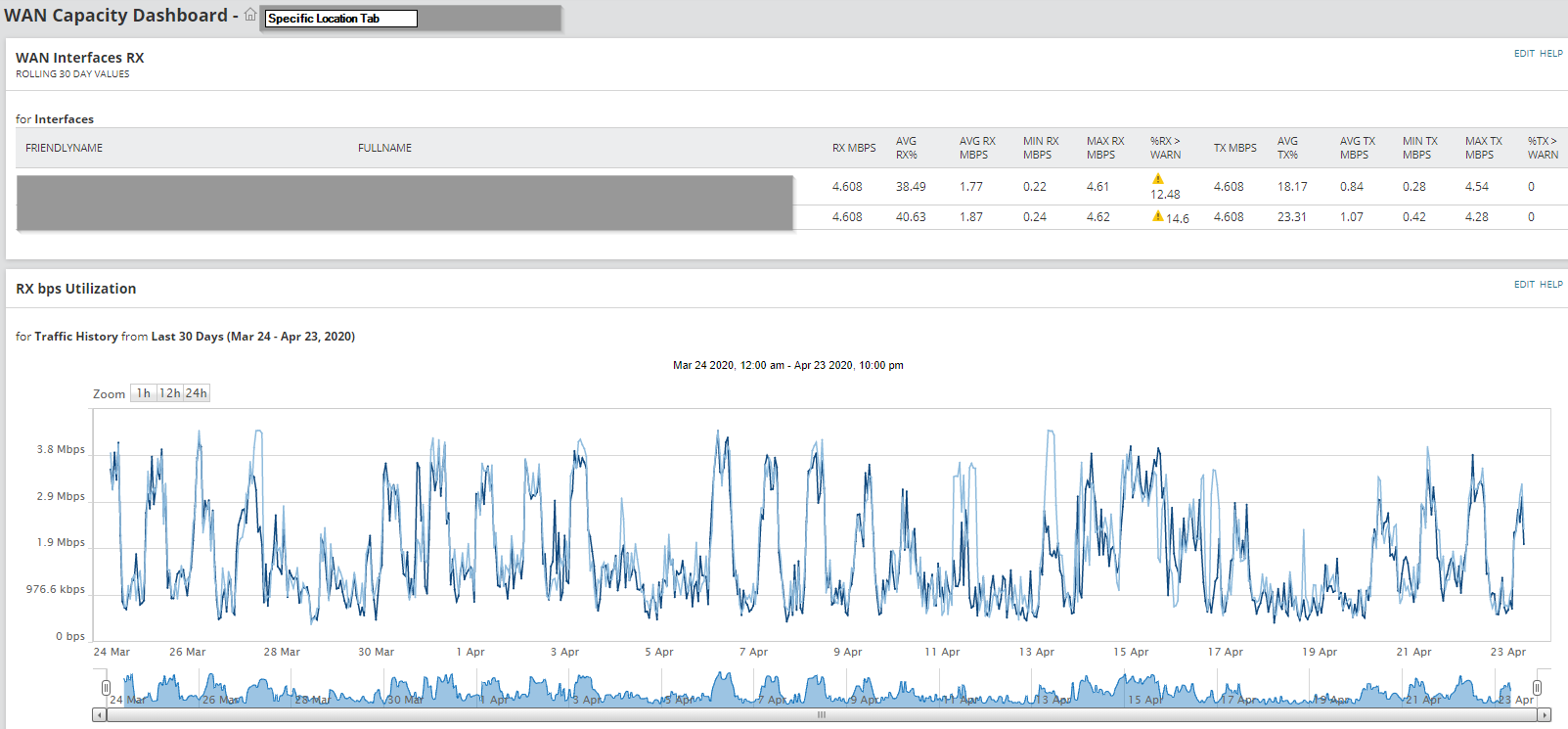
Specific location tab
#region Top of Script

<#
.SYNOPSIS
    Example of a dynamic self editing dashboard for SolarWinds Orion.
    Adds and removes tabs to a WAN Capacity Dashboard based on a list of interfaces that were tagged for reporting.
    For each interface we will look up the corresponding site name, then checks if there is already a tab for that site in the viewgroup.
    If not it creates it, if there are tabs that no longer are needed they get automatically deleted.
    Automatically changes the tab order to be alphabetical and adjusts for any additions or deletions of tabs.

.EXAMPLE
    Run ExampleDynamicViewTabs.ps1 as a scheduled task under a user account with admin permissions

.NOTES
    Version:        1.0
    Author:         Marc Netterfield
    Creation Date:  04/22/2020
    Purpose/Change: Initial Script development
#>

#endregion Top of Script
#####-----------------------------------------------------------------------------------------#####
clear-host

$now = Get-Date -Format "yyyyMMdd_HHmm"
$script = $MyInvocation.MyCommand
if ($script.path) { $dir = Split-Path $script.path }
else { $dir = [Environment]::GetFolderPath("Desktop")}
$Logfile = "$dir\$($script.name)_$now.log"
Start-Transcript -Path $Logfile -Append -IncludeInvocationHeader | Out-Null

$hostname = 'localhost'
$swis = Connect-Swis -Hostname $hostname -Trusted

#alternate method
#$user = "admin"
#$password = "password"
#$swis = connect-swis -host $hostname -username $user -password $password -ignoresslerrors

if ( !( $swistest = get-swisdata $swis "SELECT TOP 1 servername FROM Orion.Websites" ) ) {
    "Unable to connect to Orion server"
    Stop-Transcript
    exit 1
}

"Connected to $hostname successfully"

# check if tab needs to be created
$viewtoCreateQuery = @"
SELECT distinct concat(s.u_site_id,' - ',replace(s.full_name,'#','')) as site
, v.viewid

FROM interfaces i
join nodes n on n.nodeid=i.NodeID
join cah_sites s on n_sn_site_id=s.u_site_id
left join views v on v.viewgroupname='WAN Capacity Dashboard' and v.viewtitle = concat(s.u_site_id,' - ',replace(s.full_name,'#',''))

where
i.wan_reporting = 1
and v.viewid is null

order by site
"@

$viewsToCreate = (Invoke-SwisVerb $swis 'Orion.Reporting' 'ExecuteSQL' $viewtoCreateQuery).childnodes.documentelement.executesqlresults

#Will use the first tab that is not a summary as our template
$viewtemplate = Get-SwisData $swis "select top 1 viewid, viewtitle from orion.views where viewgroupname = 'Wan Capacity Dashboard' and viewtitle not like 'summary%' "

foreach($vc in $viewstoCreate) {
    "Creating page for $($vc.site)"
    # clone view template

    invoke-swisverb $swis "Orion.Views" "CloneView" @(
        "$($viewtemplate.viewid)",      #View to clone
        "$($vc.Site)"                   #name to give
    )

    $getnewview = @"
        SELECT ViewID
        FROM Orion.Views
        where viewtitle = '$($vc.Site)'
        and viewgroupname='WAN Capacity Dashboard'

    $newviewid = get-swisdata $swis $getnewview

    #copy resources from template to new view
    $clone = invoke-swisverb $swis "Orion.Views" "CloneViewContents" @(
        "$($viewtemplate.viewid)",      #source view
        "$newviewid"                    #destination view
    )
}

#need to change the filters to match each view
$changes = Get-SwisData $swis @"
SELECT v.viewtitle, r.ResourceTitle, r.ResourceName, rp.PropertyName, rp.PropertyValue, replace(rp.propertyvalue,'$($viewtemplate.viewtitle)',v.viewtitle) as repaired, rp.uri
FROM orion.views v
join Orion.resources r on r.viewid=v.viewid
join orion.ResourceProperties rp on rp.ResourceID=r.ResourceID and propertyname = 'DataSource'
where v.viewgroupname = 'Wan Capacity Dashboard' and viewtitle not like 'summary%'
and rp.PropertyValue not like '%'+v.viewtitle+'%'


foreach ($c in $changes) {
    "Adjusting $($c.viewtitle) property $($c.propertyname)"
    Set-SwisObject $swis -uri $c.uri -properties @{PropertyValue = $c.repaired }
}

"Removing views that are no longer needed"
$viewsToDelete = Invoke-SwisVerb $swis 'Orion.Reporting' 'ExecuteSQL' @"
    select distinct
    v.viewid, v.viewtitle

    from views v
    left join cah_sites s on concat(s.u_site_id,' - ',replace(s.full_name,'#','')) = v.viewtitle
    left join (select n.n_sn_site_id, i.FullName, i.wan_reporting from nodes n
    join interfaces i on n.nodeid=i.nodeid and i.wan_reporting = 1) n1 on n1.n_sn_site_id = s.u_site_id

    where v.viewgroupname='WAN Capacity Dashboard' and v.ViewTitle not like 'Summary%'
    and (s.full_name is null or n1.wan_reporting is null)
"@ | out-null

if($viewsToDelete) {
    "Deleting the following unused views:"
    $viewsToDelete | format-table -Property viewid, viewtitle

    Invoke-SwisVerb $swis 'Orion.Reporting' 'ExecuteSQL' @"
	    delete from views where viewid in (
        select distinct
        v.viewid

        from views v
        left join cah_sites s on concat(s.u_site_id,' - ',replace(s.full_name,'#','')) = v.viewtitle
        left join (select n.n_sn_site_id, i.FullName, i.wan_reporting from nodes n
        join interfaces i on n.nodeid=i.nodeid and i.wan_reporting = 1) n1 on n1.n_sn_site_id = s.u_site_id

        where v.viewgroupname='WAN Capacity Dashboard' and v.ViewTitle not like 'Summary%'
        and (s.full_name is null or n1.wan_reporting is null))
"@ | out-null

    Invoke-SwisVerb $swis 'Orion.Reporting' 'ExecuteSQL' @"
        delete from resources
        where viewid not in
        (select distinct viewid from views)
"@ | out-null

    Invoke-SwisVerb $swis 'Orion.Reporting' 'ExecuteSQL' @"
        delete from ResourceProperties
        where resourceid not in
        (select distinct ResourceID from resources)
"@ | out-null
}

"Setting tab order alphabetically"
Invoke-SwisVerb $swis 'Orion.Reporting' 'ExecuteSQL' @"
update v set ViewGroupPosition = t1.position
from views v
join (
	SELECT distinct concat(s.u_site_id,' - ',replace(s.full_name,'#','')) as site
    , v.viewid
    , v.ViewGroupPosition
	, 2+dense_rank() over ( order by  concat(s.u_site_id,' - ',replace(s.full_name,'#','')) ) as position

    FROM interfaces i
    join nodes n on n.nodeid=i.NodeID
    join cah_sites s on n_sn_site_id=s.u_site_id
    join views v on v.viewgroupname='WAN Capacity Dashboard' and v.viewtitle = concat(s.u_site_id,' - ',replace(s.full_name,'#',''))

    where
    i.wan_reporting = 1) t1 on t1.ViewID = v.ViewID
"@ | out-null

"Finished"

Stop-Transcript
